Advanced PowerPoint · Tutorial 1 of 9
How to Plan a Presentation Story: Audience, Message and Narrative in PowerPoint
Plan a deck before you design it: profile the audience, write a one-sentence job, pick a narrative pattern and storyboard titles that make the case.
- Level
- Advanced
- Time
- 14 min read
- Updated:
- Applies to:
- PowerPoint for Microsoft 365, PowerPoint 2024, PowerPoint 2021, PowerPoint for the web
What you'll learn
- Write an audience profile that names needs, resistance and the decision-maker
- State a deck's purpose as a one-sentence communication job
- Choose a narrative pattern that fits the audience and the ask
- Build a title-only storyboard in Outline View and organize it with sections
- Turn evidence slides into claims with a clear meaning and next step
Most decks that fail do not fail because the slides are ugly. They fail because nobody decided, before the first slide was made, who the deck is for and what it needs to change. The result is a sequence of attractive slides that do not add up to an argument.
This page gives you a short planning routine you run before opening a template: an audience profile, a one-sentence communication job, a narrative pattern, a title-only storyboard and an evidence plan. You will build the storyboard in PowerPoint's Outline View so the plan becomes the skeleton of the real deck.
Plan the deck before you design a slide
You already know how to make slides look good. The harder problem at this level is that a polished deck can still fail: the audience leaves without knowing what you wanted, or the decision gets pushed to "next meeting." That usually is not a design problem. It is a planning problem that design cannot fix.
This page uses one running example. You work for a public library and need the city council's budget committee to fund Sunday opening hours for a one-year trial. You have usage data, a cost estimate and a few stories from patrons. You have 15 minutes on the agenda.
Here is the planning sequence you will follow. Each step produces a small written artifact, and none of them needs PowerPoint yet:
- Audience profile. A short paragraph on who is in the room and what they need.
- Communication job. One sentence that says what should change in the audience's head or behavior.
- Narrative pattern. The shape of the argument (for example, problem, cause, solution).
- Title storyboard. The slide titles only, in order, reading like a short essay.
- Evidence plan. For each evidence slide, what it shows and what it means.
Only after step 5 do you choose layouts, pictures and charts. It feels slower at first. In practice it saves the most expensive kind of revision: rebuilding 20 finished slides because the argument changed.
Analyze the audience and their decision context
Audience analysis is not a demographic list. It is a prediction of how this specific group will react to this specific request. Answer five questions in writing:
- Who is in the room? Names or roles, and who actually makes the decision. Seven council members may be present, but the committee chair may set the agenda.
- What do they already know? If they approved last year's budget, they know the library's cost base. Do not spend three slides re-explaining it.
- What do they care about? Council members care about residents, visible results and budget risk. They care less about circulation statistics for their own sake.
- What do they resist? New recurring costs, precedents ("if the library gets Sundays, so will the pool") and staff overtime.
- What action or understanding do you need? A vote to fund a one-year trial, not a permanent change.
Write the answers as a short paragraph, not bullets, because a paragraph forces you to connect the points:
The budget committee knows our cost base and trusts our numbers. They want visible service for residents but resist new recurring costs and worry about setting a precedent. The chair decides what goes to a full vote. We need them to approve a one-year, capped trial with a clear review date.
Notice what the last two sentences do. The resistance points tell you which slides you must include (a cost cap, a review date). The decision-maker tells you whose questions to anticipate in the notes.
Three quick profiles for practice
The same topic changes shape when the audience changes:
| Scenario | Knows already | Resists | Needs to |
|---|---|---|---|
| Budget committee | Library costs | Recurring spend | Vote on a trial |
| Library staff | Daily operations | Weekend shifts | Volunteer for a rota |
| Parent group | Little about budgets | Nothing much | Show up and spread the word |
Same facts, three different decks. If you are tempted to make one deck for all three, that is a sign you have not decided who it is for.
Write the one-sentence communication job
A communication job is the single sentence that explains why the deck exists. Use this template:
By the end, the audience should understand / believe / decide / discuss / do X, because Y.
Pick one verb. "Understand" decks teach, "believe" decks persuade, "decide" decks end with a choice on the table, "discuss" decks open a structured conversation, and "do" decks end with a task. Each verb implies a different final slide.
Weak and stronger versions for the library example:
| Draft | Problem |
|---|---|
| "Present the Sunday hours idea." | No verb for the audience. It describes your activity. |
| "Show that Sunday hours are popular." | Popularity is not the decision being made. |
| "The committee should decide to fund a one-year Sunday trial, because demand is proven and the cost is capped and reviewable." | Clear verb, clear X, Y answers their resistance. |
The "because Y" part is where most of the work hides. Y should answer the main objection from your audience profile. If the committee's biggest worry is recurring cost, then "because it is popular" is the wrong Y, even if it is true.
Choose a narrative pattern that fits the job
A narrative pattern is the order in which you reveal things. The right one depends on your verb and your audience's starting point. These six cover most professional decks:
| Pattern | Use when | Typical verb |
|---|---|---|
| Problem, cause, solution | The audience feels the pain but does not know why | Decide |
| Question, analysis, answer | They asked you to investigate something | Understand, decide |
| Context, evidence, implication, action | A busy audience needs the conclusion fast | Decide, do |
| Before, change, after | You are proposing or reporting a change | Believe |
| Concept, example, application | You are teaching a skill | Understand, do |
| Story, lesson, transfer | You need people to care before they listen | Believe, discuss |
Map one topic three ways
Try the library request in three patterns and see which reads best for the committee:
- Problem, cause, solution: Families cannot use the library on weekends; Saturday is overloaded because it is the only weekend day; a Sunday trial spreads demand.
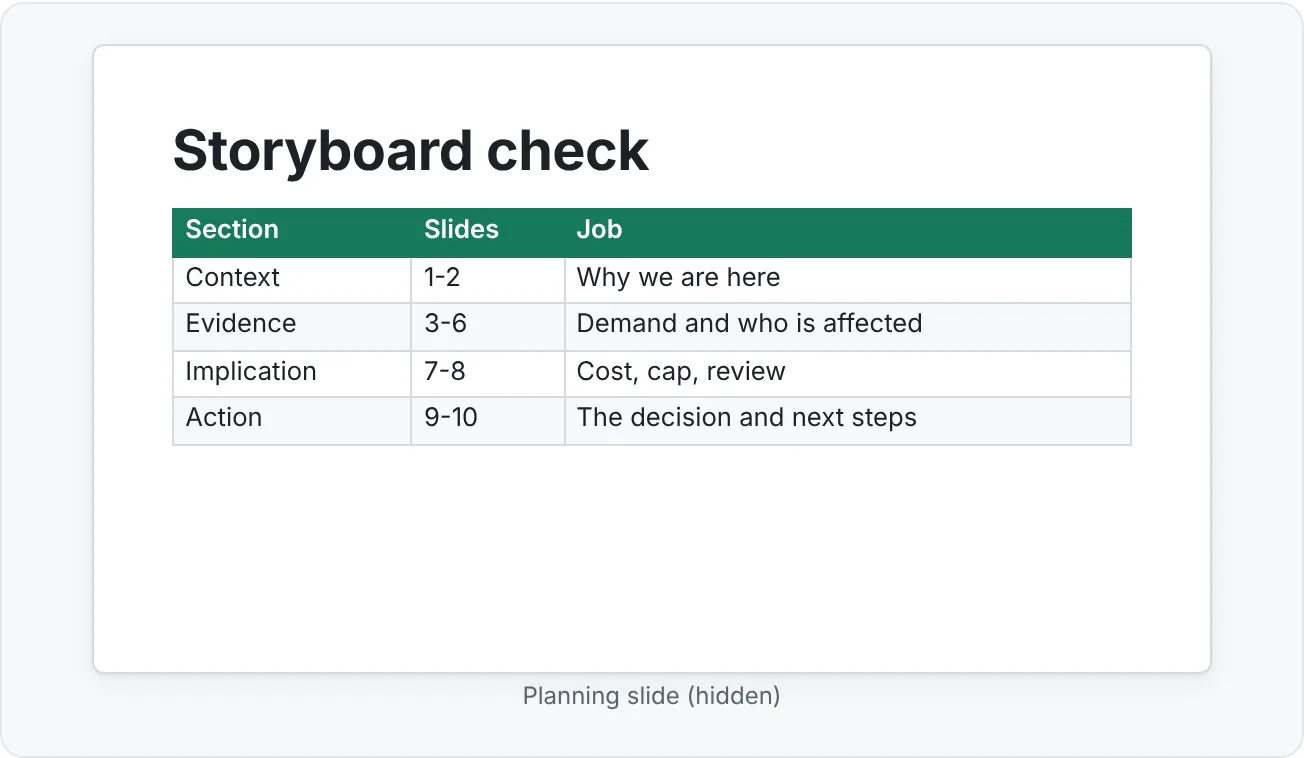
- Context, evidence, implication, action: We were asked about weekend access; Saturday visits and waitlists show unmet demand; the gap affects working families most; fund a capped trial.
- Story, lesson, transfer: A parent who works weekdays can only visit on Saturdays and finds the study rooms full; her experience is common; Sunday hours would fix it for many families.
For a budget committee that wants the answer first, context, evidence, implication, action usually wins. You can still borrow the parent story as one evidence slide. Patterns can nest: a single slide or section can use a mini-pattern of its own.
Turn slide titles into story beats
In the Beginner path you learned to write each title as a takeaway. At this level you check the sequence of titles. Read the titles alone, top to bottom. They should read like a short memo that makes your whole argument. If you could hand someone only the titles and they would understand the request, the structure is sound.
The fastest way to build this is a title-only storyboard in Outline View. Every line you type at the top level becomes a new slide title.
- Create a new blank presentation and go to View then Presentation Views then Outline View.
- Click next to the first slide icon and type the first title. Press Enter to start the next slide.
- If a line becomes a bullet under the previous slide by mistake, press Shift+Tab to promote it back to a title.
- Type all titles before adding any other content.
- Add sections for each part of your pattern: in the thumbnail pane (or Slide Sorter), select the first slide of a part and go to Home then Slides then Section then Add Section. Name sections after the beats, such as "Context" or "Action".
Check the revised list against three rules:
- Every title moves the story forward. If two titles say the same thing, merge the slides or cut one.
- No repeated generic titles. "Data," "Data (cont.)," and "More data" are a sign that one long slide has been split by length instead of by idea.
- The sequence matches the pattern. You should be able to draw a line between the titles and the beats: context, evidence, implication, action.
Connect every piece of evidence to a meaning
Evidence slides are where most decks lose the room. The presenter shows a chart, says "as you can see," and moves on. The audience saw a chart. They did not see a reason to act.
For each evidence slide, write four short answers in the speaker notes before you design it:
- What are we seeing? "Saturday visits by hour, last 12 months."
- What does it mean? "From 11 a.m. to 3 p.m. we are at or over capacity."
- Why does it matter? "People who arrive then are turned away from study rooms and computers."
- What should happen next? "A second weekend day would absorb that overflow."
Answer 2 usually becomes the slide title. Answer 3 is what you say out loud. Answer 4 links to the next slide, which is how you get smooth transitions between beats without saying "moving on."
The values in this example are illustrative. With your own data, make sure the title claim is something the data actually supports. If the chart shows a modest rise, the title should say "modest," not "surging." Overclaiming is the fastest way to lose a skeptical committee, and it is covered in more depth in the Intermediate tutorial on charts and data slides.
Common mistakes in deck planning
Starting in PowerPoint. Opening a template first pulls your attention to layouts and pictures. Plan in the outline, not on the canvas.
Writing for yourself. Decks often follow the order in which the presenter did the work (we collected data, then we analyzed it, then we found something). The audience needs the order in which they can make sense of it.
A topic instead of a job. "Q3 results" is a topic. "The board should approve hiring two analysts because Q3 backlog doubled" is a job.
Evidence without meaning. Every chart needs a sentence that tells the audience what it means for them.
Ending on "Questions?" Your last content slide should restate the decision or action. Take questions with that slide still on screen, so the ask stays visible.
Ignoring resistance. If your audience profile lists an objection and no slide answers it, expect that objection to come up anyway, usually at the worst moment.
Practice
Practice
Storyboard a 10-slide deck
Guided practice. Use the library scenario, or a real request from your own work.
- Write a three-to-five sentence audience profile that answers all five audience questions.
- Write the communication job using the "understand / believe / decide / discuss / do X, because Y" template. Make sure Y answers the main objection in your profile.
- Choose a narrative pattern and write one sentence explaining why it fits this audience.
- Open a blank presentation, switch to View then Presentation Views then Outline View and type 10 slide titles, each a full-sentence claim.
- Add three or four sections named after the beats of your pattern.
- For every evidence slide, add the four meaning answers to the speaker notes.
- Read the titles alone, aloud. Fix any title that repeats, describes a topic, or does not lead to the next one.
- Run a short self-check with this rubric:
| Criterion | Emerging | Ready | Strong |
|---|---|---|---|
| Audience | Generic description | Needs and resistance named | Decision-maker and objections drive slide choices |
| Job | Topic only | One verb, clear X | Y answers the main objection |
| Arc | Slides in work order | Pattern is visible | Titles alone make the case |
| Evidence | Charts without claims | Claims in titles | Every claim is supported and linked to the next beat |
Independent challenge. Find an old deck of your own (or a colleague's, with permission) that felt scattered. Without changing any slide design, rewrite only the outline: new audience profile, new job, a chosen pattern and a revised title sequence. Then write two or three sentences explaining which slides you cut, merged or moved, and why.
Check your understanding0 of 4 correct
Pick an answer to see whether it's right and why.
Your audience profile says the committee's main worry is ongoing cost. Which communication job is strongest?
It has one clear verb and a 'because' that answers the audience's main objection. Popularity is true but does not address cost.
You read your slide titles in order: 'Background', 'Data', 'Data (cont.)', 'Options', 'Next steps'. What is the best diagnosis?
A title sequence should read like a short memo. Generic topic titles, especially repeated ones, show that the argument lives only in the presenter's head.
A busy executive team has asked you to recommend whether to switch vendors. Which narrative pattern fits best?
This audience wants the conclusion and a basis for deciding quickly. Context, evidence, implication, action gets to the decision without a long setup.
An evidence slide shows a clear chart, but in rehearsal you cannot say why it matters to the audience. What should you do?
If you cannot answer 'why does it matter?', the slide is not part of the argument. Keep it as backup in the appendix rather than in the main flow.
You're ready to move on when
Tick each one off as you go. Your ticks are saved in this browser only.
Related
Sources and further reading
Was this guide helpful? Spot a mistake? Send feedback · admin@arumsoft.com