Rental Property Income and Expense Tracker for Excel
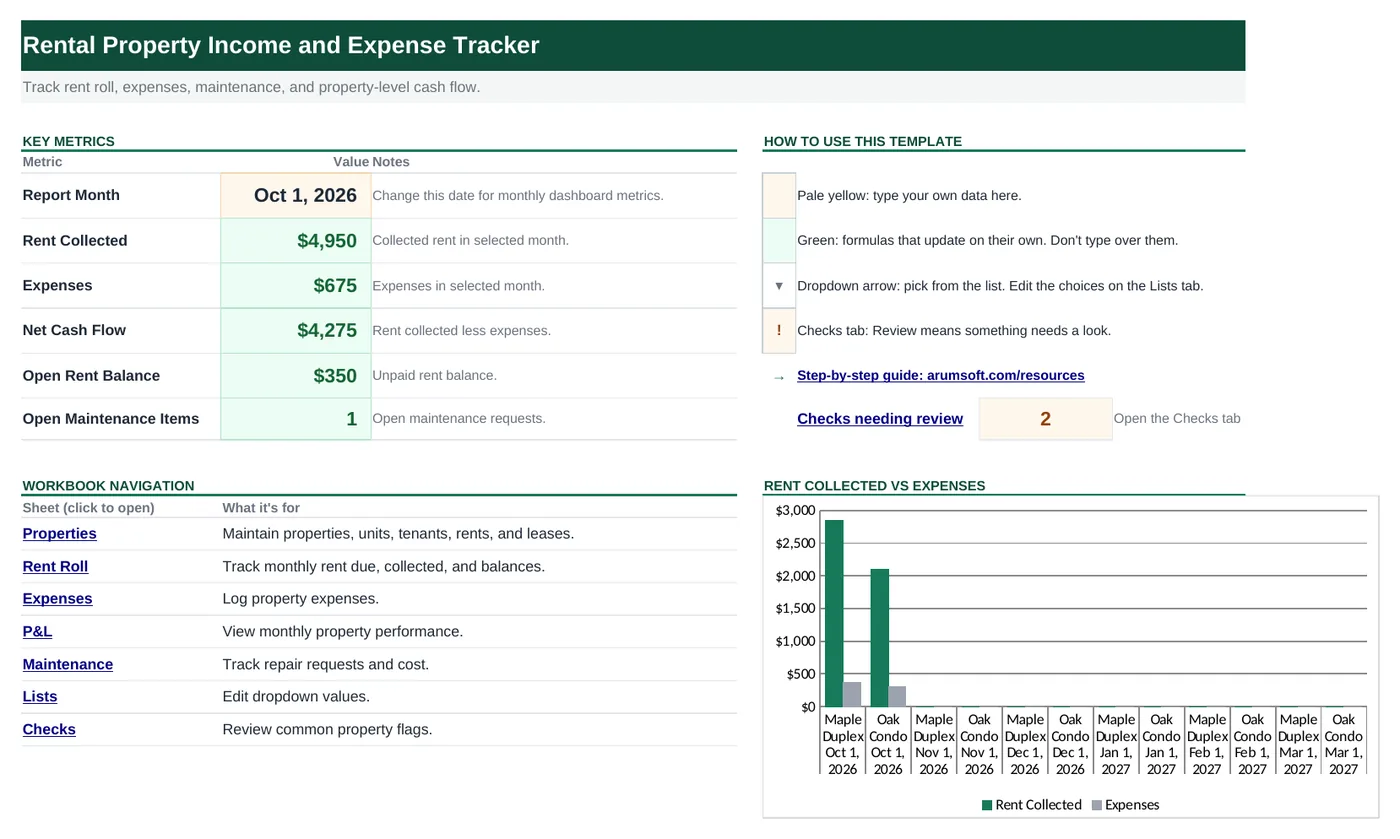
A landlord's workbook for one or several properties: a rent roll shows who has paid, expenses and maintenance are logged by property, and a P&L gives monthly cash flow per property.
- Sheets:
- 8
- Works with:
- Excel for Microsoft 365, Excel 2016 or later, Excel for Mac and Excel for the web
- Updated:
What you can do with it
- Keep tenant, rent and lease details for every unit
- See who has paid this month and what is still owed
- Log expenses and maintenance requests by property
- Compare rent collected with expenses, month by month
What's inside
The workbook has 8 sheets. You only type on a few of them; the rest calculate.
| Sheet | What it's for | You enter | Calculated for you |
|---|---|---|---|
| Start Here | Dashboard with the report month and five key numbers | Report month (B6) | Rent collected, expenses, net cash flow, open rent balance, open maintenance items |
| Properties | One row per unit (room for 50) | Property, unit, address, tenant, rent, lease dates, deposit, status | Nothing |
| Rent Roll | Rent due and collected, month by month (room for 100 rows) | Month, property, unit, tenant, rent due, rent collected | Balance, status (Paid or Open) |
| Expenses | Property expenses (room for 100) | Date, property, category, vendor, description, amount, reimbursable | Nothing |
| P&L | Cash flow by month and property (12 rows) | Month and property | Rent collected, expenses, net cash flow |
| Maintenance | Repair requests (room for 50) | Date, property, unit, issue, priority, status, cost | Nothing |
| Lists | Dropdown choices, including your property names | Property names and your own categories | Nothing |
| Checks | Four property checks | Nothing | OK or Review for each check |
Before you start
The template works as soon as you open it. Cell colors tell you what each cell is for:
- Open the file. If Excel shows a yellow Protected View bar, click Enable Editing. Files downloaded from the internet always open this way.
- Save your own copy with File› then Save As so you always have the original to start over from.
- Clear the sample data. Replace the sample properties, rent roll rows, expenses and maintenance items with your own. On P&L, change the property names in column B and the months in column A to match yours.
Step-by-step guide
Work through these in order the first time. After that, you'll mostly repeat the daily or monthly entry steps.
Set the report month
On Start Here, type the first day of the month in
B6. Rent Collected, Expenses and Net Cash Flow on the dashboard are for that month.List your properties and units
On Properties, add one row per rentable unit: Property name, Unit, Address, Tenant, Monthly Rent, Lease Start, Lease End, Deposit and Status (Occupied, Vacant or Under Repair).
Then type each property name once under Properties on the Lists sheet. The Property dropdowns on Rent Roll, Expenses, Maintenance and P&L use that list, so names always match.
Fill in the rent roll each month
At the start of each month, add one row per occupied unit on Rent Roll: Month (the 1st of the month), Property, Unit, Tenant and Rent Due.
As payments arrive, type the amount in Rent Collected. Balance shows what's still owed and Status switches from Open to Paid when the balance reaches zero.
Log expenses
On Expenses, add each cost: Date, Property, Category from the dropdown (Repairs, Utilities, HOA, Mortgage, Insurance, Taxes, Management Fees or Other), Vendor, Description, Amount and whether it's Reimbursable by the tenant.
Expenses are counted in the month of their date.
Track maintenance requests
On Maintenance, record each request: date, property, unit, issue, Priority (High, Medium, Low), Status (Open, Scheduled, Complete) and cost.
Open requests are counted on the dashboard. Complete ones turn green.
The cost here is for tracking only. When you pay for a repair, also add it on Expenses so it shows up in your cash flow.
Set up and read the P&L
Each row on P&L is one month for one property. Type the month (1st of the month) in column A and the property name in column B; Rent Collected, Expenses and Net Cash Flow fill in.
The sample has 12 rows: six months for two properties. For more properties or months, copy the last row, paste it directly below the table, then change the month and property. The formulas come along with the copy.
Read the dashboard
Start Here shows Rent Collected, Expenses and Net Cash Flow for the month, plus the Open Rent Balance across all months and the number of Open Maintenance Items.
The chart beside the navigation links compares rent collected with expenses for each P&L row.
Review the Checks sheet
Checks flags a negative month, unpaid rent, open maintenance requests and leases with no end date.
Customize the dropdowns
Everything you pick from a list comes from the Lists sheet: property names, property and maintenance statuses, expense categories, priorities and Yes/No.
Type a new item in the next empty cell of a column and it appears in that dropdown right away. When you buy another property, add its name under Properties first.
How the formulas work
You don't need to understand the formulas to use the template, but they're a good way to learn. Click any cell in Excel to see its formula in the formula bar.
=IF(B5="", "", MAX(0, E5-F5))Rent due minus rent collected, never below zero.
Learn this: How to Use MIN and MAX in Excel →=IF(B5="", "", IF(G5=0, "Paid", "Open"))Paid when nothing is owed.
Learn this: How to Use the IF Function in Excel →=SUMIFS('Rent Roll'!$F$5:$F$104, 'Rent Roll'!$A$5:$A$104, ">="&A5,
'Rent Roll'!$A$5:$A$104, "<"&DATE(YEAR(A5), MONTH(A5)+1, 1),
'Rent Roll'!$B$5:$B$104, B5)Three conditions: the month starts on or after A5, it is before the next month, and the property matches B5. Expenses in column D use the same pattern.
Learn this: How to Use SUMIF and SUMIFS in Excel →=COUNTIF(Maintenance!$F$5:$F$54, "Open")Counts requests whose status is Open.
Learn this: How to Use COUNTIF and COUNTIFS in Excel →Tips and limits
- Capacity: 50 units, 100 rent roll rows, 100 expenses and 50 maintenance items. To extend, press Ctrl+H, set Within to Workbook and Look in to Formulas, and replace
$104with$1004. - Mortgage payments are counted in full as an expense, which shows cash flow, not taxable profit. Ask a tax professional how to report rental income.
- Start a new copy each year to keep files small and make year-end totals easy.
Learn the skills behind this template
Was this guide helpful? Spot a mistake? Send feedback · admin@arumsoft.com