IT Asset and Software License Renewal Tracker for Excel
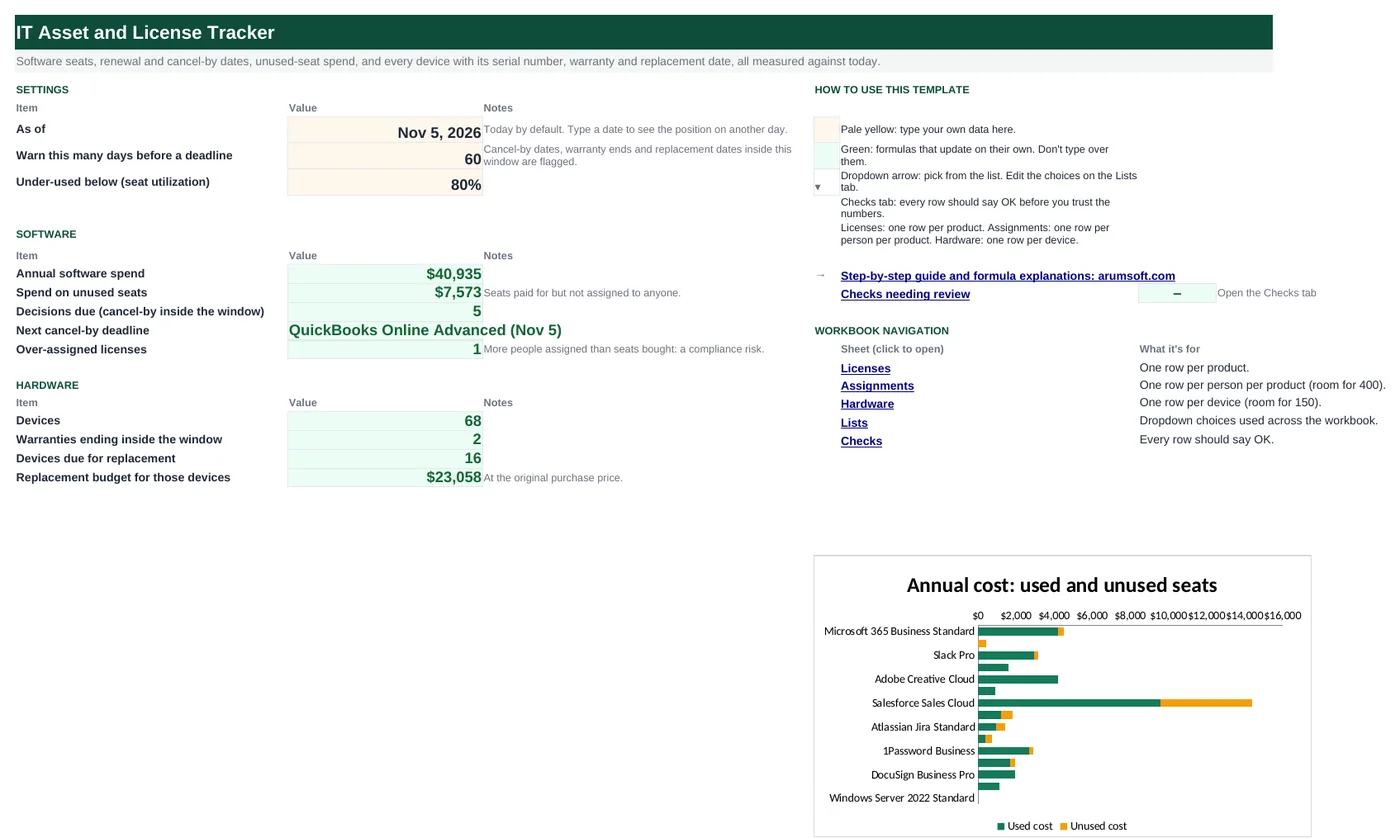
Most software overspend comes from two things: seats nobody uses and auto-renewals nobody stopped in time. This workbook counts assigned seats per product from a simple assignment list, prices the unused ones, rolls each subscription's renewal date forward to the next one, and subtracts the notice period to give a cancel-by date you can act on. A hardware register beside it tracks serial numbers, warranties and when each device is due for replacement, all measured against today.
- Sheets:
- 6
- Works with:
- Excel for Microsoft 365, Excel 2016 or later, Excel for Mac and Excel for the web
- Updated:
What you can do with it
- Seats bought vs assigned per product, utilization, and the annual cost of unused seats
- Next renewal rolled forward from the first renewal date, and a cancel-by date from the notice period
- Status: Over-assigned, Cancel-by passed, Decide now, Under-used or OK
- Hardware register: serial numbers, warranty status, age, replace-by date, replacement budget and straight-line book value
What's inside
The workbook has 6 sheets. You only type on a few of them; the rest calculate.
| Sheet | What it's for | You enter | Calculated for you |
|---|---|---|---|
| Start Here | Settings and the summary | As-of date (today by default), warning window, under-use threshold | Software spend, unused spend, decisions due, next cancel-by, over-assigned, devices, warranties ending, replacements due and budget |
| Licenses | One row per product (40) | Software, vendor, category, type, term, seats, cost per seat, first renewal date, auto-renew, notice days, owner | Seats assigned, unused, utilization, annual and unused cost, next renewal, cancel-by, days left, status |
| Assignments | Who has which seat (400) | Person, software, department, assigned date | Duplicate and listed-product checks |
| Hardware | One row per device (150) | Asset tag, type, model, serial, assigned to, location, purchase date, cost, warranty end | Warranty status, age, replacement age, replace-by date, replacement status, book value |
| Lists | Dropdowns and lifecycles | Categories, license types, device types and their replacement age | Nothing |
| Checks | Six data checks | Nothing | OK or Review |
Before you start
- Pull the subscription list from your card statements and SSO or admin consoles; shadow IT shows up on the card.
- Find each contract's renewal date and notice period (often 30–90 days for annual auto-renewals).
- Export the user list from each admin console for the Assignments tab.
Step-by-step guide
Set the as-of date and windows
Start Here B6 is today by default; B7 is how many days ahead to warn; B8 the utilization below which a product is under-used.
List the products
Licenses tab: software, vendor, category, type, term in months, seats bought, cost per seat per year, first renewal date, auto-renew, notice days and owner.
Record assignments
Assignments tab: one row per person per product. Seats assigned and unused cost update.
Act on the status
Decide now means the cancel-by date is inside your window: renew, reduce seats or cancel. Cancel-by passed means it will renew; note it for next year.
Register hardware
Hardware tab: asset tag, type, model, serial, user, location, purchase date, cost and warranty end. Replacement ages per type are on the Lists tab.
Plan replacements
Start Here B22 and B23 give the devices due and the budget at original cost.
Formula map
Every formula in the workbook, grouped by the sheet and column it lives in. A column of copied formulas counts once; the range it covers is shown.
| Sheet | Cells | Functions | What it computes | Reads | Feeds |
|---|---|---|---|---|---|
| Licenses | G5 copied down to row 44 | IF, COUNTIF | Seats assigned | A5 | Unused seats = bought − assigned; over-assigned when assigned > bought. |
| Licenses | L5 copied down to row 44 | IF, MAX | Cost of unused seats | H5, J5 | Summed on Start Here B13 and charted. |
| Licenses | N5 copied down to row 44 | IF, OR, EDATE, ROUNDUP, DATEDIF | Next renewal | M5, E5 | Cancel-by is this date minus the notice days. |
| Licenses | Q5 copied down to row 44 | IF | Cancel-by date | N5, P5 | Days to cancel-by (R5) drive the status. |
| Licenses | S5 copied down to row 44 | IF, AND | License status | G5, F5, R5, I5 | Colored and counted on Start Here. |
| Assignments | E5 copied down to row 404 | IF, COUNTIFS | Duplicate check | A5, B5 | Counted in the checks. |
| Hardware | K5 copied down to row 154 | IF, OR, YEARFRAC | Age in years | G5 | Book value uses it. |
| Hardware | L5 copied down to row 154 | IF, IFERROR, INDEX, MATCH | Replace after (years) | B5 | Replace-by = EDATE(purchase, 12 × years). |
| Hardware | O5 copied down to row 154 | IF, OR, MAX | Straight-line book value | H5, K5, L5 | A quick internal value, not tax depreciation. |
| Start Here | B15 | IFERROR, INDEX, MATCH, MINIFS, TEXT | Next cancel-by deadline | — | Put it in your calendar. |
Every formula, explained
Each formula below is copied straight from the file, so what you read here is exactly what the cell contains. Click any cell in Excel to see it in the formula bar.
=IF(A5="", "", COUNTIF(Assignments!$B$5:$B$404, A5))Counts rows on the Assignments tab for this product.
Piece by piece
COUNTIF(Assignments!$B$5:$B$404, A5)- People assigned this software.
With the sample data: A5 = Microsoft 365 Business Standard → G5 result 28
How it is used: Unused seats = bought − assigned; over-assigned when assigned > bought.
How to change it: Nothing to change.
Learn this: How to Use COUNTIF and COUNTIFS in Excel →=IF(A5="", "", MAX(0, H5)*J5)Unused seats (never below zero) times the cost per seat per year.
Piece by piece
MAX(0, H5)- Unused seats, zero if over-assigned.
*J5- Cost per seat per year.
With the sample data: H5 = 2, J5 = 150 → L5 result 300
How it is used: Summed on Start Here B13 and charted.
How to change it: Nothing to change.
Learn this: How to Use MIN and MAX in Excel →=IF(OR(A5="", M5="", N(E5)=0),
"", IF(M5>='Start Here'!$B$6,
M5, IF(EDATE(M5, E5*ROUNDUP(DATEDIF(M5, 'Start Here'!$B$6, "m")/E5, 0))>='Start Here'!$B$6, EDATE(M5, E5*ROUNDUP(DATEDIF(M5, 'Start Here'!$B$6, "m")/E5, 0)), EDATE(M5, E5*(ROUNDUP(DATEDIF(M5, 'Start Here'!$B$6, "m")/E5, 0)+1)))))Rolls the first renewal date forward by whole terms until it is on or after the as-of date.
Piece by piece
M5>='Start Here'!$B$6- Still ahead: use it as is.
DATEDIF(M5, as-of, "m")/E5- Terms that have passed.
ROUNDUP(…, 0)- Whole terms.
EDATE(M5, E5*k)- Renewal after k terms.
IF(… < as-of, …k+1)- One more term if that date is still in the past.
With the sample data: M5 = Jul 1, 2025, E5 = 12 → N5 result Jul 1, 2027
How it is used: Cancel-by is this date minus the notice days.
How to change it: Enter the first renewal date once; it rolls forward every year by itself.
Learn this: Text and Date Functions in Excel →=IF(N5="", "", N5-N(P5))The last day to give notice before the auto-renewal: next renewal minus notice days.
Piece by piece
N5- Next renewal.
-N(P5)- Notice days (0 if blank).
With the sample data: N5 = Jul 1, 2027, P5 = 30 → Q5 result Jun 1, 2027
How it is used: Days to cancel-by (R5) drive the status.
How to change it: Check the contract for the exact notice rule (some count business days).
Learn this: How to Write Basic Formulas in Excel →=IF(A5="", "", IF(G5>F5, "Over-assigned",
IF(AND(R5<>"", R5<0), "Cancel-by passed", IF(AND(R5<>"", R5<='Start Here'!$B$7), "Decide now", IF(AND(I5<>"", I5<'Start Here'!$B$8), "Under-used", "OK")))))Over-assigned first (compliance), then a passed cancel-by date, then a deadline inside the warning window, then low utilization.
Piece by piece
G5>F5- Over-assigned.
R5<0- Cancel-by passed: it will renew.
R5<='Start Here'!$B$7- Decide now.
I5<'Start Here'!$B$8- Under-used.
With the sample data: G5 = 28, F5 = 30, R5 = 208, I5 = 93.3% → S5 result OK
How it is used: Colored and counted on Start Here.
How to change it: Change the window and threshold on Start Here.
Learn this: How to Use the IF Function in Excel →=IF(A5="", "", IF(COUNTIFS($A$5:$A$404, A5, $B$5:$B$404, B5)>1,
"Duplicate", "OK"))Flags a person listed twice for the same product, which would overstate seats used.
Piece by piece
COUNTIFS($A$5:$A$404, A5, $B$5:$B$404, B5)>1- Same person and software more than once.
With the sample data: A5 = Ava Brooks, B5 = Microsoft 365 Business Standard → E5 result OK
How it is used: Counted in the checks.
How to change it: Delete the extra row.
Learn this: How to Use COUNTIF and COUNTIFS in Excel →=IF(OR(A5="", G5=""), "", YEARFRAC(G5, 'Start Here'!$B$6))Fraction of years between purchase and the as-of date.
Piece by piece
YEARFRAC(G5, 'Start Here'!$B$6)- Years, with decimals.
With the sample data: G5 = Mar 27, 2026 → K5 result 60.6%
How it is used: Book value uses it.
How to change it: Nothing to change.
Learn this: Text and Date Functions in Excel →=IF(A5="", "", IFERROR(INDEX(Lists!$E$5:$E$34, MATCH(B5, Lists!$D$5:$D$34, 0)),
""))Looks up the replacement age for this device type on the Lists tab.
Piece by piece
MATCH(B5, Lists!$D$5:$D$34, 0)- Row of the device type.
INDEX(Lists!$E$5:$E$34, …)- Its replacement age.
With the sample data: B5 = Laptop → L5 result 4
How it is used: Replace-by = EDATE(purchase, 12 × years).
How to change it: Edit the lifecycle on the Lists tab.
Learn this: How to Use INDEX and MATCH in Excel →=IF(OR(K5="", L5=""), "", H5*MAX(0, 1-K5/L5))Cost reduced evenly over the replacement life, never below zero.
Piece by piece
1-K5/L5- Share of life left.
MAX(0, …)- Zero once past its life.
H5*…- Times cost.
With the sample data: H5 = 1,435.78, K5 = 60.6%, L5 = 4 → O5 result 1,218.42
How it is used: A quick internal value, not tax depreciation.
How to change it: Use your accounting policy if it differs.
Learn this: How to Use MIN and MAX in Excel →=IFERROR(INDEX(Licenses!$A$5:$A$44,
MATCH(MINIFS(Licenses!$Q$5:$Q$44, Licenses!$Q$5:$Q$44, ">="&B6), Licenses!$Q$5:$Q$44, 0))&" ("&TEXT(MINIFS(Licenses!$Q$5:$Q$44, Licenses!$Q$5:$Q$44, ">="&B6),
"mmm d")&")", "")The earliest cancel-by date still ahead, with the product name.
Piece by piece
MINIFS(Licenses!$Q$5:$Q$44, Licenses!$Q$5:$Q$44, ">="&B6)- Earliest cancel-by on or after today.
MATCH(…, 0)- Its row.
INDEX(Licenses!$A$5:$A$44, …)&" ("&TEXT(…, "mmm d")&")"- Name and date as text.
With the sample data: B15 result QuickBooks Online Advanced (Nov 5)
How it is used: Put it in your calendar.
How to change it: Nothing to change.
Learn this: How to Use INDEX and MATCH in Excel →Tips and limits
- Capacity: 40 products, 400 assignments, 150 devices.
- B6 is =TODAY(), so statuses change every day. Type a fixed date to report on a past or future day.
- Usage-based and per-device licenses (servers, kiosks) have no person assignments; leave their utilization blank by setting the type to Perpetual or entering the device as the "person".
- Remove assignments the day someone leaves; then the unused cost shows what you can drop at the next renewal.
- Warranty end dates are on the manufacturer's support site by serial number.
Learn the skills behind this template
Was this guide helpful? Spot a mistake? Send feedback · admin@arumsoft.com