24/7 Rotating Shift Schedule for Excel (Pitman, DuPont, 4-on 4-off)
Plants, hospitals, dispatch centers and security teams that never close usually run four crews on 12-hour shifts. Writing that rotation out by hand for a year is slow and easy to get wrong. In this workbook a pattern is just one row of D, N and O codes plus an offset for each crew, so every day of the year is calculated with INDEX and MOD. Change the pattern or the start date and the whole year, the month view and the crew totals redraw.
- Sheets:
- 7
- Works with:
- Excel for Microsoft 365, Excel 2016 or later, Excel for Mac and Excel for the web
- Updated:
What you can do with it
- Pitman 2-2-3, DuPont and 4-on 4-off built in, plus a Custom row for your own cycle of up to 28 days
- 52 weeks day by day: each crew's code, who is on days and nights, and a coverage check
- Printable month view with day and night colors, weekends shaded and holidays marked
- Shifts, day and night split, weekend and holiday shifts, and average weekly hours per crew
What's inside
The workbook has 7 sheets. You only type on a few of them; the rest calculate.
| Sheet | What it's for | You enter | Calculated for you |
|---|---|---|---|
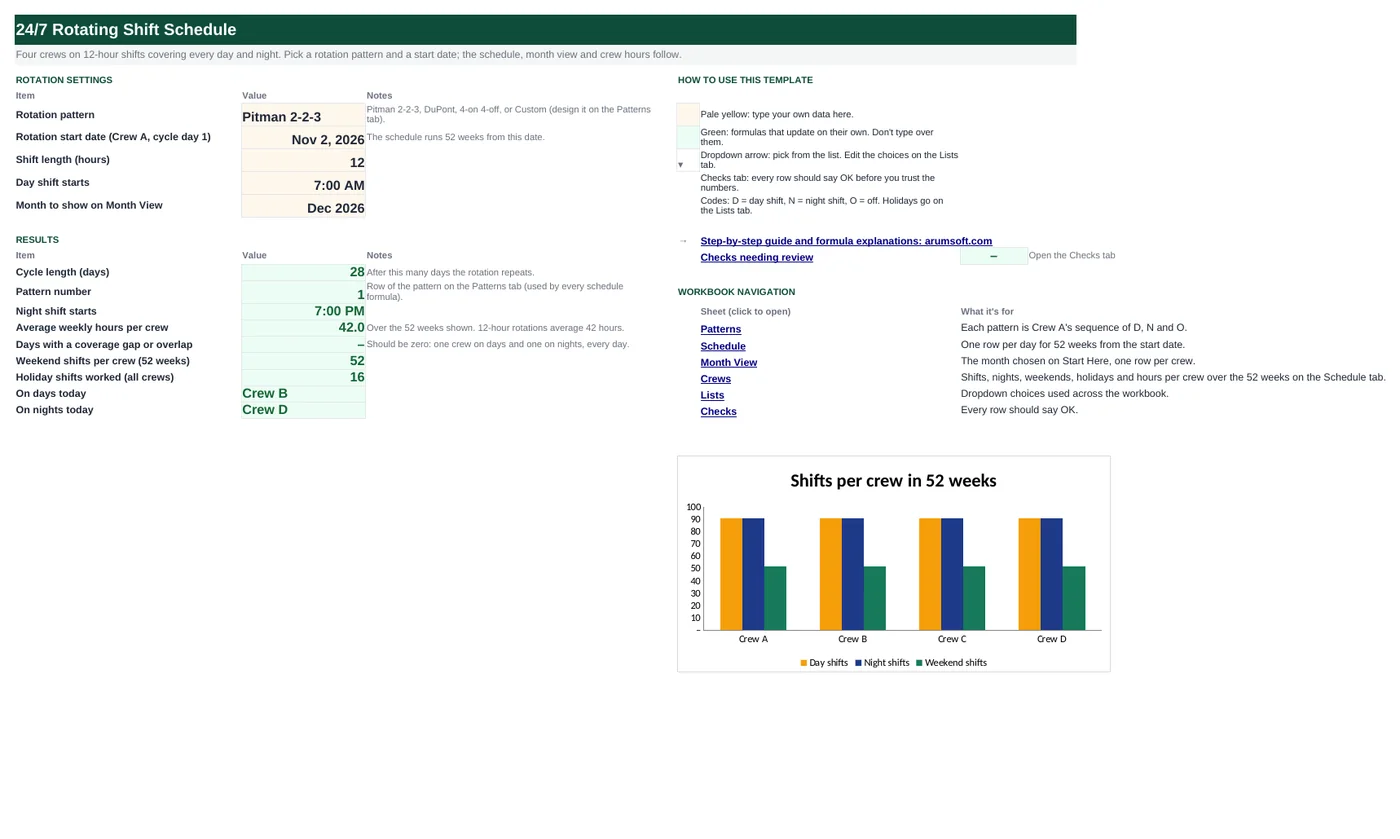
| Start Here | Settings and summary | Pattern, start date, shift length, day shift start time, month to show | Cycle length, pattern number, night shift start, average weekly hours, coverage gaps, weekend and holiday shifts, crews on today |
| Patterns | Rotation library | Cycle length, crew offsets and the D/N/O sequence for each pattern (Custom row for your own) | Nothing |
| Schedule | One row per day for 52 weeks | Nothing | Cycle day, each crew's code, crew on days, crew on nights, coverage, holiday |
| Month View | Printable month | Nothing (month is chosen on Start Here) | Dates, weekdays, each crew's code, holiday markers |
| Crews | Totals per crew | Crew name or supervisor, headcount | Shifts, day and night shifts, weekend and holiday shifts, hours, average weekly hours, crew labor hours |
| Lists | Codes and holidays | Shift codes, holiday dates | Nothing |
| Checks | Six data checks | Nothing | OK or Review |
Before you start
- Choose the rotation. Pitman 2-2-3 gives every other weekend off; DuPont gives a full week off every four weeks; 4-on 4-off is the simplest to remember.
- Pick the date Crew A starts day 1 of the cycle. A Monday makes the pattern easiest to read.
- Check your overtime rules: a 12-hour rotation averages 42 hours a week, so some weeks are over 40.
Step-by-step guide
Pick the pattern and start date
Start Here B6 and B7: choose Pitman 2-2-3, DuPont, 4-on 4-off or Custom, and the date Crew A starts cycle day 1.
Set the shift times
B8 shift length (12) and B9 when the day shift starts. The night shift start is calculated.
Name the crews
Crews tab: a name or supervisor and the headcount for each crew.
Add your holidays
Lists tab column B: the dates your site treats as holidays. They are marked on the schedule and counted per crew.
Print the month
Pick the month on Start Here B10 and print the Month View tab.
Check coverage
Start Here B18 must be zero: every day has one crew on days and one on nights. The Checks tab confirms it for the whole year.
Formula map
Every formula in the workbook, grouped by the sheet and column it lives in. A column of copied formulas counts once; the range it covers is shown.
| Sheet | Cells | Functions | What it computes | Reads | Feeds |
|---|---|---|---|---|---|
| Start Here | B15 | MATCH | Pattern number | B6 | Fed into INDEX in every schedule cell. |
| Schedule | C5 copied down to row 368 | MOD | Day in the cycle | A5 | Shows where each day sits in the cycle. |
| Schedule | D5 copied down to row 368 | INDEX, MOD | Crew code for the day | A5 | E5:G5 are the same formula for crews B–D; Month View uses it with the calendar date. |
| Schedule | H5 copied down to row 368 | IFERROR, INDEX, MATCH | Crew on days | D5, E5, F5, G5 | I5 does the same for N. Start Here B21 and B22 read today's row. |
| Schedule | J5 copied down to row 368 | IF, OR, COUNTIF, AND | Coverage check | D5, E5, F5, G5 | Counted on Start Here B18 and in the first check. |
| Month View | B6 copied across to column AF | IF, DAY, EOMONTH, DATE, YEAR, MONTH | Calendar date for each column | B5 | Row 8–11 use it to calculate each crew's code. |
| Crews | G5 | SUMPRODUCT, INDEX, WEEKDAY | Weekend shifts | — | Weekend fairness between crews; H5 counts holidays the same way. |
| Crews | J5 copied down to row 8 | COUNT | Average weekly hours | I5 | Shown on Start Here B17: 42 for every 12-hour 4-crew rotation. |
| Start Here | B21 | IFERROR, INDEX, MATCH, TODAY | Crew on days today | — | A quick check for supervisors; B22 does nights. |
Every formula, explained
Each formula below is copied straight from the file, so what you read here is exactly what the cell contains. Click any cell in Excel to see it in the formula bar.
=MATCH(B6, Patterns!$A$5:$A$8, 0)Finds the chosen pattern's row on the Patterns tab. Every schedule formula uses this number to read the right sequence.
Piece by piece
MATCH(B6, Patterns!$A$5:$A$8, 0)- Exact match on the pattern name: 1 for Pitman, 2 for DuPont…
With the sample data: B6 = Pitman 2-2-3 → B15 result 1
How it is used: Fed into INDEX in every schedule cell.
How to change it: Nothing to change; pick the pattern in B6.
Learn this: How to Use INDEX and MATCH in Excel →=MOD(A5-'Start Here'!$B$7, 'Start Here'!$B$14)+1How many days since the rotation started, wrapped around the cycle length, plus one so the count starts at 1.
Piece by piece
A5-'Start Here'!$B$7- Days since the start date.
MOD(…, 'Start Here'!$B$14)- Remainder after dividing by the cycle length (28 for Pitman).
+1- Day 1 instead of day 0.
With the sample data: A5 = Nov 2, 2026 → C5 result 1
How it is used: Shows where each day sits in the cycle.
How to change it: Nothing to change.
Learn this: How to Write Basic Formulas in Excel →=INDEX(Patterns!$G$5:$AH$8,
'Start Here'!$B$15, MOD($A5-'Start Here'!$B$7+INDEX(Patterns!$C$5:$F$8, 'Start Here'!$B$15, 1),
'Start Here'!$B$14)+1)Looks up the crew's position in the pattern: the cycle day plus the crew's offset, wrapped with MOD, picks one of the D, N or O codes.
Piece by piece
INDEX(Patterns!$G$5:$AH$8, 'Start Here'!$B$15, …)- The chosen pattern's row of codes.
$A5-'Start Here'!$B$7- Days since the start.
+INDEX(Patterns!C$5:C$8, 'Start Here'!$B$15)- This crew's offset (0 for A, 7 for B, 14 for C, 21 for D on Pitman). Column C is relative, so the formula copied right reads offsets B, C and D.
MOD(…, 'Start Here'!$B$14)+1- Position 1 to 28 in the sequence.
With the sample data: A5 = Nov 2, 2026 → D5 result D
How it is used: E5:G5 are the same formula for crews B–D; Month View uses it with the calendar date.
How to change it: Change offsets on the Patterns tab, not here.
Learn this: Relative, Absolute and Mixed References in Excel →=IFERROR(INDEX($D$4:$G$4, MATCH("D", D5:G5, 0)), "None")Finds the first D in the four crew columns and returns that column's header.
Piece by piece
MATCH("D", D5:G5, 0)- Which crew column holds D.
INDEX($D$4:$G$4, …)- The crew name in the header.
IFERROR(…, "None")- No one on days.
With the sample data: D5 = D, E5 = O, F5 = N, G5 = O → H5 result Crew A
How it is used: I5 does the same for N. Start Here B21 and B22 read today's row.
How to change it: Nothing to change.
Learn this: How to Use INDEX and MATCH in Excel →=IF(OR(COUNTIF(D5:G5, "D")=0,
COUNTIF(D5:G5, "N")=0), "Gap",
IF(AND(COUNTIF(D5:G5, "D")=1, COUNTIF(D5:G5, "N")=1),
"OK", "Overlap"))Gap if nobody is on days or nights, OK if exactly one crew is on each, Overlap otherwise.
Piece by piece
COUNTIF(D5:G5, "D")- Crews on days.
COUNTIF(D5:G5, "N")- Crews on nights.
OR(…=0, …=0)- Either shift empty: Gap.
AND(…=1, …=1)- Exactly one each: OK.
With the sample data: D5 = D, E5 = O, F5 = N, G5 = O → J5 result OK
How it is used: Counted on Start Here B18 and in the first check.
How to change it: Nothing to change.
Learn this: How to Use AND and OR in Excel →=IF(B$5<=DAY(EOMONTH($B$4, 0)),
DATE(YEAR($B$4), MONTH($B$4),
B$5), "")Builds the date from the month and the day number above it, and leaves the column blank past the month's last day.
Piece by piece
DAY(EOMONTH($B$4, 0))- Days in this month.
B$5<=…- Day number still inside the month.
DATE(YEAR($B$4), MONTH($B$4), B$5)- The date.
With the sample data: B5 = 1 → B6 result Dec 1, 2026
How it is used: Row 8–11 use it to calculate each crew's code.
How to change it: Change the month on Start Here B10.
Learn this: Text and Date Functions in Excel →=SUMPRODUCT((INDEX(Schedule!$D$5:$G$368, 0, 1)<>"O")*(WEEKDAY(Schedule!$A$5:$A$368, 2)>5))Counts days where this crew works and the date is a Saturday or Sunday.
Piece by piece
INDEX(Schedule!$D$5:$G$368, 0, 1)- Crew A's column (2, 3, 4 for the other crews).
(…<>"O")- 1 when working.
(WEEKDAY(Schedule!$A$5:$A$368, 2)>5)- 1 on Saturday (6) or Sunday (7).
SUMPRODUCT(…)- Adds the days where both are 1.
With the sample data: G5 result 52
How it is used: Weekend fairness between crews; H5 counts holidays the same way.
How to change it: Nothing to change.
Learn this: Essential Excel Functions: SUM, AVERAGE, COUNT, MIN and MAX →=I5/(COUNT(Schedule!$A$5:$A$368)/7)Hours per person over the year divided by the number of weeks on the schedule.
Piece by piece
I5- Shifts × shift length.
COUNT(Schedule!$A$5:$A$368)/7- Weeks on the schedule (52).
With the sample data: I5 = 2,184 → J5 result 42
How it is used: Shown on Start Here B17: 42 for every 12-hour 4-crew rotation.
How to change it: Nothing to change.
Learn this: How to Write Basic Formulas in Excel →=IFERROR(INDEX(Schedule!$H$5:$H$368,
MATCH(TODAY(), Schedule!$A$5:$A$368, 0)),
"Outside schedule")Finds today's row on the Schedule tab and returns the crew on days.
Piece by piece
MATCH(TODAY(), Schedule!$A$5:$A$368, 0)- Today's row.
INDEX(Schedule!$H$5:$H$368, …)- Crew on days.
IFERROR(…, "Outside schedule")- Today is outside the 52 weeks.
With the sample data: B21 result Crew B
How it is used: A quick check for supervisors; B22 does nights.
How to change it: Move the start date forward each year.
Learn this: How to Use TODAY and NOW in Excel →Tips and limits
- The schedule covers 52 weeks from the start date. For the next year, move the start date forward by a whole number of cycles (364 days is 13 Pitman or DuPont cycles) so crews keep their place.
- A crew's offset is how many days it runs behind Crew A. Offsets of a quarter cycle (7 on a 28-day pattern) give even coverage.
- Custom patterns: fill one row with D, N and O, set the cycle length and offsets, and choose Custom. If the coverage check flags days, try other offsets.
- Average weekly hours are 42 for any 12-hour 4-crew rotation; the weekly split varies, so check overtime by your workweek.
- Print the Month View on one landscape page; holidays show as H in the last row.
Learn the skills behind this template
Was this guide helpful? Spot a mistake? Send feedback · admin@arumsoft.com