FIFO Inventory Valuation and Lot Tracker for Excel
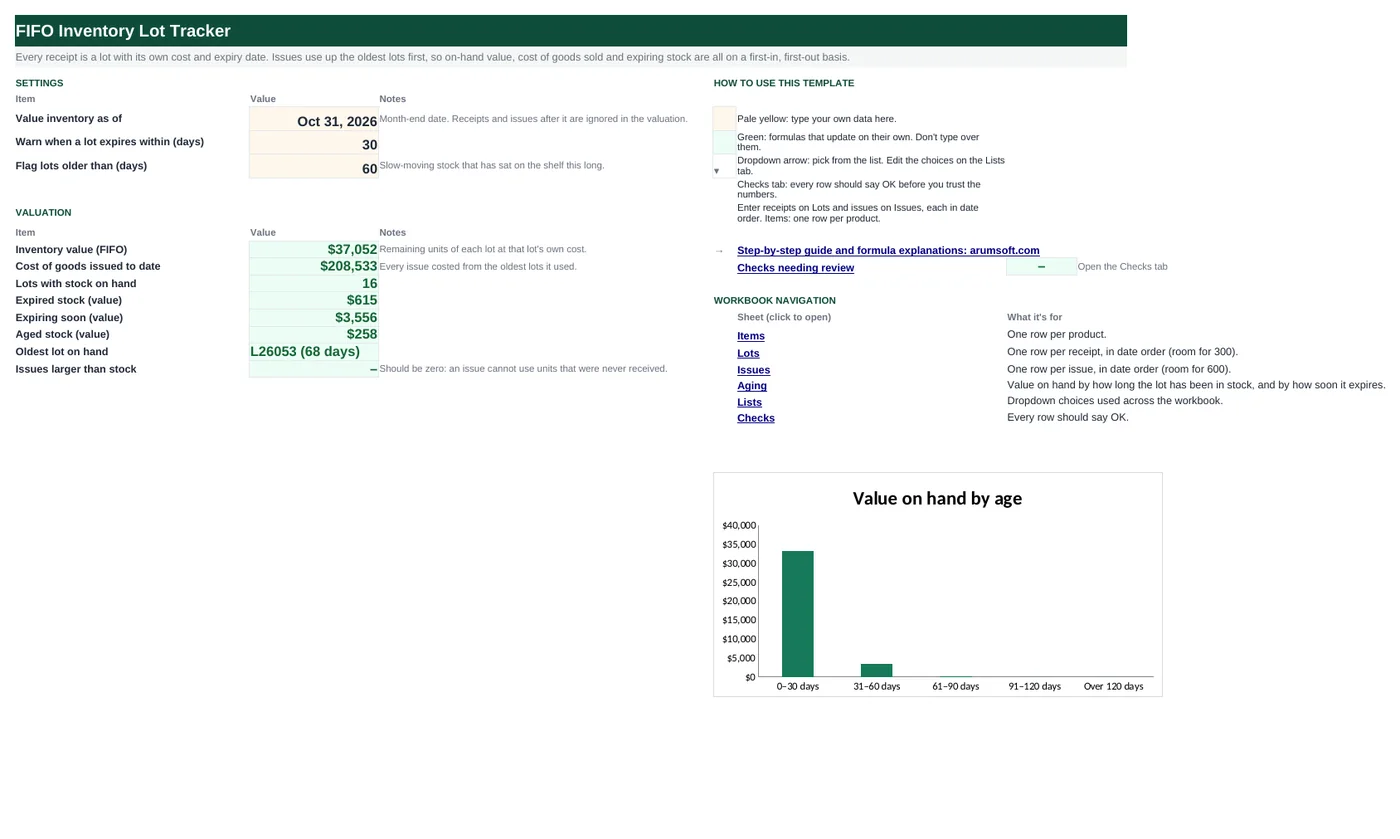
First in, first out means two things in a warehouse: pick the oldest stock first, and value what is left at the cost of the newest receipts. Both need lot-level records. This workbook keeps every receipt as a lot with its own cost and expiry date and every issue in date order. Formulas work out how much of each lot has been used, cost each issue from the lots it actually drew on, and give you FIFO value, cost of goods issued, the next lot to pick, and stock that is expired, expiring or sitting too long.
- Sheets:
- 7
- Works with:
- Excel for Microsoft 365, Excel 2016 or later, Excel for Mac and Excel for the web
- Updated:
What you can do with it
- Lot register: receipt date, quantity, unit cost and expiry, with units used and remaining under FIFO
- FIFO cost of every issue, even when it spans two or three lots at different costs
- Per item: on hand, FIFO value, average cost, cost of goods issued, next lot to pick, earliest expiry
- Expired, expiring-soon and aged stock flagged, with an aging report by days in stock and days to expiry
What's inside
The workbook has 7 sheets. You only type on a few of them; the rest calculate.
| Sheet | What it's for | You enter | Calculated for you |
|---|---|---|---|
| Start Here | Settings and valuation | Valuation date, expiry warning days, aged-stock days | FIFO value, cost of goods issued, lots on hand, expired, expiring and aged value, oldest lot, issues larger than stock |
| Items | One row per product (30) | Item code, description, unit | Received, issued, on hand, FIFO value, average cost, cost of goods issued, next lot to pick, earliest expiry, status |
| Lots | Receipts in date order (300) | Lot, item, received date, quantity, unit cost, expiry | Lot value, units before this lot, units used, remaining, remaining value, age, days to expiry, status, order check |
| Issues | Issues in date order (600) | Date, item, quantity, reference | Units issued before, FIFO cost, unit cost, stock check |
| Aging | Value by age and by expiry | Bucket limits | Lots and value per bucket |
| Lists | Units | Units of measure | Nothing |
| Checks | Six data checks | Nothing | OK or Review |
Before you start
- Give each receipt a lot number (your PO and line, or the supplier's batch number).
- Enter lots and issues in date order. The checks catch rows out of order.
- Use landed cost per unit (price plus freight) if that is how you value inventory.
Step-by-step guide
Set the valuation date
Start Here B6: usually a month end. Lots received and issues made after it are ignored in the valuation.
List the items
Items tab: code, description and unit. Everything else on the row calculates.
Log receipts as lots
Lots tab: lot number, item, received date, quantity, unit cost and expiry date, oldest first.
Log issues
Issues tab: date, item, quantity and a reference (order or work order). The FIFO cost appears beside each.
Pick and rotate
Items column J names the oldest lot that still has stock: pick from it. Column L and Lots column N flag expired and expiring stock.
Close the month
Start Here gives FIFO value and cost of goods issued; the Checks tab proves received value minus cost issued equals the value on hand.
Formula map
Every formula in the workbook, grouped by the sheet and column it lives in. A column of copied formulas counts once; the range it covers is shown.
| Sheet | Cells | Functions | What it computes | Reads | Feeds |
|---|---|---|---|---|---|
| Lots | H5 copied down to row 304 | IF, SUMIF | Units before this lot | B5 | Units used and the FIFO cost of issues both measure against it. |
| Lots | I5 copied down to row 304 | IF, OR, MAX, MIN, SUMIFS | Units used from this lot | D5, H5 | Remaining = quantity − used; remaining value = remaining × this lot's cost. |
| Lots | N5 copied down to row 304 | IF, AND | Lot status | J5, M5, L5 | Start Here sums remaining value by status. |
| Issues | E5 copied down to row 604 | IF, SUMIF | Units issued before | B5 | Combined with the lots' start and end positions to cost the issue. |
| Issues | F5 copied down to row 604 | IF, SUMPRODUCT, ABS | FIFO cost of the issue | E5, C5 | Summed per item as cost of goods issued. An issue of 10 that takes 4 units at $32.00 and 6 at $33.10 costs $326.60. |
| Issues | H5 copied down to row 604 | IF, SUMIFS | Stock check | E5, C5 | Counted on Start Here B19 and in the checks. |
| Items | J5 copied down to row 34 | IF, IFERROR, INDEX, MATCH | Next lot to pick | A5 | The pick instruction for FIFO rotation. |
| Items | K5 copied down to row 34 | IF, OR, MINIFS | Earliest expiry on hand | A5 | Drives the item status. |
| Aging | E5 copied down to row 9 | SUMIFS | Value by age bucket | — | The Start Here chart; the total must equal FIFO value. |
Every formula, explained
Each formula below is copied straight from the file, so what you read here is exactly what the cell contains. Click any cell in Excel to see it in the formula bar.
=IF(A5="", 0, SUMIF($B$4:B4, B5, $D$4:D4))Adds the quantities of all earlier lots of the same item. That is where this lot starts in the item's FIFO queue.
Piece by piece
$B$4:B4- Expanding range: every row above this one.
SUMIF(…, B5, $D$4:D4)- Quantity of earlier lots of this item.
IF(A5="", 0, …)- Zero for empty rows so other formulas can do arithmetic on it.
With the sample data: B5 = BEAN-B → H5 result 0
How it is used: Units used and the FIFO cost of issues both measure against it.
How to change it: Nothing to change; keep lots in date order.
Learn this: How to Use SUMIF and SUMIFS in Excel →=IF(OR(A5="", C5>'Start Here'!$B$6),
0, MAX(0, MIN(D5, SUMIFS(Issues!$C$5:$C$604, Issues!$B$5:$B$604, B5, Issues!$A$5:$A$604, "<="&'Start Here'!$B$6)-H5)))Total issued for the item up to the valuation date, minus what earlier lots could cover, limited to between 0 and this lot's quantity.
Piece by piece
SUMIFS(Issues!$C$5:$C$604, Issues!$B$5:$B$604, B5, Issues!$A$5:$A$604, "<="&'Start Here'!$B$6)- Units issued for this item to date.
-H5- Less what earlier lots supplied.
MIN(D5, …)- Never more than the lot held.
MAX(0, …)- Never negative.
C5>'Start Here'!$B$6- Lots received after the date are untouched.
With the sample data: D5 = 50, H5 = 0 → I5 result 50
How it is used: Remaining = quantity − used; remaining value = remaining × this lot's cost.
How to change it: Nothing to change.
Learn this: How to Use MIN and MAX in Excel →=IF(A5="", "", IF(C5>'Start Here'!$B$6,
"Not yet received", IF(J5=0, "Used up", IF(AND(M5<>"", M5<0), "Expired", IF(AND(M5<>"", M5<='Start Here'!$B$7), "Expiring soon", IF(L5>'Start Here'!$B$8, "Aged", "In stock"))))))Checks in order: not yet received, used up, expired, expiring within the warning window, older than the aged-stock threshold, otherwise in stock.
Piece by piece
C5>'Start Here'!$B$6- Received after the valuation date.
J5=0- Used up.
M5<0- Expired.
M5<='Start Here'!$B$7- Expiring soon.
L5>'Start Here'!$B$8- Aged.
With the sample data: J5 = 0, M5 = —, L5 = — → N5 result Used up
How it is used: Start Here sums remaining value by status.
How to change it: Change the windows on Start Here.
Learn this: How to Use the IF Function in Excel →=IF(A5="", "", SUMIF($B$4:B4, B5, $C$4:C4))Running total of earlier issues of the same item: where this issue starts in the FIFO queue.
Piece by piece
SUMIF($B$4:B4, B5, $C$4:C4)- Earlier issues of this item.
With the sample data: B5 = FLR-50 → E5 result 0
How it is used: Combined with the lots' start and end positions to cost the issue.
How to change it: Nothing to change; keep issues in date order.
Learn this: How to Use SUMIF and SUMIFS in Excel →=IF(A5="", "", SUMPRODUCT((Lots!$B$5:$B$304=B5)*(((((Lots!$H$5:$H$304+Lots!$D$5:$D$304)+(E5+C5)-ABS((Lots!$H$5:$H$304+Lots!$D$5:$D$304)-(E5+C5)))/2)-((Lots!$H$5:$H$304+E5+ABS(Lots!$H$5:$H$304-E5))/2))+ABS(((((Lots!$H$5:$H$304+Lots!$D$5:$D$304)+(E5+C5)-ABS((Lots!$H$5:$H$304+Lots!$D$5:$D$304)-(E5+C5)))/2)-((Lots!$H$5:$H$304+E5+ABS(Lots!$H$5:$H$304-E5))/2))))/2*Lots!$E$5:$E$304))Treats each lot as a stretch of units from its start (units before it) to its end (start + quantity), and this issue as the stretch from E5 to E5 + C5. The overlap with each lot, times that lot's cost, is added up.
Piece by piece
(Lots!$B$5:$B$304=B5)- Only lots of this item.
(a+b−ABS(a−b))/2- The smaller of a and b, written so it works on whole columns: min(lot end, issue end).
(a+b+ABS(a−b))/2- The larger: max(lot start, issue start).
(x+ABS(x))/2- Overlap, or 0 if the stretches do not meet.
*Lots!$E$5:$E$304- Times each lot's unit cost.
SUMPRODUCT(…)- Added over all lots.
With the sample data: E5 = 0, C5 = 4 → F5 result 73.96
How it is used: Summed per item as cost of goods issued. An issue of 10 that takes 4 units at $32.00 and 6 at $33.10 costs $326.60.
How to change it: Nothing to change.
Learn this: Essential Excel Functions: SUM, AVERAGE, COUNT, MIN and MAX →=IF(A5="", "", IF(E5+C5>SUMIFS(Lots!$D$5:$D$304, Lots!$B$5:$B$304, B5, Lots!$C$5:$C$304, "<="&A5),
"Short", "OK"))Short if this issue would take the item past the units received by its date.
Piece by piece
E5+C5- Units issued after this one.
SUMIFS(Lots!$D$5:$D$304, Lots!$B$5:$B$304, B5, Lots!$C$5:$C$304, "<="&A5)- Units received by the issue date.
With the sample data: E5 = 0, C5 = 4 → H5 result OK
How it is used: Counted on Start Here B19 and in the checks.
How to change it: Fix the date or quantity, or log the missing receipt.
Learn this: How to Use SUMIF and SUMIFS in Excel →=IF(A5="", "", IFERROR(INDEX(Lots!$A$5:$A$304, MATCH(1, INDEX((Lots!$B$5:$B$304=A5)*(Lots!$J$5:$J$304>0), 0), 0)),
"None"))The first lot down the list (so the oldest) for this item that still has units.
Piece by piece
(Lots!$B$5:$B$304=A5)*(Lots!$J$5:$J$304>0)- 1 for lots of this item with stock.
INDEX(…, 0)- Lets MATCH search the array without Ctrl+Shift+Enter.
MATCH(1, …, 0)- First such lot.
INDEX(Lots!$A$5:$A$304, …)- Its lot number.
With the sample data: A5 = OIL-1L → J5 result L26073
How it is used: The pick instruction for FIFO rotation.
How to change it: Nothing to change.
Learn this: How to Use INDEX and MATCH in Excel →=IF(OR(A5="", F5=0), "", MINIFS(Lots!$F$5:$F$304,
Lots!$B$5:$B$304, A5, Lots!$J$5:$J$304,
">0"))The soonest expiry date among this item's lots that still hold stock.
Piece by piece
MINIFS(Lots!$F$5:$F$304, Lots!$B$5:$B$304, A5, Lots!$J$5:$J$304, ">0")- Minimum expiry where item matches and units remain.
With the sample data: A5 = OIL-1L → K5 result Mar 25, 2028
How it is used: Drives the item status.
How to change it: Nothing to change.
Learn this: How to Use MIN and MAX in Excel →=SUMIFS(Lots!$K$5:$K$304,
Lots!$L$5:$L$304, ">="&B5,
Lots!$L$5:$L$304, "<="&C5)Adds remaining value of lots whose age falls between the bucket limits.
Piece by piece
Lots!$K$5:$K$304- Remaining value.
Lots!$L$5:$L$304, ">="&B5- Age at least the From value.
…, "<="&C5- And at most the To value.
With the sample data: E5 result 33,346.45
How it is used: The Start Here chart; the total must equal FIFO value.
How to change it: Edit the limits in columns B and C.
Learn this: How to Use SUMIF and SUMIFS in Excel →Tips and limits
- Capacity: 30 items, 300 lots, 600 issues. For a longer history, start a new file each year with opening lots at their remaining quantities and costs.
- Enter lots and issues in date order. FIFO depends on order, and the Lots column O and Issues column H checks tell you when something is out of place.
- Returns to stock: enter them as a new lot at the cost they were issued at.
- Stock adjustments (damage, count differences): enter shortages as issues with a reference such as ADJ, and overages as a new lot.
- FIFO is for valuation and rotation. If you must pick by expiry (FEFO) instead, use Items column K and the Lots status.
Learn the skills behind this template
Was this guide helpful? Spot a mistake? Send feedback · admin@arumsoft.com