Expert PowerPoint · Tutorial 5 of 9
How to Structure High-Stakes PowerPoint Decks: Training, Pitch, Executive and Data Reports
Match deck structure to the genre: training, pitch, executive update, data report or case study, so each deck asks its audience for the right response.
- Level
- Expert
- Time
- 13 min read
- Updated:
- Applies to:
- PowerPoint for Microsoft 365, PowerPoint 2024, PowerPoint 2021, PowerPoint for Mac, PowerPoint for the web
What you'll learn
- Choose a deck genre from the response you need from the audience
- Structure a training deck around practice and checks for understanding
- Rewrite a feature list as a pitch built on pain, proof and a next step
- Write a one-slide executive summary that ends in a clear decision request
- Turn charts into a data story that ends in an action
- Prepare a high-stakes deck with a pre-read version, appendix and backup plan
The same content needs a different deck depending on who's in the room and what you need from them. A training deck that's structured like an executive update leaves learners unable to do anything. An executive update structured like a training deck buries the decision on slide 23, after the executive has already left for the next meeting.
This page covers five professional deck genres and the structure each one needs. The running example is one piece of content told five ways: the tutoring site's new XLOOKUP practice program, which needs to be taught to tutors, approved by a director, pitched to partner schools, reported on with data and written up as a case study. The numbers in the examples are illustrative.
Start from the response you need
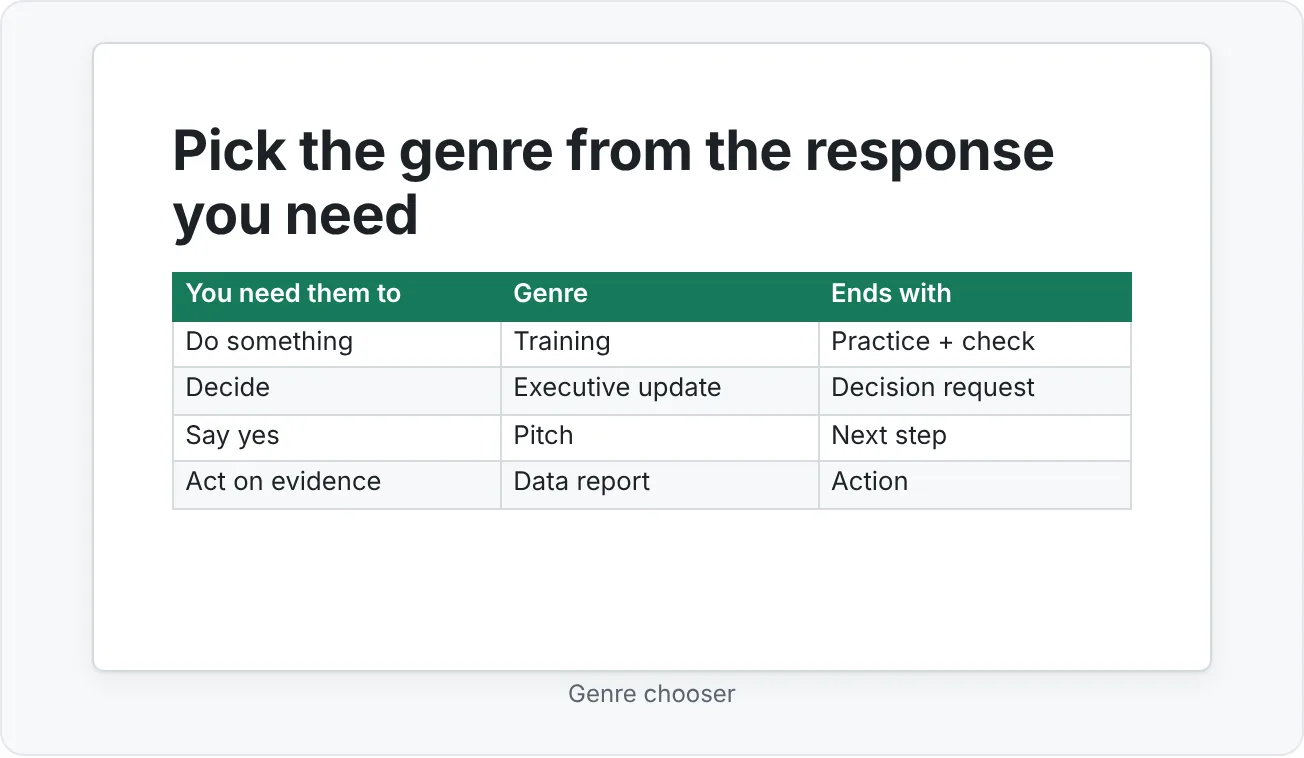
Every high-stakes deck exists to get a response: a skill, a decision, a signature, an understanding, a hire. Name the response first, and the genre (and its structure) follows.
| Genre | The audience is asking | You need them to | Structure |
|---|---|---|---|
| Training | "Can I do this myself?" | Do something new | Objectives, concept, demo, guided practice, challenge, check, recap |
| Pitch | "Why should I care, and why you?" | Say yes to a next step | Pain, future state, solution, proof, offer, next step |
| Executive update | "What do you need from me?" | Decide | Summary and ask, key changes, risks, options, recommendation, decision |
| Data report | "What does the evidence say?" | Act on a finding | Question, finding, evidence, interpretation, implication, action |
| Case study | "What did you do, and can you do it again?" | Trust your judgment | Problem, role, process, output, result, reflection |
Write the response as a sentence on a sticky note before you open PowerPoint: "After this deck, the director approves funding for two more terms." If you can't write that sentence, you're not ready to choose slides.
Training decks: build for doing, not telling
A lecture deck transfers information. A training deck changes what people can do. The difference is mostly in how much of the deck is practice.
Use this sequence for each skill:
- Learning objective. One slide, written as something the learner will do: "Write an XLOOKUP that returns a price from a product table."
- Concept. The minimum explanation, with one clear visual.
- Demo. Show it working, live or with step screenshots.
- Guided practice. Learners do it with support: an exercise slide with numbered steps and a timer.
- Independent challenge. A similar task without the steps.
- Check for understanding. A quiz or diagnostic question that reveals misconceptions.
- Recap. The objective again, now as something they've done.
Use your template's Exercise and Quiz layouts here. A training deck where every exercise slide looks the same teaches learners where to look for instructions.
Pitch decks: tell a value story, not a feature list
A pitch persuades someone to take a next step. Features don't persuade on their own; outcomes for the audience do. Build the pitch in six moves:
- Pain. The problem the audience has, in their words. "Your students lose marks on lookup questions in the spreadsheet unit."
- Desired future. What it looks like when the problem is gone.
- Solution. What you offer, described as the bridge from pain to future.
- Proof. Evidence it works: results, a pilot, a quote from a similar customer. One strong proof beats five weak ones.
- Offer. Exactly what they get, and what it costs (in money, time or effort).
- Next step. One small, specific action. "Run a four-week pilot with one class starting in November."
Executive updates: lead with the decision
Executives read the first slide and skim the rest. Put the whole story, including what you need from them, on slide 1. This is often called answer-first or bottom-line-up-front structure.
The executive update structure:
- Executive summary. Situation, result, recommendation and the decision needed, on one slide.
- Key changes. What's different since the last update.
- Risks. What could go wrong, how likely and what you're doing about it.
- Options. Two or three real options with trade-offs (including "do nothing").
- Recommendation. Which option and why.
- Decision needed. The specific ask, with a deadline.
Executive decks are also where appendix slides earn their keep. Move detail into an appendix after the closing slide, then link to it so you can jump there if asked. Insert then Links then Zoom then Slide Zoom or a hyperlink from a small "Details" button on the summary slide lets you answer a deep question without scrolling through the deck in front of everyone.
Data report decks: from charts to a decision
A data report fails when it's a sequence of charts with labels as titles ("Q3 completion rate"). It works when each chart answers a question and the deck ends in an action.
The data report structure:
- Question. What did we need to know? "Did the practice program improve lookup skills?"
- Finding. The answer, as a title. "Learners who completed practice made half as many lookup errors."
- Evidence. The chart that proves it, with the key bar or line highlighted and a source line.
- Interpretation. What it means, including limits. "Learners chose to do practice, so motivated learners may be overrepresented."
- Implication. What it changes for the audience.
- Action. What to do next.
To turn three separate charts into a decision story, give each chart a takeaway title, order them so each answers the question the previous one raises, and add an action slide at the end.
Portfolio and case study decks: show judgment
A case study deck proves you can do the work again. The audience (a hiring manager, a client, a review panel) cares about your decisions as much as your output.
A five-slide case study:
- Problem. The situation and why it mattered.
- Role. What you did, separate from what the team did. Be specific.
- Process. The key decisions and the alternatives you rejected, with one sketch or before/after.
- Output and result. What you made and what changed, with evidence.
- Reflection. What you'd do differently. This slide is where experienced reviewers decide whether you can learn.
Prepare for the high-stakes moment
Whatever the genre, high-stakes decks share a few production habits:
- Two versions: presented and pre-read. A deck you present can be sparse because you're there to explain. A deck sent ahead or left behind has to stand alone. Build the presented version first, then make a pre-read copy with fuller titles, a written summary and notes turned into text. Don't try to make one file do both jobs.
- Appendix and hidden slides. Put likely-question detail in an appendix. Slide Show then Set Up then Hide Slide keeps backup slides in the file without showing them in the normal flow.
- Rehearse with feedback. Slide Show then Rehearse with Coach (Speaker Coach) gives private feedback on pacing, filler words and whether you're just reading your slide text aloud. Rehearse the first two minutes most; that's when nerves hit hardest.
- A backup plan. Bring the deck as .pptx and PDF on a second device or drive. Embed fonts if presenting from another machine. Download any linked or online video so it plays offline.
- Presenter View. Test it on the actual room setup, if you can. If not, practice switching displays with Slide Show › Monitors so it doesn't surprise you.
Common mistakes with high-stakes decks
- Using one structure for every audience. The same content needs a different order for learners, executives and buyers.
- Burying the ask. If the decision is on slide 18, many executives never see it.
- Training decks with no practice. Explaining is not teaching. If learners don't do anything, they probably can't yet.
- Feature-led pitches. Lead with the audience's problem, not your product's list.
- Charts with topic titles. "Q3 results" makes the audience do the interpretation. Tell them the finding.
- Overstating the data. One unsupported claim makes every other slide suspect.
- One file for presenting and sending. Sparse slides confuse readers, and dense slides overwhelm listeners.
- No backup. The projector, the Wi-Fi and the video link will fail on the day it matters most.
Practice
Practice
Build three versions of the same content
Guided practice:
- Pick one real project or program (or use the XLOOKUP practice program from this page).
- Write the response you need for three audiences on three sticky notes: learners, a director and a potential partner.
- Build a one-slide executive summary with the decision in the title.
- Rewrite a feature list as a pitch slide that starts with the audience's pain and ends with a specific next step.
- Turn three charts into a data story: takeaway titles, a logical order and an action slide.
- Add an appendix with two backup slides, hide them, and link to one from the summary with Slide Zoom.
Independent challenge:
- Build three short versions of the same content: a training deck (objective, demo, practice, check, recap), an executive update (summary and decision first) and a pitch (pain to next step).
- Make a pre-read version of the executive update that stands alone without you.
- Rehearse the pitch with Speaker Coach and fix the top issue it reports.
- Reflection: what changed in slide order between the three versions, and why did each audience need that order?
Check your understanding0 of 4 correct
Pick an answer to see whether it's right and why.
You have 10 minutes with a director to get approval for a budget increase. Where should the request appear?
Executive updates lead with the decision. If time runs short, the director has still seen the ask.
A deck to teach tutors a new skill has 15 slides of explanation and a recap. What's the most important change?
Training decks build skill through practice and checks. More explanation or polish doesn't change what learners can do.
Which slide title best fits a data report deck?
A data report title states the finding so the chart becomes evidence for it, rather than leaving the audience to interpret.
Your pitch deck will be presented live and also emailed to people who missed the meeting. What's the best approach?
Presented decks rely on the speaker. A pre-read needs to stand alone, so a second version serves both audiences better than one compromise file.
You're ready to move on when
Tick each one off as you go. Your ticks are saved in this browser only.
Related
Sources and further reading
Was this guide helpful? Spot a mistake? Send feedback · admin@arumsoft.com