Startup Cap Table and Series A Dilution Simulator for Excel
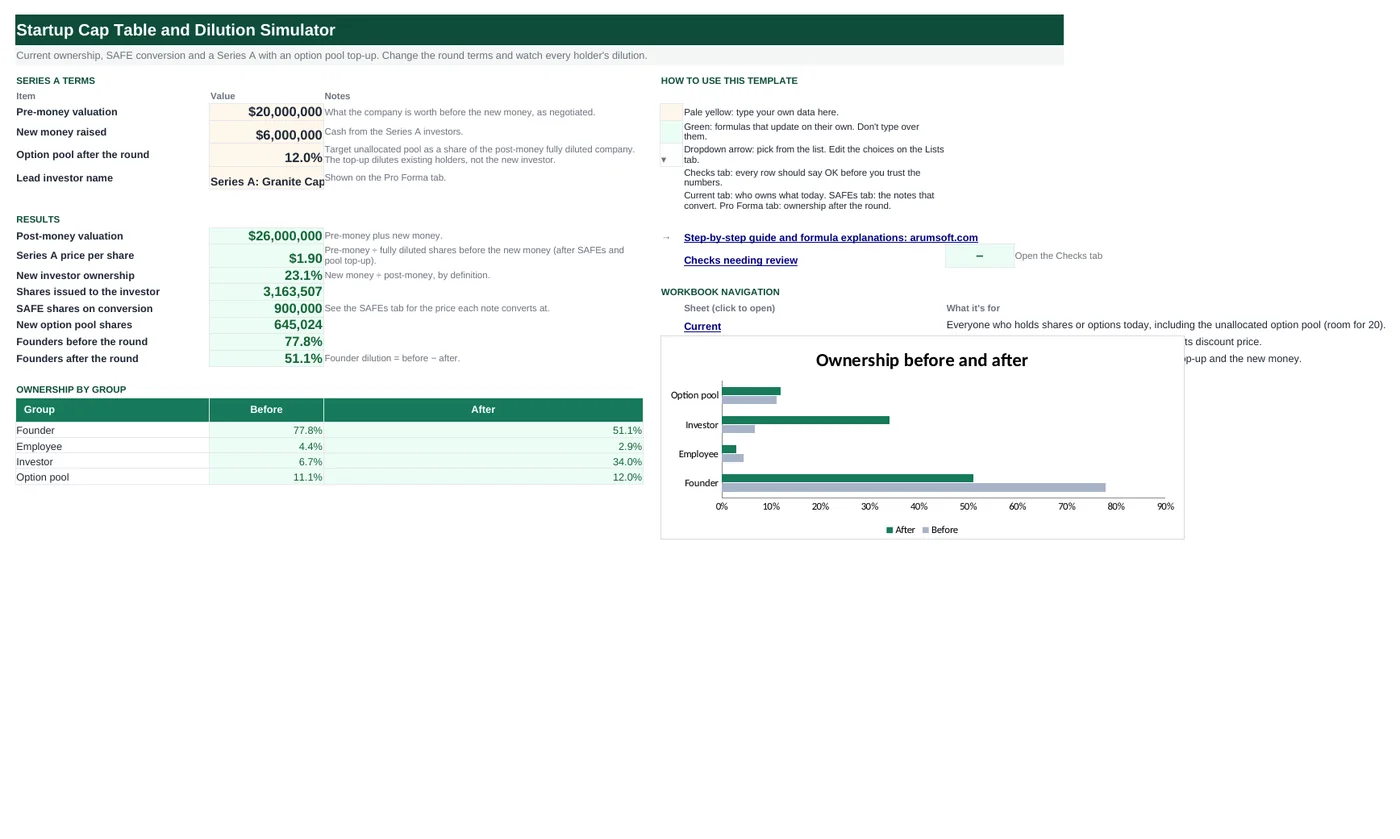
Type who owns what today, the SAFEs you have raised and the terms of the round you are negotiating, and the workbook converts the notes, sizes the option pool, prices the shares and shows each holder's ownership before and after. Change the pre-money or the pool target and every number moves. Filled in for a fictional company with two founders, one angel and three SAFEs.
- Sheets:
- 6
- Works with:
- Excel for Microsoft 365, Excel 2016 or later, Excel for Mac and Excel for the web
- Updated:
What you can do with it
- See every holder's ownership before and after a priced round
- Convert SAFEs at the lower of their cap price and discount price
- Size the option pool top-up to a post-money percentage
- Test how pre-money valuation and pool size change founder dilution
What's inside
The workbook has 6 sheets. You only type on a few of them; the rest calculate.
| Sheet | What it's for | You enter | Calculated for you |
|---|---|---|---|
| Start Here | Round terms, results and a before/after chart | Pre-money valuation, new money, target option pool, lead investor name | Post-money, price per share, investor ownership, shares issued, SAFE shares, pool top-up, founder ownership before and after |
| Current | Who owns what today (room for 20 holders) | Holder, type, shares | Ownership %, totals, shares excluding the pool |
| SAFEs | Notes that convert in the round (room for 8) | Investor, amount, valuation cap, discount | Cap price, discount price, conversion price, which applies, shares, effective valuation |
| Pro Forma | Ownership after the round, plus the round math | Nothing | Shares after, ownership after, change in points, and the nine-line round calculation |
| Lists | Holder types for the dropdown | Add a type if you need one | Nothing |
| Checks | Six consistency checks | Nothing | OK or Review |
Before you start
- Collect the current share counts from your incorporation documents and option grants. Include the unallocated option pool as its own row.
- For each SAFE, note the amount, the valuation cap (if any) and the discount (if any). The template models pre-money SAFEs; see the tips for post-money SAFEs.
- Get the term sheet basics: pre-money valuation, amount raised, and the option pool percentage the investor expects after the round.
Step-by-step guide
Enter the current cap table
On the Current tab, one row per holder with their type (Founder, Employee, Investor or Option pool) and share count. The ownership column and totals calculate. Keep the unallocated pool as a row of type Option pool; the round math needs it.
Enter the SAFEs
On the SAFEs tab type each note's investor, amount, cap and discount. Leave the cap blank for a discount-only note. The sheet works out the cap price (cap ÷ current fully diluted shares), the discount price (Series A price × (1 − discount)), takes the lower, and converts the amount into shares.
Enter the round terms on Start Here
B6 pre-money valuation, B7 new money, B8 the option pool you have agreed to have unallocated after the round, as a percentage of the post-money fully diluted company. B9 is just the investor's name for the Pro Forma tab.
Read the Pro Forma tab
Every existing holder, every SAFE investor and the new investor with shares before and after, ownership after and the change in percentage points. The pool row shows the top-up. The Round math block underneath shows the nine numbers behind it.
Negotiate with the model
The three levers that matter: pre-money (B6), pool target (B8) and whether the pool is topped up before or after the money. Watch Start Here B18 and B19: founders before and after. A larger pre-money with a larger pool can leave founders worse off than a smaller pre-money with no top-up.
Check the Checks tab
Ownership adds to 100% before and after, share counts reconcile within rounding, the pool target is sane, every discount is under 100% and the round terms are present.
Formula map
Every formula in the workbook, grouped by the sheet and column it lives in. A column of copied formulas counts once; the range it covers is shown.
| Sheet | Cells | Functions | What it computes | Reads | Feeds |
|---|---|---|---|---|---|
| Current | D5 copied down to row 24 | IF | Ownership today | C5, C25 | The "before" column of the Pro Forma and the founder % on Start Here. |
| SAFEs | E5 copied down to row 12 | IF | Cap price | C5 | Compared with the discount price in H5. |
| SAFEs | G5 copied down to row 12 | IF | Discount price | F5, D5 | Compared with the cap price in H5. |
| SAFEs | H5 copied down to row 12 | IF, MIN | Conversion price | E5, G5 | J5 divides the amount by this price. |
| SAFEs | J5 copied down to row 12 | IF, ROUND | Shares on conversion | B5, H5 | Summed in J13 and fed into the round math on the Pro Forma tab. |
| SAFEs | B16 | IF, SUMPRODUCT, IFERROR | Pass-1 Series A price | — | Column F links to this cell. |
| Pro Forma | B41 | ROUND | Fully diluted shares after the round | B37, B38, B39, B40 | Price per share, investor shares and the pool top-up all follow from this total. |
| Pro Forma | B42 | arithmetic | Series A price per share | B41 | Shown on Start Here B13. |
| Pro Forma | B44 | ROUND | New option pool shares | B40, B41 | Added to the pool row in column D; shown on Start Here B17. |
| Pro Forma | D5 copied down to row 24 | IF | Shares after the round | B5, C5 | E5 divides this by the new total. |
| Pro Forma | F5 | IF | Change in ownership | E5 | The number founders care about. |
| Start Here | B19 | SUMIF | Founders after the round | — | Compare with B18 (before) for total founder dilution. |
| Checks | B7 | IF, ABS | Share count reconciles | — | A larger difference means a formula was edited. |
Every formula, explained
Each formula below is copied straight from the file, so what you read here is exactly what the cell contains. Click any cell in Excel to see it in the formula bar.
=IF(C5="", "", C5/$C$25)Shares divided by the total fully diluted shares (including the unallocated pool).
Piece by piece
C5=""- Empty row: show nothing.
C5/$C$25- Shares ÷ total. The total is absolute so every row divides by the same cell.
With the sample data: C5 = 4,000,000, C25 = 9,000,000 → D5 result 44.4%
How it is used: The "before" column of the Pro Forma and the founder % on Start Here.
How to change it: Nothing to change.
Learn this: Relative, Absolute and Mixed References in Excel →=IF(C5="", "", C5/Current!$C$25)The valuation cap divided by the company's fully diluted shares before the round: the maximum price the note can convert at.
Piece by piece
C5=""- No cap: show nothing (the note converts at the discount only).
C5/Current!$C$25- Cap ÷ fully diluted shares today.
With the sample data: C5 = 8,000,000 → E5 result 88.9%
How it is used: Compared with the discount price in H5.
How to change it: Pre-money SAFEs divide by shares before the round; post-money SAFEs divide by the post-money capitalization. See the tips.
Learn this: How to Write Basic Formulas in Excel →=IF(B5="", "", F5*(1-D5))The Series A price with the note's discount applied. The Series A price used here is the pass-1 price from B16 (see below).
Piece by piece
F5- Pass-1 Series A price per share, linked from B16.
1-D5- One minus the discount, for example 0.8 for a 20% discount.
With the sample data: F5 = 2.02, D5 = 20.0% → G5 result 1.62
How it is used: Compared with the cap price in H5.
How to change it: Nothing to change.
Learn this: How to Write Basic Formulas in Excel →=IF(B5="", "", IF(C5="", G5, MIN(E5, G5)))The lower of the cap price and the discount price: the investor always gets the better deal. A note without a cap converts at the discount price.
Piece by piece
C5=""- No cap: use the discount price.
MIN(E5, G5)- Otherwise the lower of the two.
With the sample data: E5 = 88.9%, G5 = 1.62 → H5 result 88.9%
How it is used: J5 divides the amount by this price.
How to change it: Nothing to change.
Learn this: How to Use MIN and MAX in Excel →=IF(B5="", "", ROUND(B5/H5, 0))Amount invested divided by the conversion price, rounded to whole shares.
Piece by piece
B5/H5- Dollars ÷ price per share.
ROUND(…, 0)- Whole shares.
With the sample data: B5 = 500,000, H5 = 88.9% → J5 result 562,500
How it is used: Summed in J13 and fed into the round math on the Pro Forma tab.
How to change it: Nothing to change.
Learn this: How to Round Numbers in Excel: ROUND, ROUNDUP and ROUNDDOWN →=IF(SUMPRODUCT(--(B5:B12<>""),
IFERROR(B5:B12/E5:E12, 0))+Current!$C$25=0,
0, 'Start Here'!$B$6/(Current!$C$25+SUMPRODUCT(--(B5:B12<>""), IFERROR(B5:B12/E5:E12, 0))))A first estimate of the round price assuming every capped note converts at its cap price. The discount prices are tested against this estimate; the final price is then computed on the Pro Forma tab from the actual conversion. This two-pass approach avoids a circular reference.
Piece by piece
IFERROR(B5:B12/E5:E12, 0)- Each note's shares at its cap price (0 where there is no cap).
SUMPRODUCT(--(B5:B12<>""), …)- Adds those share counts for the notes that exist.
'Start Here'!$B$6/(Current!$C$25+…)- Pre-money ÷ (shares today + SAFE shares at cap).
With the sample data: B16 result 2.02
How it is used: Column F links to this cell.
How to change it: If every note converts at its cap (the usual case when caps are well below the round), pass 1 and the final price give the same result.
Learn this: How to Use SUMIF and SUMIFS in Excel →=ROUND((B37+B38)/(1-B39-B40), 0)The closed-form solution to the pool top-up. The investor gets a fixed share of the company (new money ÷ post-money) and the pool a fixed share (the target), so everyone else must be the remainder: (existing non-pool shares + SAFE shares) ÷ (1 − investor share − pool share).
Piece by piece
B37+B38- Existing shares excluding the pool, plus SAFE conversion shares.
1-B39-B40- The fraction of the company left for those holders after the investor's share (B39) and the pool target (B40).
ROUND(…, 0)- Whole shares.
With the sample data: B37 = 8,000,000, B38 = 900,000, B39 = 23.1%, B40 = 12.0% → B41 result 13,708,531
How it is used: Price per share, investor shares and the pool top-up all follow from this total.
How to change it: Nothing to change.
Learn this: How to Write Basic Formulas in Excel →='Start Here'!$B$12/B41Post-money valuation divided by fully diluted shares after the round. This equals pre-money ÷ pre-money shares, which is how term sheets state it.
Piece by piece
'Start Here'!$B$12- Post-money valuation.
B41- Fully diluted shares after the round.
With the sample data: B41 = 13,708,531 → B42 result 1.9
How it is used: Shown on Start Here B13.
How to change it: Nothing to change.
Learn this: How to Write Basic Formulas in Excel →=ROUND(B40*B41-Current!$C$28, 0)The pool the term sheet asks for, minus the pool that already exists. Only the difference is newly created.
Piece by piece
B40*B41- Target pool share × total shares = the pool after the round.
Current!$C$28- The unallocated pool today.
ROUND(…, 0)- Whole shares.
With the sample data: B40 = 12.0%, B41 = 13,708,531 → B44 result 645,024
How it is used: Added to the pool row in column D; shown on Start Here B17.
How to change it: Nothing to change.
Learn this: How to Write Basic Formulas in Excel →=IF(C5="", "", IF(B5="Option pool", C5+$B$44, C5))Existing holders keep their shares; only the option pool row grows by the top-up.
Piece by piece
B5="Option pool"- Is this the pool row?
C5+$B$44- Pool today plus the new pool shares.
C5- Everyone else: unchanged.
With the sample data: B5 = Founder, C5 = 4,000,000 → D5 result 4,000,000
How it is used: E5 divides this by the new total.
How to change it: Nothing to change.
Learn this: How to Use the IF Function in Excel →=IF(D5="", "", E5-Current!D5)Ownership after minus ownership before, in percentage points. Negative is dilution.
Piece by piece
E5- Ownership after.
Current!D5- Ownership before, from the Current tab.
With the sample data: E5 = 29.2% → F5 result -15.3%
How it is used: The number founders care about.
How to change it: Nothing to change.
Learn this: How to Write Basic Formulas in Excel →=SUMIF('Pro Forma'!$B$5:$B$33,
"Founder", 'Pro Forma'!$E$5:$E$33)Adds the post-round ownership of every row whose type is Founder.
Piece by piece
'Pro Forma'!$B$5:$B$33- The type column.
"Founder"- The type to add.
'Pro Forma'!$E$5:$E$33- Ownership after.
With the sample data: B19 result 51.1%
How it is used: Compare with B18 (before) for total founder dilution.
How to change it: Change "Founder" to "Employee" to track the team instead.
Learn this: How to Use SUMIF and SUMIFS in Excel →=IF(ABS('Pro Forma'!$B$45-'Pro Forma'!$B$41)<=5,
"OK", "Review")The round math rebuilds the total from its parts (existing + SAFE + existing pool + investor + new pool) and compares it with the closed-form total. Rounding each part to whole shares can leave a difference of a few shares, so the test allows 5.
Piece by piece
ABS('Pro Forma'!$B$45-'Pro Forma'!$B$41)- Difference between the rebuilt total and the solved total.
<=5- Tolerance in shares.
With the sample data: B7 result OK
How it is used: A larger difference means a formula was edited.
How to change it: Nothing to change.
Learn this: How to Use the IF Function in Excel →Tips and limits
- The template models pre-money SAFEs (cap ÷ shares before the round). Post-money SAFEs (the YC standard since 2018) convert at cap ÷ post-money capitalization including the SAFEs themselves; in practice the difference is that SAFE holders are not diluted by each other. Model those by entering the SAFE ownership percentages directly (amount ÷ cap) and adjusting the Current tab.
- The pool top-up is modeled as part of the pre-money (the investor's percentage is new money ÷ post-money, unaffected by the pool). That is the standard investor-friendly structure; a pool created after the money would dilute the investor too.
- Pass-1 pricing: discount prices are tested against a price that assumes caps apply. When a note would convert at its discount instead, the final price is slightly different from the estimate; the Checks tab's reconciliation stays within rounding either way.
- This is a modeling tool, not legal or tax advice. Have the final cap table prepared by counsel or a cap table service before closing.
Learn the skills behind this template
Was this guide helpful? Spot a mistake? Send feedback · admin@arumsoft.com