Fixed Asset Depreciation Schedule for Excel: Book and MACRS
List your assets once and get two schedules: book depreciation by straight-line or double-declining balance using Excel's SLN and DDB functions, and US tax depreciation from the MACRS half-year tables. A report-year setting pulls this year's expense, accumulated depreciation and net book value for every asset onto one tab, with the book-versus-tax difference your accountant will ask about.
- Sheets:
- 7
- Works with:
- Excel for Microsoft 365, Excel 2016 or later, Excel for Mac and Excel for the web
- Updated:
What you can do with it
- Keep an asset register with cost, salvage, life, book method and MACRS class
- See book depreciation for every year of each asset's life (SLN or DDB)
- See MACRS tax depreciation from the IRS 3-, 5-, 7-, 10-, 15- and 20-year tables
- Pull this year's expense, accumulated depreciation and net book value with one report-year input
What's inside
The workbook has 7 sheets. You only type on a few of them; the rest calculate.
| Sheet | What it's for | You enter | Calculated for you |
|---|---|---|---|
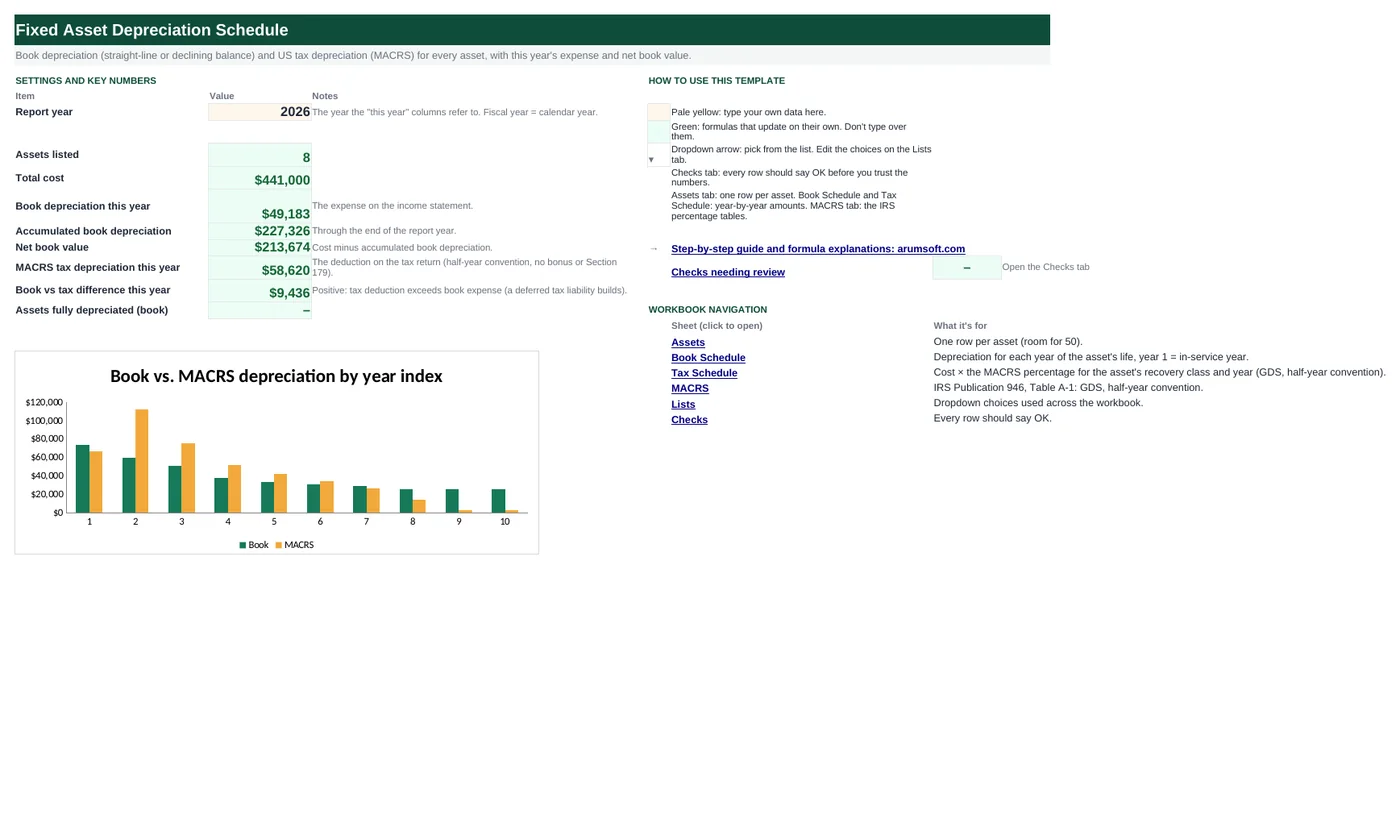
| Start Here | Report year and the totals | Report year | Total cost, book depreciation this year, accumulated, net book value, MACRS this year, book vs tax difference, fully depreciated count |
| Assets | The register (room for 50) | Asset, category, in-service date, cost, salvage, life, book method, MACRS class | Year index, book depreciation this year, accumulated, NBV, MACRS this year, tax basis remaining |
| Book Schedule | Book depreciation per year of life (15 years) | Nothing | SLN or DDB for every asset and year |
| Tax Schedule | MACRS depreciation per recovery year (21 years) | Nothing | Cost × table percentage |
| MACRS | IRS Table A-1 percentages | Update if the tables change | Column totals (should be 100%) |
| Lists | Dropdowns | Categories, methods, classes | Nothing |
| Checks | Six checks | Nothing | OK or Review |
Before you start
- Gather the fixed asset list with cost, in-service date and, for book purposes, the salvage value and useful life your accounting policy uses.
- Assign each asset a MACRS recovery class (computers and vehicles are 5-year, most machinery and furniture 7-year, land improvements 15-year). Your tax preparer or IRS Publication 946 has the full list.
- The schedules are by year index (year 1 = the in-service year), not by calendar year, so the same row works for assets bought in different years.
Step-by-step guide
Set the report year
Start Here B6. Every "this year" number on the Assets tab is for this calendar year.
Fill the Assets tab
One row per asset: name, category, in-service date, cost, salvage, useful life in years, book method (Straight-line or Declining balance) and MACRS class. The six green columns calculate.
Read the book columns
Year index is how many years into its life the asset is this year. Book depreciation this year reads the Book Schedule at that index; accumulated sums the schedule up to that index; net book value is cost minus accumulated.
Read the tax columns
MACRS this year reads the Tax Schedule at the same index; tax basis remaining is cost minus everything deducted so far. The Start Here difference row shows how far tax runs ahead of book.
Look at the schedules when you need detail
Book Schedule and Tax Schedule have one row per asset and one column per year. Totals at the bottom give the company-wide curve, which is what the Start Here chart plots.
Check the Checks tab
Salvage below cost, methods and classes present, MACRS columns totaling 100%, lives within the 15-year schedule, and no asset placed in service after the report year.
Formula map
Every formula in the workbook, grouped by the sheet and column it lives in. A column of copied formulas counts once; the range it covers is shown.
| Sheet | Cells | Functions | What it computes | Reads | Feeds |
|---|---|---|---|---|---|
| Assets | I5 copied down to row 54 | IF, YEAR | Year index | C5 | Both schedules are read at this column position. |
| Assets | J5 copied down to row 54 | IF, IFERROR, INDEX | Book depreciation this year | I5 | Summed on Start Here B10. |
| Assets | K5 copied down to row 54 | IF, SUMIF | Accumulated book depreciation | I5 | Net book value in L5 subtracts this from cost. |
| Book Schedule | E5 copied down to row 54 | IF, OR, SLN, DDB | Book depreciation for one year | — | The Assets tab reads this row by year index. |
| Tax Schedule | E5 copied down to row 54 | IF, OR, INDEX, MATCH | MACRS depreciation for one year | — | The Assets tab reads this row by year index. |
| Tax Schedule | D5 | IF | Recovery years | B5 | Used to blank out the schedule past the recovery period. |
| Start Here | B14 | arithmetic | Book vs tax difference | B13, B10 | The temporary difference behind deferred tax. |
| Start Here | B15 | COUNTIFS | Assets fully depreciated | — | Candidates for disposal review. |
| Checks | B8 | IF, SUMPRODUCT, ABS | MACRS columns add to 100% | — | Protects against a typo when editing the table. |
Every formula, explained
Each formula below is copied straight from the file, so what you read here is exactly what the cell contains. Click any cell in Excel to see it in the formula bar.
=IF(C5="", "", 'Start Here'!$B$6-YEAR(C5)+1)How many years into its life the asset is in the report year: report year minus the in-service year, plus one, so the in-service year is year 1.
Piece by piece
'Start Here'!$B$6- Report year.
YEAR(C5)- The year of the in-service date.
+1- Makes the first year 1 rather than 0.
With the sample data: C5 = Mar 15, 2023 → I5 result 4
How it is used: Both schedules are read at this column position.
How to change it: Nothing to change.
Learn this: Text and Date Functions in Excel →=IF(A5="", "", IFERROR(INDEX('Book Schedule'!$E5:$S5, 1, I5),
0))Looks across the asset's row of the Book Schedule and returns the value in the year-index column. Beyond the asset's life the schedule is blank, which IFERROR turns into 0.
Piece by piece
'Book Schedule'!$E5:$S5- The 15 yearly values for this asset.
1, I5- Row 1 of that one-row range, column = year index.
IFERROR(…, 0)- Index past the end of the range (or a blank) becomes 0.
With the sample data: I5 = 4 → J5 result 17,000
How it is used: Summed on Start Here B10.
How to change it: Nothing to change.
Learn this: How to Use INDEX and MATCH in Excel →=IF(A5="", "", SUMIF('Book Schedule'!$E$4:$S$4,
"<="&I5, 'Book Schedule'!$E5:$S5))Adds the schedule values whose year header is less than or equal to the year index: every year up to and including this one.
Piece by piece
'Book Schedule'!$E$4:$S$4- The header row of year numbers 1–15.
"<="&I5- The condition, built as text: "<=4" for year index 4.
'Book Schedule'!$E5:$S5- The values summed where the condition is met.
With the sample data: I5 = 4 → K5 result 68,000
How it is used: Net book value in L5 subtracts this from cost.
How to change it: Nothing to change.
Learn this: How to Use SUMIF and SUMIFS in Excel →=IF(OR($A5="", E$4>$D5), "",
IF($B5="Straight-line", SLN($C5, Assets!$E5, $D5),
DDB($C5, Assets!$E5, $D5, E$4)))Straight-line uses SLN; declining balance uses DDB with the default factor of 2 (double-declining), which Excel stops at the salvage value. Blank beyond the asset's life.
Piece by piece
E$4>$D5- This year number is past the useful life: blank.
SLN($C5, Assets!$E5, $D5)- (Cost − salvage) ÷ life, the same every year.
DDB($C5, Assets!$E5, $D5, E$4)- Declining balance for period E$4 at twice the straight-line rate; never takes book value below salvage.
With the sample data: E5 result 17,000
How it is used: The Assets tab reads this row by year index.
How to change it: For 150% declining balance add a fifth argument: DDB(cost, salvage, life, period, 1.5).
Learn this: Relative, Absolute and Mixed References in Excel →=IF(OR($A5="", E$4>$D5), "",
$C5*INDEX(MACRS!$B$5:$G$25,
E$4, MATCH($B5, MACRS!$B$4:$G$4, 0))/100)Cost times the percentage from the IRS table for the asset's class and recovery year, divided by 100 because the table is stored in percent.
Piece by piece
E$4>$D5- Past the recovery period (class + 1 years because of the half-year convention): blank.
MATCH($B5, MACRS!$B$4:$G$4, 0)- Which column of the MACRS table holds this class.
INDEX(MACRS!$B$5:$G$25, E$4, …)- The percentage for this year in that column.
$C5*…/100- Applied to cost (salvage is ignored for tax).
With the sample data: E5 result 26,436.5
How it is used: The Assets tab reads this row by year index.
How to change it: Nothing to change; update the MACRS tab if the IRS tables change.
Learn this: How to Use INDEX and MATCH in Excel →=IF(Assets!A5="", "", B5+1)Under the half-year convention an asset in class N is depreciated over N + 1 calendar years, because the first and last years each get half a year.
Piece by piece
B5+1- Class plus one.
With the sample data: B5 = 7 → D5 result 8
How it is used: Used to blank out the schedule past the recovery period.
How to change it: Nothing to change.
Learn this: How to Write Basic Formulas in Excel →=B13-B10MACRS depreciation minus book depreciation for the report year. Positive early in an asset's life (tax front-loads), negative later.
Piece by piece
B13- MACRS this year.
B10- Book this year.
With the sample data: B13 = 58,619.6, B10 = 49,183.49 → B14 result 9,436.11
How it is used: The temporary difference behind deferred tax.
How to change it: Nothing to change.
Learn this: How to Write Basic Formulas in Excel →=COUNTIFS(Assets!$A$5:$A$54,
"<>", Assets!$L$5:$L$54,
"<=0.005")Counts assets whose net book value has reached zero (within half a cent).
Piece by piece
Assets!$A$5:$A$54, "<>"- Rows with an asset.
Assets!$L$5:$L$54, "<=0.005"- Net book value effectively zero.
With the sample data: B15 result 0
How it is used: Candidates for disposal review.
How to change it: Nothing to change.
Learn this: How to Use COUNTIF and COUNTIFS in Excel →=IF(SUMPRODUCT(--(ABS(MACRS!$B$26:$G$26-100)>0.02))=0,
"OK", "Review")Each class column of the MACRS table must total 100 (percent). SUMPRODUCT counts columns whose total is off by more than 0.02.
Piece by piece
ABS(MACRS!$B$26:$G$26-100)>0.02- TRUE for a column that does not total 100.
--(…)- Converts TRUE/FALSE to 1/0.
SUMPRODUCT(…)=0- No bad columns.
With the sample data: B8 result OK
How it is used: Protects against a typo when editing the table.
How to change it: Nothing to change.
Learn this: How to Use SUMIF and SUMIFS in Excel →Tips and limits
- Capacity: 50 assets, 15 years of book life, 21 years of MACRS recovery. For longer book lives (buildings), copy column S of the Book Schedule to the right and extend the ranges in Assets columns J and K.
- Book depreciation here is whole-year from the in-service year. If your policy prorates the first year by month, multiply year 1 by (13 − MONTH(in-service date)) ÷ 12 and add the remainder as an extra year.
- MACRS uses the GDS half-year convention only. The mid-quarter convention (required when more than 40% of the year's additions fall in Q4), bonus depreciation and Section 179 are not modeled; this is a schedule, not tax advice.
- Keep disposed assets in the register with a note until year-end so the schedules still tie to the prior year.
Learn the skills behind this template
Was this guide helpful? Spot a mistake? Send feedback · admin@arumsoft.com