NNN Lease CAM Reconciliation for Excel
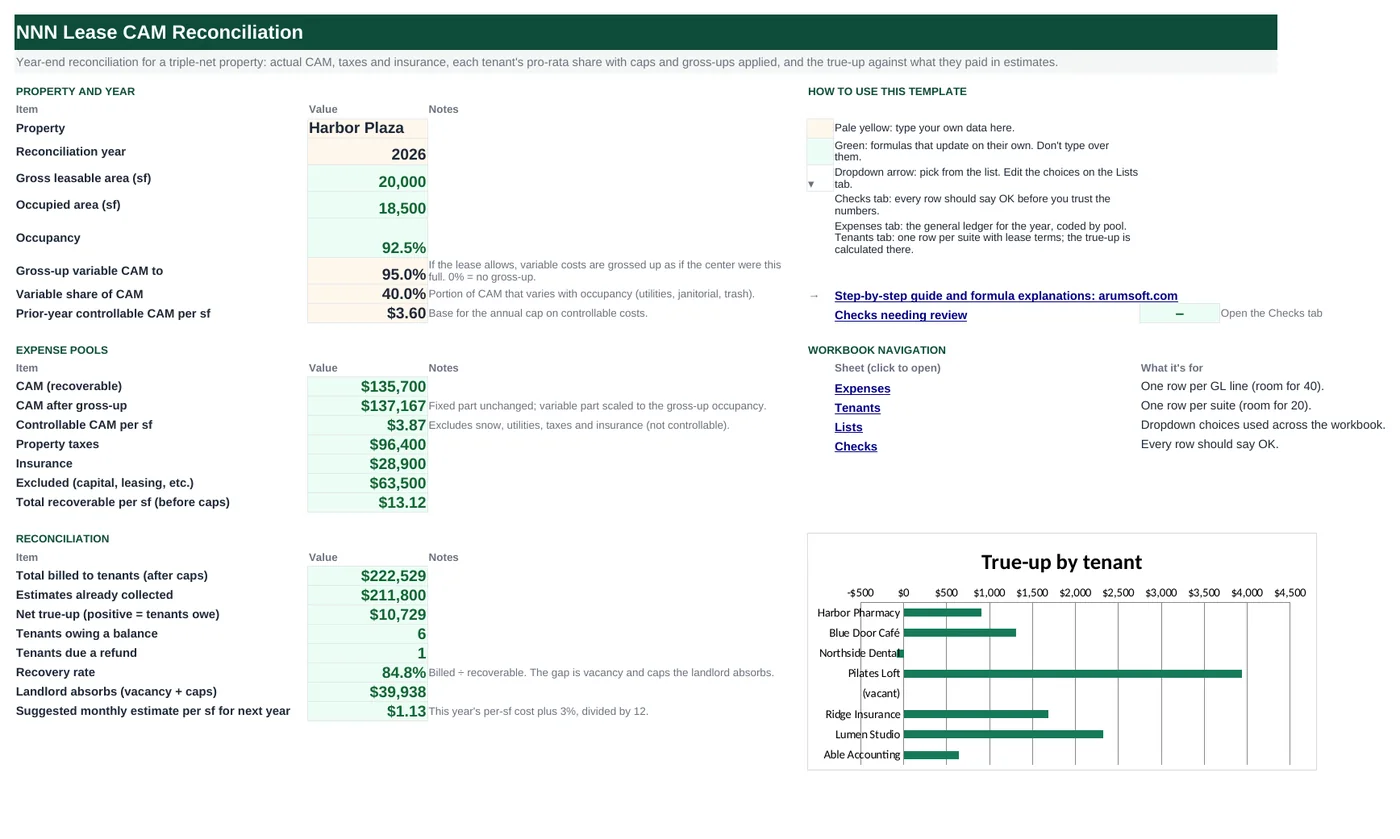
At year end a triple-net landlord has to show each tenant what the common areas, taxes and insurance actually cost and settle the difference against the monthly estimates they paid. This workbook codes the year's expenses into pools, grosses up variable CAM for vacancy where the lease allows, applies each suite's pro-rata share, caps controllable costs at the lease's annual limit, and produces a bill or refund per tenant plus the recovery rate the landlord actually achieved.
- Sheets:
- 5
- Works with:
- Excel for Microsoft 365, Excel 2016 or later, Excel for Mac and Excel for the web
- Updated:
What you can do with it
- Expense pools: CAM, taxes, insurance, and excluded capital items
- Occupancy gross-up on the variable share of CAM
- Pro-rata share, controllable-cost cap, cap savings and tax/insurance share per tenant
- True-up against estimates paid, recovery rate, and next year's suggested estimate
What's inside
The workbook has 5 sheets. You only type on a few of them; the rest calculate.
| Sheet | What it's for | You enter | Calculated for you |
|---|---|---|---|
| Start Here | Property, pools and the reconciliation summary | Gross-up target, variable share of CAM, prior-year controllable CAM per sf | GLA, occupied area, occupancy, pools, CAM after gross-up, controllable per sf, recoverable per sf, billed, collected, true-up, counts, recovery rate, landlord absorbs, suggested estimate |
| Expenses | The year's GL (40 rows) | Expense, pool, amount, recoverable?, controllable? | Total |
| Tenants | One row per suite (20) | Suite, tenant, area, occupied, pays taxes/insurance, cap %, monthly estimate, months occupied | Pro-rata share, CAM share, controllable per sf, capped per sf, cap savings, tax and insurance share, total due, estimates paid, true-up, status |
| Lists | Dropdowns | Pools, Yes/No | Nothing |
| Checks | Six checks | Nothing | OK or Review |
Before you start
- Pull the year's general ledger for the property and decide, line by line, which pool each expense belongs to and whether the leases allow it to be recovered.
- Read each lease for the denominator (GLA or occupied area), the gross-up clause, the controllable-cost cap and which of taxes and insurance the tenant pays.
- Have each tenant's monthly estimate and months of occupancy for the year.
Step-by-step guide
Enter the property settings
Start Here B11–B13: gross-up target (0% if the leases do not allow it), the variable share of CAM, and last year's controllable CAM per sf for the cap.
Code the expenses
Expenses tab: pool (CAM, Taxes, Insurance, Excluded), amount, recoverable Yes/No, controllable Yes/No. Capital items and leasing costs go to Excluded.
Register the tenants
Tenants tab: area, occupied, whether they pay taxes and insurance, their cap %, the monthly estimate they paid and months occupied as a fraction of 12.
Read each tenant's line
Pro-rata share, CAM share after gross-up, controllable per sf against the cap, cap savings, tax and insurance share, total due, estimates paid and the true-up with a Bill / Refund / Settled status.
Read the summary
Start Here B27–B34: total billed, collected, net true-up, how many tenants owe or are owed, the recovery rate, what the landlord absorbs, and a suggested estimate per sf for next year.
Check
Areas add to GLA, shares add to occupancy, every expense is coded, excluded items are not recoverable, occupied suites are complete, and the gross-up target is sensible.
Formula map
Every formula in the workbook, grouped by the sheet and column it lives in. A column of copied formulas counts once; the range it covers is shown.
| Sheet | Cells | Functions | What it computes | Reads | Feeds |
|---|---|---|---|---|---|
| Start Here | B18 | IF, OR | CAM after gross-up | B17, B12, B11, B10 | The pool every tenant's CAM share is based on. |
| Start Here | B19 | IF, SUMIFS | Controllable CAM per sf | B8 | Compared with last year's figure × (1 + cap) per tenant. |
| Tenants | J5 copied down to row 24 | IF, OR | Pro-rata share | C5 | Applied to every pool. |
| Tenants | K5 copied down to row 24 | IF, OR | CAM share | J5, I5 | Before the cap credit. |
| Tenants | M5 copied down to row 24 | IF, OR, MIN | Capped controllable per sf | G5, L5 | Cap savings = (actual − capped) × area × months. |
| Tenants | O5 copied down to row 24 | IF, OR | Tax and insurance share | E5, F5, J5, I5 | Added to the CAM share in total due. |
| Tenants | P5 copied down to row 24 | IF | Total due | K5, N5, O5 | Compared with estimates paid for the true-up. |
| Tenants | R5 copied down to row 24 | IF | True-up | P5, Q5 | Summed on Start Here B29; charted. |
| Start Here | B32 | IF | Recovery rate | B27, B18, B20, B21 | B33 shows the same gap in dollars. |
| Checks | B6 | IF, ABS, SUMIF | Shares of occupied suites add to the occupancy | — | Catches a suite area that was typed wrong. |
Every formula, explained
Each formula below is copied straight from the file, so what you read here is exactly what the cell contains. Click any cell in Excel to see it in the formula bar.
=IF(OR(B11=0, B10>=B11), B17, B17*(1-B12)+B17*B12*B11/B10)The fixed part of CAM stays as is; the variable part is scaled up as if the center were at the gross-up occupancy. No change when there is no gross-up or occupancy already exceeds the target.
Piece by piece
OR(B11=0, B10>=B11)- No gross-up, or already at or above the target: use actual CAM.
B17*(1-B12)- Fixed share of CAM.
+B17*B12*B11/B10- Variable share scaled by target ÷ actual occupancy.
With the sample data: B17 = 135,700, B12 = 40.0%, B11 = 95.0%, B10 = 92.5% → B18 result 137,167.03
How it is used: The pool every tenant's CAM share is based on.
How to change it: Nothing to change; set B11 to 0 if the leases do not permit gross-up.
Learn this: How to Use the IF Function in Excel →=IF(B8=0, 0, SUMIFS(Expenses!$C$5:$C$44,
Expenses!$B$5:$B$44, "CAM",
Expenses!$D$5:$D$44, "Yes",
Expenses!$E$5:$E$44, "Yes")/B8)Recoverable CAM lines marked controllable, divided by the GLA.
Piece by piece
Expenses!$B$5:$B$44, "CAM"- CAM pool.
Expenses!$D$5:$D$44, "Yes"- Recoverable.
Expenses!$E$5:$E$44, "Yes"- Controllable.
/B8- Per square foot of GLA.
With the sample data: B8 = 20,000 → B19 result 3.87
How it is used: Compared with last year's figure × (1 + cap) per tenant.
How to change it: Nothing to change.
Learn this: How to Use SUMIF and SUMIFS in Excel →=IF(OR(A5="", 'Start Here'!$B$8=0), "", C5/'Start Here'!$B$8)Suite area divided by the gross leasable area.
Piece by piece
C5- Suite area.
'Start Here'!$B$8- GLA.
With the sample data: C5 = 3,200 → J5 result 16.0%
How it is used: Applied to every pool.
How to change it: If a lease uses occupied area as the denominator, divide by Start Here B9 instead (and skip the gross-up).
Learn this: How to Write Basic Formulas in Excel →=IF(OR(A5="", D5<>"Yes"), 0, 'Start Here'!$B$18*J5*I5)Grossed-up CAM times the pro-rata share times the fraction of the year occupied; zero for a vacant suite.
Piece by piece
D5<>"Yes"- Vacant: 0.
'Start Here'!$B$18- CAM after gross-up.
*J5- Pro-rata share.
*I5- Months occupied ÷ 12.
With the sample data: J5 = 16.0%, I5 = 1 → K5 result 21,946.72
How it is used: Before the cap credit.
How to change it: Nothing to change.
Learn this: Relative, Absolute and Mixed References in Excel →=IF(OR(A5="", D5<>"Yes"),
0, IF(G5=0, L5, MIN(L5, 'Start Here'!$B$13*(1+G5))))This year's controllable CAM per sf, limited to last year's figure × (1 + the tenant's cap %). No cap when the cap is 0%.
Piece by piece
G5=0- No cap: use the actual figure.
'Start Here'!$B$13*(1+G5)- Last year × (1 + cap).
MIN(L5, …)- The lower of actual and capped.
With the sample data: G5 = 5.0%, L5 = 3.87 → M5 result 3.78
How it is used: Cap savings = (actual − capped) × area × months.
How to change it: For a cumulative (compounding) cap, replace B13*(1+G5) with the base-year figure × (1+G5)^years.
Learn this: How to Use MIN and MAX in Excel →=IF(OR(A5="", D5<>"Yes"),
0, (IF(E5="Yes", 'Start Here'!$B$20, 0)+IF(F5="Yes", 'Start Here'!$B$21, 0))*J5*I5)Taxes if the tenant pays them, plus insurance if they pay that, times share and months.
Piece by piece
IF(E5="Yes", 'Start Here'!$B$20, 0)- Property taxes.
+IF(F5="Yes", 'Start Here'!$B$21, 0)- Insurance.
*J5*I5- Share and months.
With the sample data: E5 = Yes, F5 = Yes, J5 = 16.0%, I5 = 1 → O5 result 20,048
How it is used: Added to the CAM share in total due.
How to change it: Nothing to change.
Learn this: How to Use the IF Function in Excel →=IF(A5="", "", K5-N5+O5)CAM share minus cap savings plus tax and insurance share.
Piece by piece
K5- CAM share.
-N5- Cap savings.
+O5- Tax and insurance share.
With the sample data: K5 = 21,946.72, N5 = 288, O5 = 20,048 → P5 result 41,706.72
How it is used: Compared with estimates paid for the true-up.
How to change it: Nothing to change.
Learn this: How to Write Basic Formulas in Excel →=IF(A5="", "", P5-Q5)Total due minus estimates paid: positive is a bill, negative a refund.
Piece by piece
P5- Total due.
-Q5- Monthly estimate × 12 × months fraction.
With the sample data: P5 = 41,706.72, Q5 = 40,800 → R5 result 906.72
How it is used: Summed on Start Here B29; charted.
How to change it: Nothing to change.
Learn this: How to Write Basic Formulas in Excel →=IF(B18+B20+B21=0, 0, B27/(B18+B20+B21))What was billed divided by what was recoverable; the gap is vacancy and caps.
Piece by piece
B27- Billed to tenants.
B18+B20+B21- Recoverable CAM, taxes and insurance.
With the sample data: B27 = 222,528.88, B18 = 137,167.03, B20 = 96,400, B21 = 28,900 → B32 result 84.8%
How it is used: B33 shows the same gap in dollars.
How to change it: Nothing to change.
Learn this: How to Write Basic Formulas in Excel →=IF(ABS(SUMIF(Tenants!$D$5:$D$24, "Yes", Tenants!$J$5:$J$24)-'Start Here'!$B$10)<0.0001,
"OK", "Review")Adds the pro-rata shares of occupied suites and compares with the occupancy percentage.
Piece by piece
SUMIF(Tenants!$D$5:$D$24, "Yes", Tenants!$J$5:$J$24)- Shares of occupied suites.
-'Start Here'!$B$10- Minus occupancy.
ABS(…)<0.0001- Equal within rounding.
With the sample data: B6 result OK
How it is used: Catches a suite area that was typed wrong.
How to change it: Nothing to change.
Learn this: How to Use SUMIF and SUMIFS in Excel →Tips and limits
- Capacity: 40 expense lines, 20 suites. Extend with Ctrl+H ($44, $24).
- Gross-up only what the lease allows (usually variable costs such as utilities and janitorial). The variable share in B12 should come from the ledger, not a guess.
- Management fees based on gross income are usually not controllable and often capped separately; the sample marks them non-controllable.
- Keep the Excluded pool visible. Tenants and their auditors will ask what was left out, and a roof replacement in CAM is the classic dispute.
- Send the reconciliation with a copy of the Expenses tab; most leases give tenants an audit right, and a clear schedule closes the question faster.
Learn the skills behind this template
Was this guide helpful? Spot a mistake? Send feedback · admin@arumsoft.com