Call Center Staffing Calculator for Excel (Erlang C)
Doubling calls does not double the agents you need, and adding one agent at the peak can move the service level by ten points. That is why contact centers staff with Erlang C, the queueing formula that turns call volume and handle time into the chance a caller waits. This workbook does it for every 30-minute interval with Excel's POISSON function, finds the fewest agents that hit your service level without overloading them, adds shrinkage, and tests the roster you actually have.
- Sheets:
- 6
- Works with:
- Excel for Microsoft 365, Excel 2016 or later, Excel for Mac and Excel for the web
- Updated:
What you can do with it
- Traffic in Erlangs from calls and average handle time for each half hour
- Fewest agents meeting your service level (80% in 20 seconds by default), found from an Erlang C grid
- Occupancy cap, shrinkage breakdown, scheduled heads per interval and FTEs per week
- Service level, average speed of answer and short/over for the roster you enter
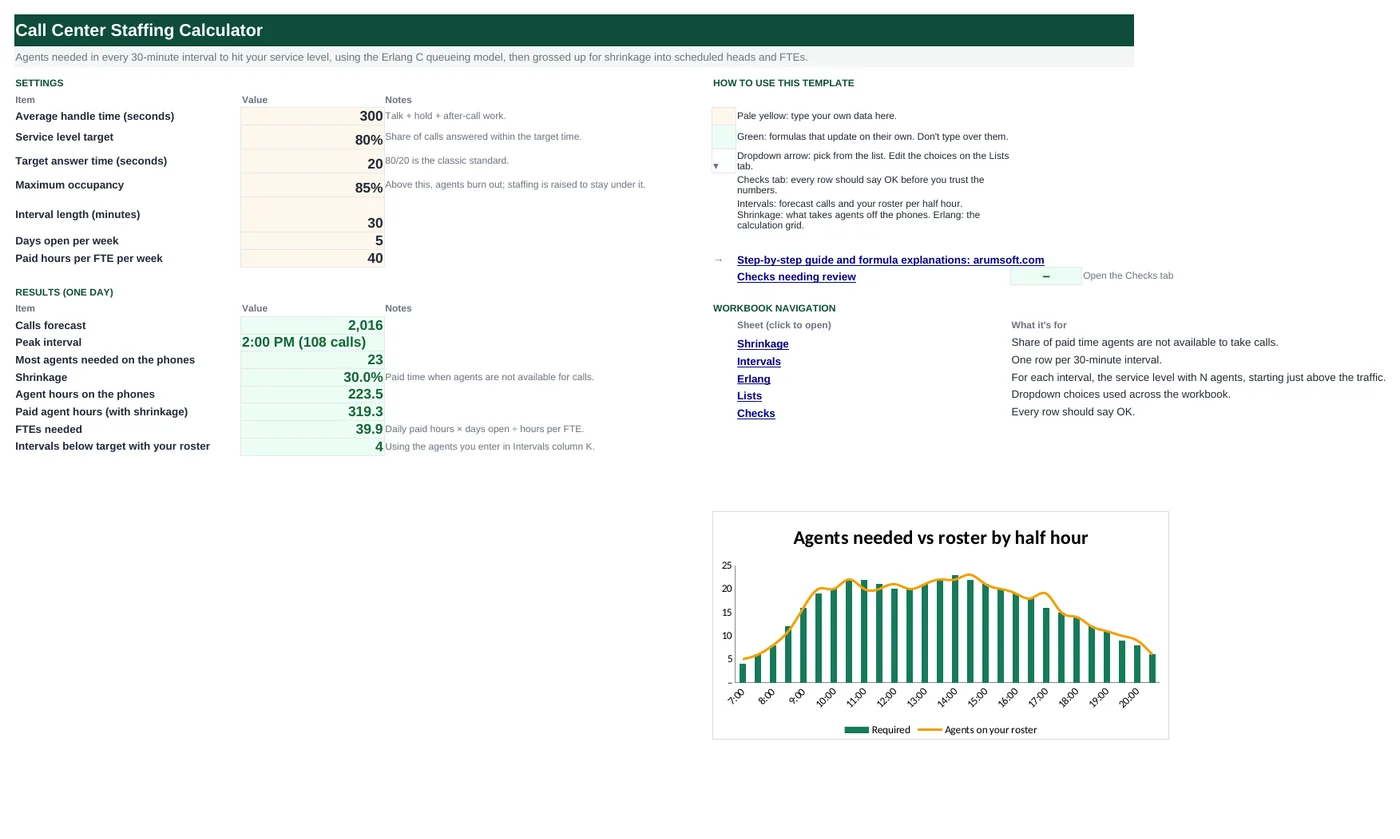
What's inside
The workbook has 6 sheets. You only type on a few of them; the rest calculate.
| Sheet | What it's for | You enter | Calculated for you |
|---|---|---|---|
| Start Here | Settings and daily results | Handle time, service level target and answer time, maximum occupancy, interval length, days open, hours per FTE | Calls, peak interval, peak agents, shrinkage, agent hours on the phones and paid, FTEs, intervals below target with your roster |
| Shrinkage | What takes agents off the phones | Share of paid time for breaks, training, meetings, absence, PTO, admin | Total shrinkage |
| Intervals | One row per half hour (48) | Forecast calls, agents on your roster | Erlangs, agents for service level and occupancy, required, scheduled, occupancy, roster service level, speed of answer, status |
| Erlang | The calculation grid | Nothing | Service level with N, N+1 … agents for every interval |
| Lists | Common targets | Reference list | Nothing |
| Checks | Six data checks | Nothing | OK or Review |
Before you start
- Get calls offered per half hour for a typical day (average the same weekday over several weeks, and add back abandoned calls).
- Get average handle time: talk + hold + after-call work, in seconds.
- Agree the service level target with the business, for example 80% of calls answered within 20 seconds.
Step-by-step guide
Set the targets
Start Here B6–B12: handle time, service level and answer time, maximum occupancy, interval length, days open and hours per FTE.
Enter shrinkage
Shrinkage tab: the share of paid time lost to each item. Total shrinkage is usually 25–35%.
Enter the forecast
Intervals column B: calls for each half hour.
Read the requirement
Column H is agents needed on the phones; column I adds shrinkage to give the heads to schedule.
Test your roster
Column K: agents you actually have logged in. Column L gives the service level they will deliver and column N says Short or Over.
Size the team
Start Here B22 converts the day into FTEs per week.
Formula map
Every formula in the workbook, grouped by the sheet and column it lives in. A column of copied formulas counts once; the range it covers is shown.
| Sheet | Cells | Functions | What it computes | Reads | Feeds |
|---|---|---|---|---|---|
| Intervals | C5 copied down to row 52 | IF | Traffic in Erlangs | B5 | Every Erlang C calculation starts from it. |
| Erlang | C5 copied down to row 52 | IF, POISSON, FALSE, TRUE, EXP | Service level with N agents | — | Each column to the right adds one agent; the cell turns green when the target is reached. |
| Intervals | D5 copied down to row 52 | IF, COUNTIF | Agents for the service level | C5 | Service level rises with N, so counting the misses finds the first hit without a lookup. |
| Intervals | E5 copied down to row 52 | IF, ROUNDUP | Agents for the occupancy cap | C5 | Matters at high volume, where Erlang alone would run people at 90%+. |
| Intervals | I5 copied down to row 52 | IF, ROUNDUP | Scheduled heads | H5 | What to put on the schedule for that half hour. |
| Intervals | L5 copied down to row 52 | IF, OR, POISSON, FALSE, TRUE, EXP | Service level with your roster | K5, C5 | Column M uses Pw × AHT ÷ (N − A) for the average speed of answer. |
| Start Here | B22 | arithmetic | FTEs needed | B21, B11, B12 | The headcount to hire to, before adding supervisors and support. |
Every formula, explained
Each formula below is copied straight from the file, so what you read here is exactly what the cell contains. Click any cell in Excel to see it in the formula bar.
=IF(N(B5)=0, 0, B5*'Start Here'!$B$6/('Start Here'!$B$10*60))The workload in the interval: calls × handle time ÷ the seconds in the interval. 17.3 Erlangs means 17.3 agents would be busy all the time.
Piece by piece
B5*Start Here!$B$6- Calls × average handle time (seconds of work).
/('Start Here'!$B$10*60)- Seconds in a 30-minute interval (1,800).
With the sample data: B5 = 12 → C5 result 2
How it is used: Every Erlang C calculation starts from it.
How to change it: Nothing to change.
Learn this: How to Write Basic Formulas in Excel →=IF(Intervals!$C5=0, 1, 1-POISSON(($B5+0),
Intervals!$C5, FALSE())/(POISSON(($B5+0), Intervals!$C5, FALSE())+(1-Intervals!$C5/($B5+0))*POISSON(($B5+0)-1, Intervals!$C5, TRUE()))*EXP(-(($B5+0)-Intervals!$C5)*'Start Here'!$B$8/'Start Here'!$B$6))Erlang C: the chance a call waits, from the Poisson distribution, then the share answered within the target time.
Piece by piece
POISSON(N, A, FALSE)- Poisson probability of exactly N calls in progress (A = traffic).
(1-A/N)*POISSON(N-1, A, TRUE)- Weighted probability of fewer than N.
Pw = first ÷ (first + second)- Erlang C: probability the caller has to wait.
1-Pw*EXP(-(N-A)*'Start Here'!$B$8/'Start Here'!$B$6)- Share answered within the target time.
With the sample data: C5 result 58.4%
How it is used: Each column to the right adds one agent; the cell turns green when the target is reached.
How to change it: Nothing to change.
Learn this: Essential Excel Functions: SUM, AVERAGE, COUNT, MIN and MAX →=IF(C5=0, 0, Erlang!$B5+COUNTIF(Erlang!$C5:$AP5,
"<"&'Start Here'!$B$7))The first N in the grid row is just above the traffic; every column still below target adds one more agent.
Piece by piece
Erlang!$B5- First N to try: INT(traffic) + 1.
COUNTIF(Erlang!$C5:$AP5, "<"&'Start Here'!$B$7)- How many N values fall short of the target.
With the sample data: C5 = 2 → D5 result 4
How it is used: Service level rises with N, so counting the misses finds the first hit without a lookup.
How to change it: Nothing to change.
Learn this: How to Use COUNTIF and COUNTIFS in Excel →=IF(C5=0, 0, ROUNDUP(C5/'Start Here'!$B$9, 0))Enough agents that each is busy no more than the maximum occupancy.
Piece by piece
C5/'Start Here'!$B$9- Traffic ÷ 85%.
ROUNDUP(…, 0)- Whole agents.
With the sample data: C5 = 2 → E5 result 3
How it is used: Matters at high volume, where Erlang alone would run people at 90%+.
How to change it: Change the cap on Start Here B9.
Learn this: How to Round Numbers in Excel: ROUND, ROUNDUP and ROUNDDOWN →=IF(H5=0, 0, ROUNDUP(H5/(1-Shrinkage!$B$11), 0))Agents needed on the phones, grossed up for shrinkage.
Piece by piece
H5- Required on the phones (larger of D and E).
/(1-Shrinkage!$B$11)- Divide by available share (70%).
ROUNDUP(…, 0)- Whole people.
With the sample data: H5 = 4 → I5 result 6
How it is used: What to put on the schedule for that half hour.
How to change it: Edit shrinkage on its tab.
Learn this: How to Round Numbers in Excel: ROUND, ROUNDUP and ROUNDDOWN →=IF(OR(N(B5)=0, N(K5)=0),
"", IF(K5<=C5, 0, 1-POISSON(K5, C5, FALSE())/(POISSON(K5, C5, FALSE())+(1-C5/K5)*POISSON(K5-1, C5, TRUE()))*EXP(-(K5-C5)*'Start Here'!$B$8/'Start Here'!$B$6)))The same Erlang C formula with N = the agents on your roster.
Piece by piece
K5<=C5- Fewer agents than traffic: the queue grows without limit, service level 0.
POISSON(K5, C5, …)- Erlang C with the roster.
EXP(-(K5-C5)*'Start Here'!$B$8/'Start Here'!$B$6)- Share answered in time.
With the sample data: K5 = 5, C5 = 2 → L5 result 95.1%
How it is used: Column M uses Pw × AHT ÷ (N − A) for the average speed of answer.
How to change it: Type a different roster in column K to test it.
Learn this: Essential Excel Functions: SUM, AVERAGE, COUNT, MIN and MAX →=B21*B11/B12Paid agent hours for the day × days open ÷ hours per FTE.
Piece by piece
B21- Agent hours on the phones ÷ (1 − shrinkage).
*B11/B12- × 5 days ÷ 40 hours.
With the sample data: B21 = 319.29, B11 = 5, B12 = 40 → B22 result 39.91
How it is used: The headcount to hire to, before adding supervisors and support.
How to change it: Adjust days open and FTE hours.
Learn this: How to Write Basic Formulas in Excel →Tips and limits
- Erlang C assumes callers never hang up, so it slightly overstates staffing when abandonment is high. That margin is usually welcome.
- Model each weekday separately if volume differs; copy the workbook or add columns for each day.
- Schedules come in shift blocks, so the real roster will exceed the half-hour requirement somewhere. Use column K to see where you are short.
- Occupancy above 85–90% for long stretches drives attrition; keep the cap even when service level is met.
- For chat or email with concurrency, Erlang C does not apply directly; use workload ÷ concurrency instead.
Learn the skills behind this template
Was this guide helpful? Spot a mistake? Send feedback · admin@arumsoft.com