Chemical SDS and Hazmat Inventory Log for Excel
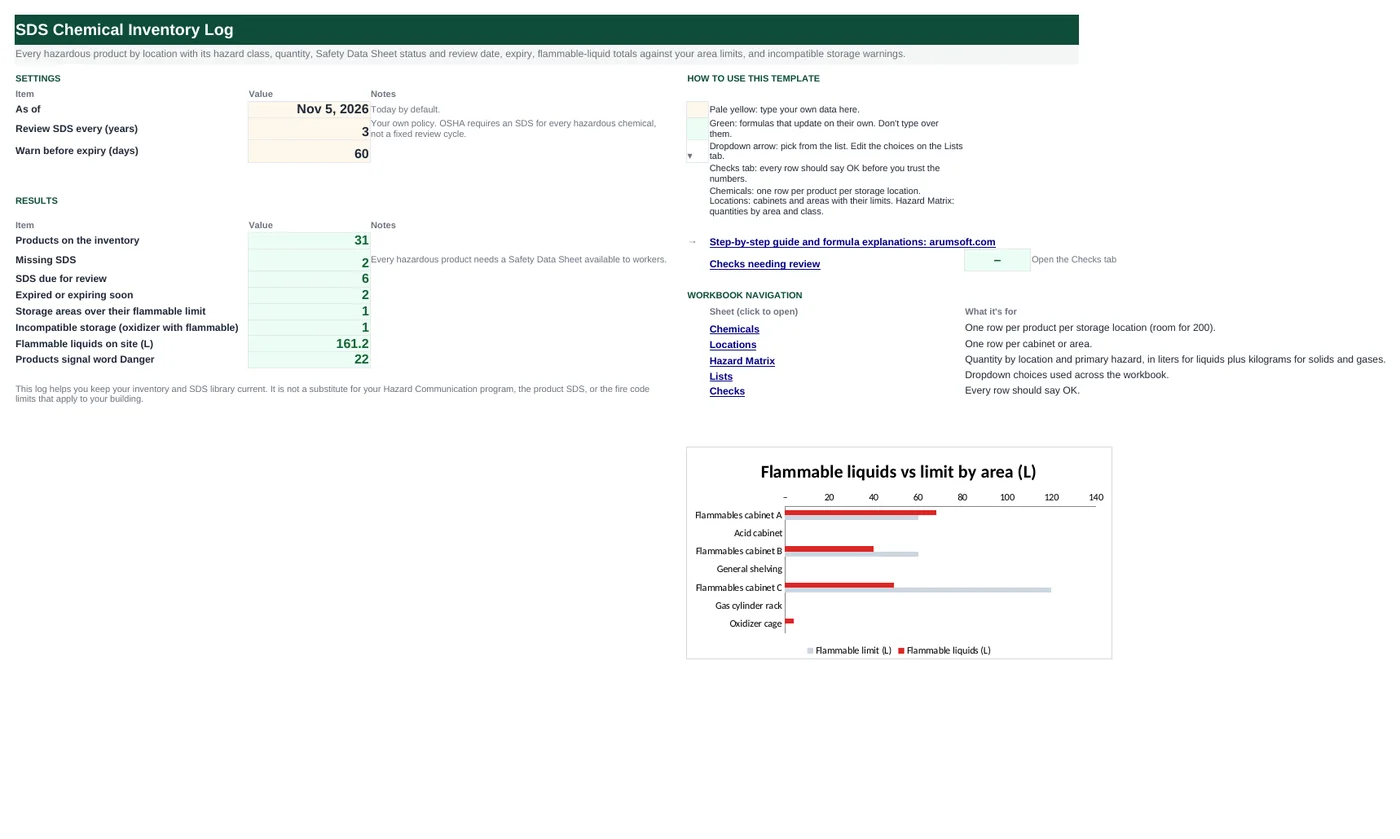
A chemical inventory has two jobs: proving you have a current Safety Data Sheet for every hazardous product, and knowing how much of what is stored where. This workbook keeps one row per product per cabinet, converts containers into liters or kilograms so areas can be totalled, compares flammable liquids in each cabinet with the limit you set, warns when an oxidizer shares space with a flammable, and flags missing SDSs, reviews due and expiring stock.
- Sheets:
- 6
- Works with:
- Excel for Microsoft 365, Excel 2016 or later, Excel for Mac and Excel for the web
- Updated:
What you can do with it
- One row per product per storage area with CAS number, GHS hazard class, signal word and SDS link
- Quantity converted from mL, gal, g or lb into liters or kilograms for totals
- Flammable liquids per cabinet against your limit, and oxidizer-with-flammable storage warnings
- Missing SDS, SDS review due, expired and expiring flags, with a location × hazard matrix
What's inside
The workbook has 6 sheets. You only type on a few of them; the rest calculate.
| Sheet | What it's for | You enter | Calculated for you |
|---|---|---|---|
| Start Here | Settings and results | As-of date (today), SDS review cycle in years, expiry warning days | Products, missing SDS, reviews due, expired or expiring, areas over limit, incompatible storage, flammable liters on site, Danger products |
| Chemicals | One row per product per area (200) | Product, manufacturer, CAS, location, cabinet, primary hazard, signal word, container size, unit, containers, SDS on file, SDS revision date, expiry, SDS link | Review due, days to expiry, quantity in base unit, area status, status |
| Locations | Cabinets and areas (20) | Location, cabinet, flammable limit in liters | Products, flammable liters, share of limit, limit status, oxidizer + flammable check |
| Hazard Matrix | Quantity by location and hazard | Nothing | Liters or kilograms per hazard class per location |
| Lists | Dropdowns and unit factors | Hazard classes, signal words, units with conversion factors | Nothing |
| Checks | Six data checks | Nothing | OK or Review |
Before you start
- Walk every room and cabinet; list each product with its container size and count.
- Pull the current SDS for each product from the manufacturer's site and note its revision date (Section 16 or the header).
- Ask your fire marshal or EHS lead for the flammable-liquid limit for each cabinet and area.
Step-by-step guide
Set the policy
Start Here B7 and B8: how often you re-check each SDS, and how far ahead to warn about expiry.
List the storage areas
Locations tab: location, cabinet or area, and the flammable-liquid limit in liters (0 where none applies).
Enter the inventory
Chemicals tab: one row per product per area, with hazard class, signal word, container size, unit and count.
Record the SDS
SDS on file Yes/No, revision date and the file name or link.
Fix the flags
Status column: Missing SDS, Expired, Expiring soon, SDS review due, Area over limit, Incompatible storage.
Report
Start Here and the Hazard Matrix show totals by area for inspections and emergency planning.
Formula map
Every formula in the workbook, grouped by the sheet and column it lives in. A column of copied formulas counts once; the range it covers is shown.
| Sheet | Cells | Functions | What it computes | Reads | Feeds |
|---|---|---|---|---|---|
| Chemicals | Q5 copied down to row 204 | IF, IFERROR, INDEX, MATCH | Quantity in the base unit | H5, J5, I5 | Every location total adds this column. |
| Chemicals | O5 copied down to row 204 | IF, OR, EDATE | SDS review due | L5 | Past this date the status says SDS review due. |
| Chemicals | U5 copied down to row 204 | IF, AND, LEFT, ISNUMBER, SEARCH | Status | K5, P5, O5, T5 | Counted on Start Here; colored by severity. |
| Locations | E5 copied down to row 24 | IF, SUMIFS | Flammable liquids in the area | — | Compared with the limit for Over limit / Near limit. |
| Locations | H5 copied down to row 24 | IF, AND, COUNTIFS | Oxidizer stored with flammable | — | Feeds the product status as "Incompatible storage". |
| Hazard Matrix | A5 copied down to row 12 | IFERROR, INDEX, MATCH, COUNTIF | Unique location list | — | Columns B–I then SUMIFS the quantity by location and hazard class. |
Every formula, explained
Each formula below is copied straight from the file, so what you read here is exactly what the cell contains. Click any cell in Excel to see it in the formula bar.
=IF(A5="", "", H5*J5*IFERROR(INDEX(Lists!$E$5:$E$34, MATCH(I5, Lists!$D$5:$D$34, 0)),
    0))
Container size × number of containers × the conversion factor for the unit (mL → L, gal → L, g → kg, lb → kg).
Piece by piece
H5*J5- Size × containers.
MATCH(I5, Lists!$D$5:$D$34, 0)- Row of the unit.
INDEX(Lists!$E$5:$E$34, …)- Its factor (gal = 3.785).
IFERROR(…, 0)- 0 for an unknown unit (the check flags it).
With the sample data: H5 = 4, J5 = 6, I5 = L → Q5 result 24
How it is used: Every location total adds this column.
How to change it: Add units on the Lists tab with their factor and base unit.
Learn this: How to Use INDEX and MATCH in Excel →=IF(OR(A5="", L5=""), "", EDATE(L5, 12*'Start Here'!$B$7))Revision date plus your review cycle in years.
Piece by piece
EDATE(L5, 12*'Start Here'!$B$7)- 3 years × 12 months after the revision date.
With the sample data: L5 = Aug 6, 2023 → O5 result Aug 6, 2026
How it is used: Past this date the status says SDS review due.
How to change it: Change the cycle on Start Here B7.
Learn this: Text and Date Functions in Excel →=IF(A5="", "", IF(K5<>"Yes",
"Missing SDS", IF(AND(P5<>"", P5<0), "Expired", IF(AND(P5<>"", P5<='Start Here'!$B$8), "Expiring soon", IF(AND(O5<>"", O5<'Start Here'!$B$6), "SDS review due", IF(LEFT(T5, 4)="Over", "Area over limit", IF(ISNUMBER(SEARCH("mixed", T5)), "Incompatible storage", "OK")))))))The most important problem first: no SDS, expired, expiring, review due, area over its limit, incompatible storage.
Piece by piece
K5<>"Yes"- Missing SDS.
P5<0- Expired.
P5<='Start Here'!$B$8- Expiring soon.
O5<'Start Here'!$B$6- SDS review due.
LEFT(T5, 4)="Over"- Area over limit.
SEARCH("mixed", T5)- Incompatible storage.
With the sample data: K5 = Yes, P5 = 111, O5 = Aug 6, 2026, T5 = Over limit → U5 result SDS review due
How it is used: Counted on Start Here; colored by severity.
How to change it: Nothing to change.
Learn this: How to Use the IF Function in Excel →=IF(A5="", "", SUMIFS(Chemicals!$Q$5:$Q$204,
Chemicals!$S$5:$S$204, I5,
Chemicals!$F$5:$F$204, "Flammable",
Chemicals!$R$5:$R$204, "L"))Adds liters of products whose primary hazard is Flammable in this cabinet.
Piece by piece
Chemicals!$Q$5:$Q$204- Quantity in base units.
Chemicals!$S$5:$S$204, I5- Same location and cabinet (a combined key).
Chemicals!$F$5:$F$204, "Flammable"- Flammable products.
Chemicals!$R$5:$R$204, "L"- Liquids only (liters).
With the sample data: E5 result 68
How it is used: Compared with the limit for Over limit / Near limit.
How to change it: Nothing to change.
Learn this: How to Use SUMIF and SUMIFS in Excel →=IF(A5="", "", IF(AND(COUNTIFS(Chemicals!$S$5:$S$204, I5, Chemicals!$F$5:$F$204, "Oxidizer")>0, COUNTIFS(Chemicals!$S$5:$S$204, I5, Chemicals!$F$5:$F$204, "Flammable")>0),
"Incompatible", "OK"))Incompatible when the same area holds at least one oxidizer and at least one flammable.
Piece by piece
COUNTIFS(…, I5, Chemicals!$F$5:$F$204, "Oxidizer")>0- An oxidizer is here.
COUNTIFS(…, "Flammable")>0- A flammable is here.
AND(…)- Both.
With the sample data: H5 result OK
How it is used: Feeds the product status as "Incompatible storage".
How to change it: Add more pairs (acid with base, for example) with the same pattern.
Learn this: How to Use AND and OR in Excel →=IFERROR(INDEX(Locations!$A$5:$A$24,
MATCH(0, INDEX(COUNTIF($A$4:A4, Locations!$A$5:$A$24)+(Locations!$A$5:$A$24=""), 0), 0)),
"")Pulls each location from the Locations tab once, in order.
Piece by piece
COUNTIF($A$4:A4, Locations!$A$5:$A$24)- Locations already listed above (expanding range).
+(Locations!$A$5:$A$24="")- Blanks count as listed so they are skipped.
MATCH(0, INDEX(…, 0), 0)- First location not yet listed.
INDEX(Locations!$A$5:$A$24, …)- Its name.
With the sample data: A5 result Lab 101
How it is used: Columns B–I then SUMIFS the quantity by location and hazard class.
How to change it: Nothing to change.
Learn this: How to Use INDEX and MATCH in Excel →Tips and limits
- Capacity: 200 product rows and 20 storage areas.
- Primary hazard drives the totals. Methanol, for example, is both flammable and toxic; if you file it as Acute toxicity, it is not counted in the flammable total, so pick the hazard that matters for storage limits.
- Limits on the Locations tab are yours to set; typical flammable cabinets are rated for 60 or 120 gallons, but allowable quantities per area depend on the fire code and building.
- OSHA requires an SDS for each hazardous chemical and access for workers; it does not set an expiry for SDSs. The review cycle here is a good-practice check that you have the latest version.
- This log supports, and does not replace, your Hazard Communication program, the SDS itself and EHS advice.
Learn the skills behind this template
Was this guide helpful? Spot a mistake? Send feedback · admin@arumsoft.com