What you can do with it
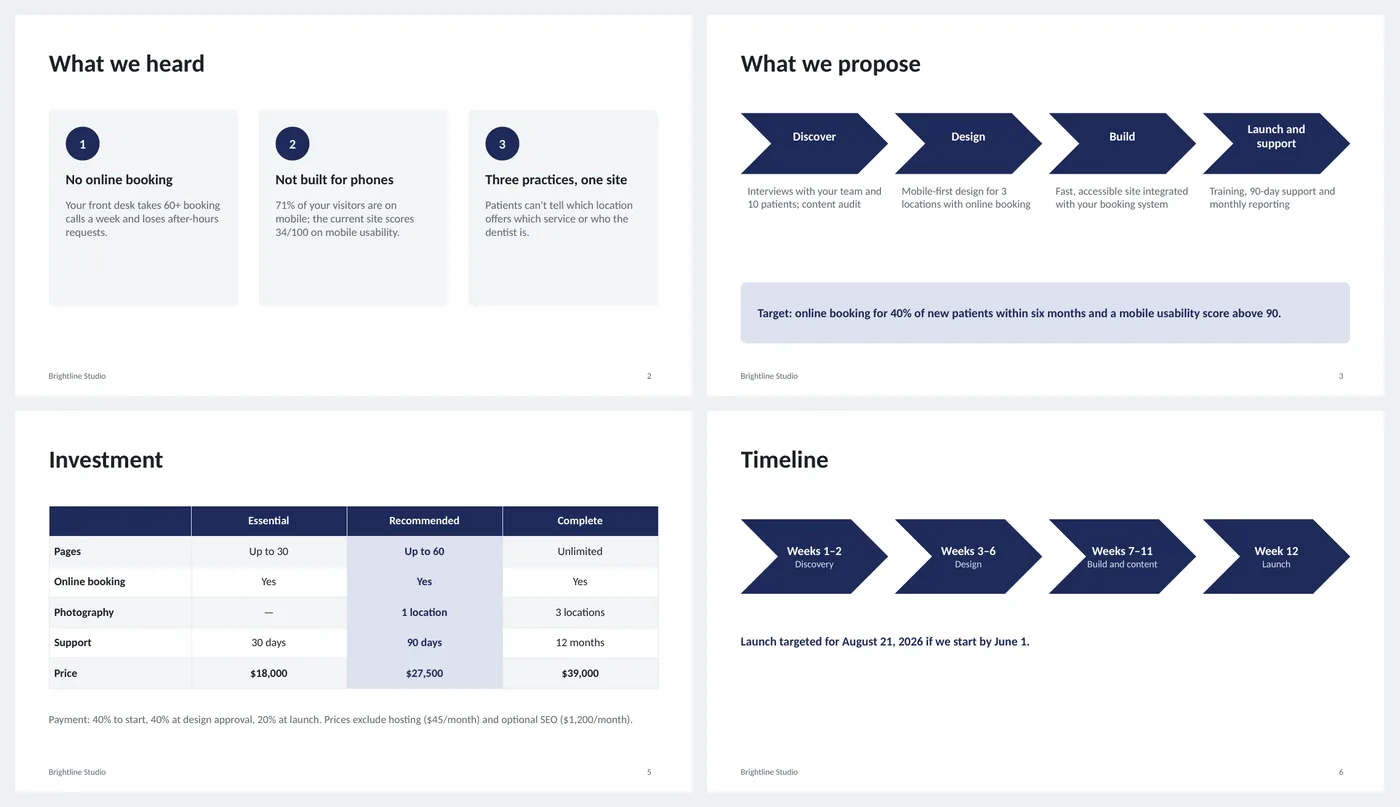
- "What we heard": three problem cards in the customer's words
- Four-step approach chevrons with a target outcome band
- Scope table with included and optional items
- Three-tier pricing table, recommended tier highlighted, payment terms below
- Timeline chevrons with a launch date; why-us and next-steps closing
Slide by slide: what to write
Title
What is proposed, for whom, by whom, the date and how long the price is valid. The validity line creates a reason to decide.
What we heard
Three problems, each with a number from the customer's own situation ("71% of your visitors are on mobile"). If they do not recognize themselves here, nothing after it matters.
What we propose
Four steps as chevrons with one line each, then the outcome you are aiming at as a measurable target.
Scope and deliverables
A table of deliverables with Included / Optional and a note. Optional rows are how you keep the base price honest.
Investment
Three tiers, the middle one highlighted. Rows are the things that differ; the last row is price. Payment terms and exclusions underneath in one sentence.
Timeline
Weeks as chevrons and a launch date that depends on a start date ("if we start by June 1").
Why us and next steps
Four proof points on the left, three concrete steps on the right, starting with the one the customer takes.
What's in the template
The deck is a finished example, not a blank frame: every slide is filled in for a fictional company so you can see the length, tone and level of detail that works, then overwrite it.
Editing the slide in PowerPoint
Change the highlighted tier
The middle column uses the light accent fill and bold text. To highlight another tier, select its cells and apply the same fill (Table Design › Shading) and bold.
Rename the tiers
Essential, Recommended and Complete are placeholders; many teams use Bronze/Silver/Gold or Starter/Standard/Pro.
Add or remove table rows
Click in the last row and press Tab to add one; right-click › Delete Rows to remove. The header row stays dark automatically.
Change the colors
Design › Variants › Colors. Every shape, table and chart uses theme colors, so one change recolors the whole deck. The green, amber and red status words are fixed on purpose.
How the slide is built
Three layouts (title, content, dark closing) with placeholders, footer and slide numbers, built on a named theme so Design › Variants recolors every slide at once. Problem cards and the why-us panels are rounded rectangles; the approach and timeline are chevron shapes; scope and pricing are PowerPoint tables with the recommended column shaded.
Frequently asked questions
Should the price be on slide 5 or at the end?
Slide 5, after scope. Customers skip to it anyway; putting it after scope means they have seen what it buys.
Why three tiers?
A single price is a yes/no; three prices turn the question into which one. The highlighted tier is the one you expect most customers to pick.
How do I handle a customer who wants a custom scope?
Keep the three tiers and add a fourth column, or make the scope table the negotiation and leave pricing as a range.
Can I send this as a PDF?
Yes. File › Save As › PDF. If you need a signature, add a final slide with signature lines or attach a one-page agreement.
Is the sample company real?
No. The company, people and numbers are invented so the deck can show realistic length and tone. Replace all of it.
Learn the skills behind this template
Was this guide helpful? Spot a mistake? Send feedback · admin@arumsoft.com