What you can do with it
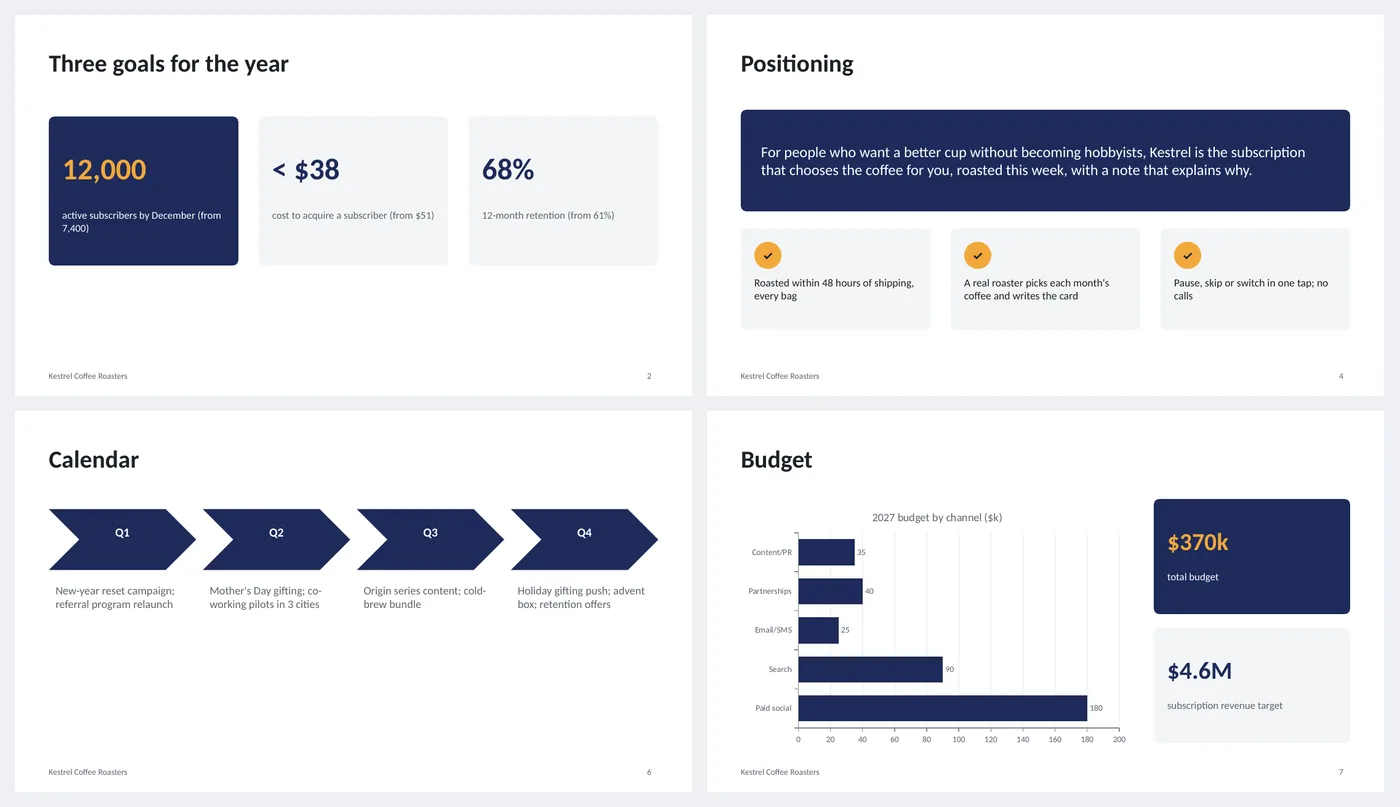
- Three goal tiles with the current number in brackets
- Three audience segment cards
- Positioning statement on a dark band with three proof points
- Channel table: objective, budget and primary KPI per channel
- Quarterly calendar chevrons, budget bar chart, KPI table with targets
Slide by slide: what to write
Title
Year, company, the product line the plan covers and who prepared it.
Three goals
Three, not seven. Each is a number with the current value in brackets so the gap is visible: "12,000 subscribers (from 7,400)".
Audience
Two or three segments with a name you would use in conversation ("the weekday ritual"), who they are, how they buy and their share of customers.
Positioning
One sentence in the form "For [who] who want [what], [product] is the [category] that [difference]". Then three proof points that make it true.
Channels
One row per channel with its objective, budget and the single KPI you will judge it by. If a channel has no KPI, cut it.
Calendar
One chevron per quarter with the two or three campaigns in it. Seasonal moments go here, not on the goals slide.
Budget
The channel budgets as a bar chart, with total budget and the revenue target beside it so the ratio is obvious.
Measurement
The KPI table: metric, now, mid-year target, year-end target and how often it is reviewed. This is the slide you bring back every month.
What's in the template
The deck is a finished example, not a blank frame: every slide is filled in for a fictional company so you can see the length, tone and level of detail that works, then overwrite it.
Editing the slide in PowerPoint
Change the goals
Click the big number in each tile and type; the label below explains it. Keep three tiles.
Update the budget chart
Right-click the chart › Edit Data. The channel table on slide 5 is separate, so update both.
Add or remove table rows
Click in the last row and press Tab to add one; right-click › Delete Rows to remove. The header row stays dark automatically.
Change the colors
Design › Variants › Colors. Every shape, table and chart uses theme colors, so one change recolors the whole deck. The green, amber and red status words are fixed on purpose.
How the slide is built
Three layouts (title, content, dark closing) with placeholders, footer and slide numbers, built on a named theme so Design › Variants recolors every slide at once. Goal tiles and segment cards are rounded rectangles; the calendar is a row of chevron shapes; the budget is a native horizontal bar chart; channels and KPIs are PowerPoint tables.
Frequently asked questions
Is this for a product launch or an annual plan?
Annual. For a launch, keep slides 2 to 5 and replace the calendar with a launch timeline (the timeline maker on this site builds one).
How detailed should the channel table be?
One line per channel. Tactics (which ads, which emails) belong in a working document; the deck is for the decision on where the money goes.
What if we do not know our cost per customer?
Put the best estimate and mark it; a plan with an estimate beats one with no measurement slide.
Can I add a competitor slide?
Yes, after Positioning. Keep it to a table of three competitors and how your proof points differ.
Is the sample company real?
No. The company, people and numbers are invented so the deck can show realistic length and tone. Replace all of it.
Learn the skills behind this template
Was this guide helpful? Spot a mistake? Send feedback · admin@arumsoft.com