Quarterly Business Review Template.pptx
Free to download. No sign-up needed. No macros.
What you can do with it
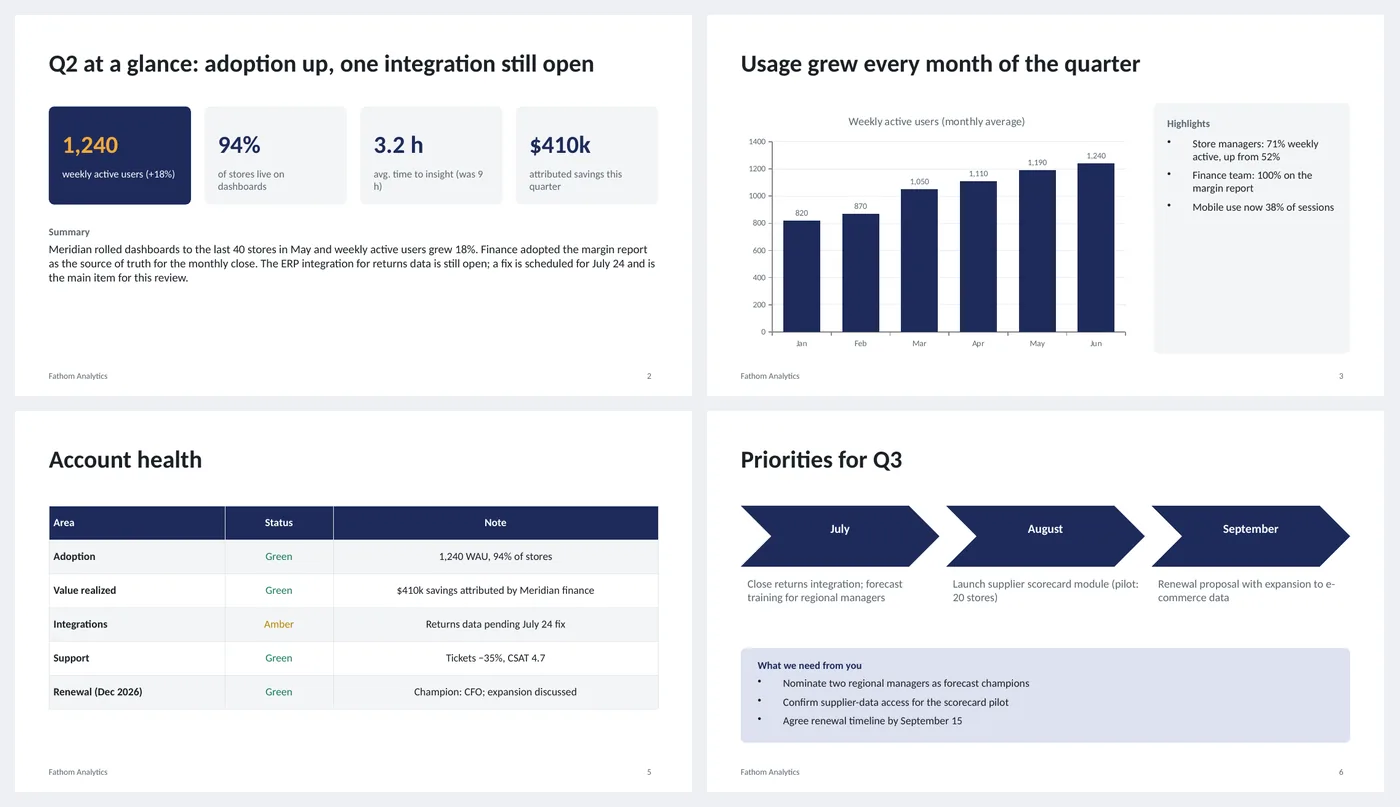
- Quarter at a glance: four KPI tiles and a written summary
- Monthly usage column chart with a highlights card
- Wins and misses side by side
- Account health table with green, amber and red status
- Next-quarter priorities as three steps, plus "what we need from you"
Slide by slide: what to write
Title
Quarter, customer name, your account team and the date. Customers forward these; make sure the first slide says who it is from.
Quarter at a glance
Four numbers that matter to the customer, with the change in brackets, then a summary of three sentences: what happened, what it means, what is open. If the customer reads nothing else, this slide is enough.
Usage
One chart, with the thing you want them to notice in the title ("Usage grew every month"). Three highlights beside it, each with a number.
Wins and misses
Four wins, three misses. Write the misses plainly with what fixed or will fix them. A QBR with no misses reads as a sales pitch.
Account health
Five or six areas rated green, amber or red with a one-line reason. Renewal is always a row.
Priorities and asks
Three things for next quarter, one per month, and the two or three things you need the customer to do. Dates on all of them.
What's in the template
The deck is a finished example, not a blank frame: every slide is filled in for a fictional company so you can see the length, tone and level of detail that works, then overwrite it.
Editing the slide in PowerPoint
Update the chart
Right-click the chart › Edit Data and type the six months. The value labels and axis update themselves.
Change a status color
The status words use fixed green, amber and red. Select the word and change its font color; the three hex codes are in the speaker notes.
Add a slide
Duplicate the wins-and-misses slide for a second product or region; keep the deck under ten slides.
Change the colors
Design › Variants › Colors. Every shape, table and chart uses theme colors, so one change recolors the whole deck. The green, amber and red status words are fixed on purpose.
How the slide is built
Three layouts (title, content, dark closing) with placeholders, footer and slide numbers, built on a named theme so Design › Variants recolors every slide at once. KPI tiles are rounded rectangles; the usage chart is a native column chart with value labels; the health table is a PowerPoint table with colored status text.
Frequently asked questions
How long should a QBR be?
Forty-five minutes with thirty for discussion, which means six to eight slides. This deck is six; add an appendix for detail rather than more main slides.
Should I include pricing or renewal terms?
Mention renewal timing on the health slide and in the asks, but keep commercial terms for a separate conversation unless the customer asked for them.
What if the quarter was bad?
Say so on slide 2 and give the misses slide more room. Customers remember honesty at the next renewal.
Can I use it for an internal business review?
Yes. Replace "customer" with the business unit and "asks" with decisions needed; the structure holds.
Is the sample company real?
No. The company, people and numbers are invented so the deck can show realistic length and tone. Replace all of it.
Learn the skills behind this template
Was this guide helpful? Spot a mistake? Send feedback · admin@arumsoft.com