What you can do with it
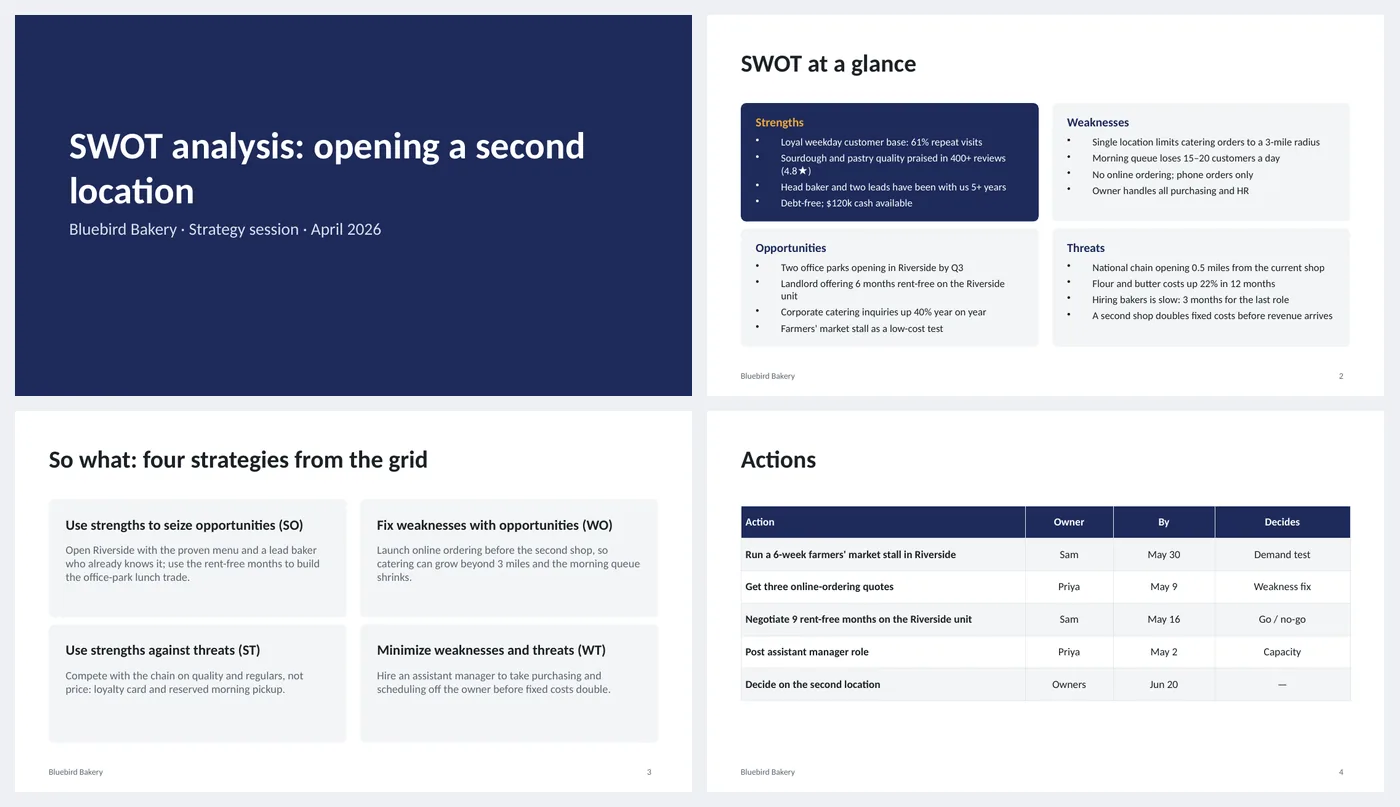
- Two-by-two SWOT grid with four bullets per quadrant; strengths highlighted
- TOWS strategy slide: SO, WO, ST and WT, one sentence each
- Action table with owner, date and what the action decides
- Title slide that states the decision the analysis supports
Slide by slide: what to write
Title
Name the decision, not just "SWOT analysis". "Opening a second location" tells the room what the grid is for and keeps the bullets relevant.
SWOT at a glance
Four bullets per quadrant, each with a number or a fact where you can ("61% repeat visits", not "loyal customers"). Strengths and weaknesses are internal; opportunities and threats are outside your control.
Four strategies
This is the slide people skip. Pair the quadrants: use strengths to seize opportunities (SO), use opportunities to fix weaknesses (WO), use strengths to blunt threats (ST), and minimize the worst weakness-threat combination (WT). One sentence each.
Actions
Turn the strategies into five or six actions with an owner, a date and the question each one answers. The last row is the decision itself and its date.
What's in the template
The deck is a finished example, not a blank frame: every slide is filled in for a fictional company so you can see the length, tone and level of detail that works, then overwrite it.
Editing the slide in PowerPoint
Rewrite the quadrants
Click any bullet and type over it. Keep to four or five bullets per quadrant; if you have more, the long ones belong in an appendix.
Change which quadrant is dark
The strengths panel is dark to draw the eye. To highlight a different quadrant, swap the fill colors of the two rounded rectangles (Shape Format › Shape Fill).
Add or remove table rows
Click in the last row and press Tab to add one; right-click › Delete Rows to remove. The header row stays dark automatically.
Change the colors
Design › Variants › Colors. Every shape, table and chart uses theme colors, so one change recolors the whole deck. The green, amber and red status words are fixed on purpose.
How the slide is built
Three layouts (title, content, dark closing) with placeholders, footer and slide numbers, built on a named theme so Design › Variants recolors every slide at once. The grid and the strategies are rounded rectangles with text boxes inside, not a table, so each quadrant can grow independently. The actions are a native table.
Frequently asked questions
What goes in strengths versus opportunities?
Strengths are things you have now and control: people, cash, reputation. Opportunities are outside changes you could take advantage of: a new office park, a landlord offer. If you would lose it by changing nothing, it is a strength; if someone else could take it, it is an opportunity.
How many bullets per quadrant?
Four is right for a slide; the example uses four. If you have twelve, rank them and show the top four, with the rest in notes.
What is TOWS?
The same four quadrants read as pairs. It is the step that turns a description into strategies, which is why it is the third slide.
Can I use it for a personal SWOT?
Yes. Replace the bakery with yourself, keep the strategy slide, and make the actions things you can do this quarter.
Is the sample company real?
No. The company, people and numbers are invented so the deck can show realistic length and tone. Replace all of it.
Learn the skills behind this template
Was this guide helpful? Spot a mistake? Send feedback · admin@arumsoft.com