Meeting Agenda and Minutes Template.pptx
Free to download. No sign-up needed. No macros.
What you can do with it
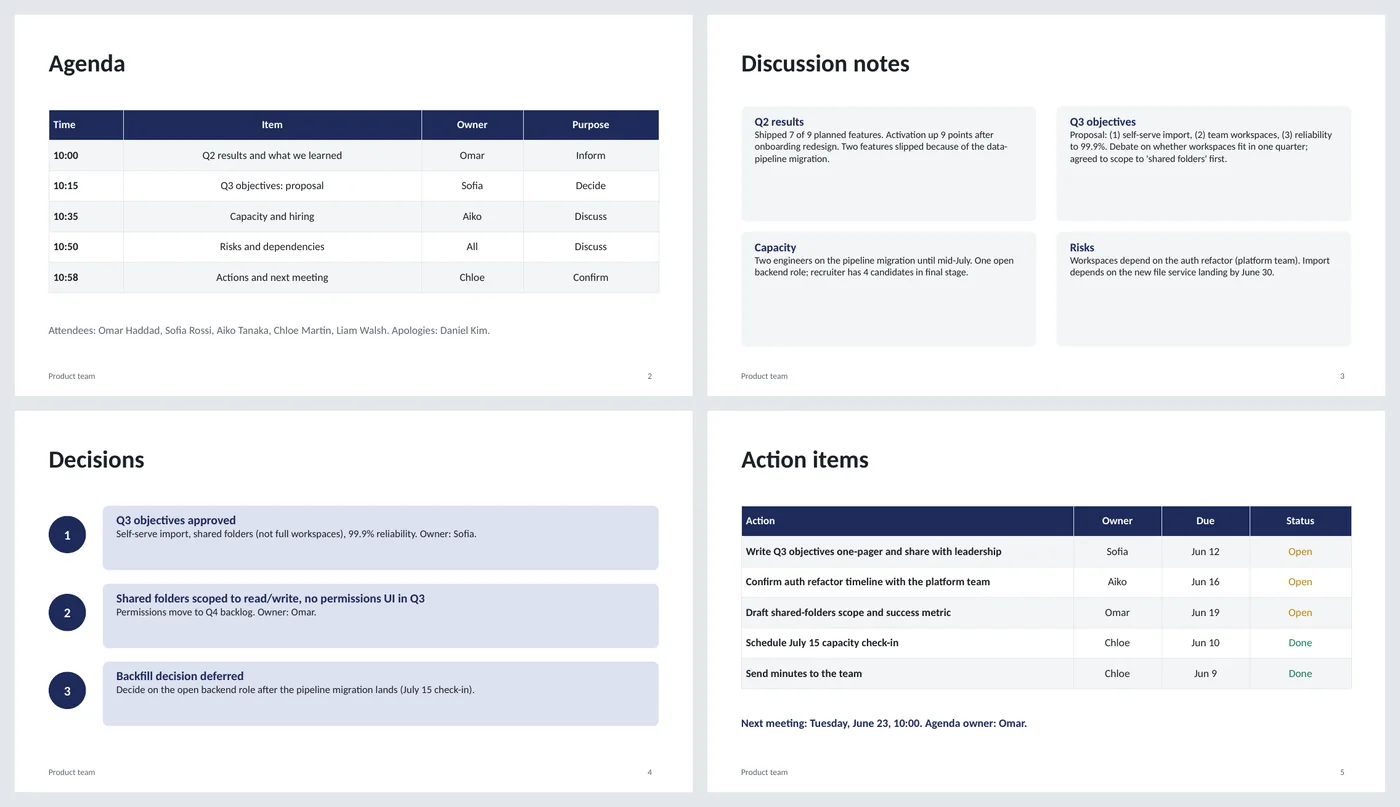
- Agenda table with time, item, owner and purpose (inform, discuss, decide, confirm)
- Discussion notes as one card per agenda item
- Numbered decisions with the owner, so later messages can cite "decision 2"
- Action table with owner, due date and colored status; next meeting line
Slide by slide: what to write
Title
Meeting name, date and time, place or link, facilitator and note-taker. Naming the note-taker in advance is what gets minutes written.
Agenda
One row per item with a start time, an owner and a purpose. The purpose column is the useful one: people prepare differently for "decide" than for "inform". Attendees and apologies underneath.
Discussion notes
One card per agenda item, two to four sentences: what was said that matters, not who said what. Write the disagreements down; they are what people check later.
Decisions
Numbered. Each has the decision in bold, then scope and owner. If nothing was decided, write that; it is still information.
Action items
Action, owner, due date, status. One owner per action, a date for every action. Finish with the next meeting date and who owns its agenda.
What's in the template
The deck is a finished example, not a blank frame: every slide is filled in for a fictional company so you can see the length, tone and level of detail that works, then overwrite it.
Editing the slide in PowerPoint
Run it as a series
Keep one file per meeting series and duplicate the five slides for each meeting, or keep one file per meeting named by date. Both work; pick one and stay with it.
Add rows
Click in the last row of a table and press Tab to add another. Right-click › Delete Rows to remove.
Change status colors
The status words use fixed green and amber so they read the same in any theme. Select a word and change its font color to update it.
Send as minutes
File › Save As › PDF and attach it, or paste the decisions and actions into the meeting invite's notes.
How the slide is built
Two layouts with placeholders, footer and slide numbers. Agenda and actions are native tables with a dark header row; notes are light cards in a two-by-two grid; decisions are numbered circles beside tinted cards. Status words are colored text, not shapes, so they survive copy and paste into other decks.
Frequently asked questions
Why PowerPoint for minutes instead of a document?
Because the agenda and the minutes are then one file, the decisions slide can be shown at the start of the next meeting, and most teams already share decks. If your team lives in documents, copy the same structure there.
How detailed should discussion notes be?
Enough that someone who missed the meeting understands why each decision was made. Two to four sentences per item is usually right; verbatim notes are a transcript, not minutes.
What if an item has no owner?
Then it is not an action yet. Either assign one in the meeting or move it to a parking-lot line under the actions table.
Can I use it for recurring 1:1s or stand-ups?
Yes, though for very short meetings the agenda and actions slides are enough; delete the other three.
Is the sample meeting real?
No. The team, names and topics are invented. Replace everything.
Learn the skills behind this template
Was this guide helpful? Spot a mistake? Send feedback · admin@arumsoft.com