What you can do with it
- The standard 12-slide seed-round structure, in the order investors expect
- A fictional sample company with realistic numbers so every slide shows what "done" looks like
- Native charts and tables you edit in place; cards, chevrons and stat tiles built from plain shapes
- Theme-driven: change every color at once with Design › Variants, or swap in your brand
Slide by slide: what to write
Title
Company name, a one-line promise that a stranger understands, round and date. Keep the logo small; the sentence is the slide.
Problem
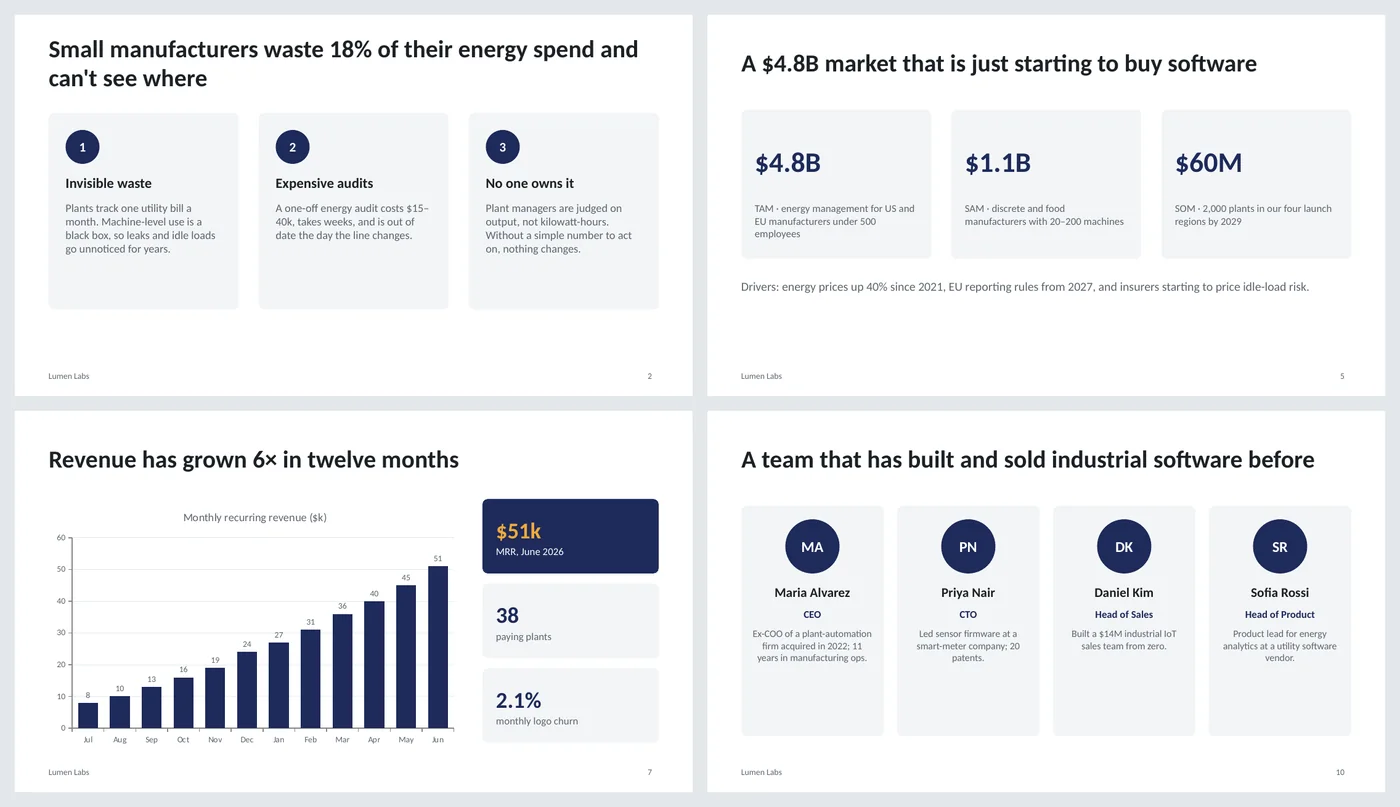
Three pain points, each a short headline plus two sentences of evidence. Make the headline of the slide the size of the problem ("waste 18% and can't see where"), not the word "Problem".
Solution
How it works in three steps, then one sentence of outcome with a number. Resist listing features here; that's the next slide.
Product
Five bullets of what it does for the user, and two stat tiles that prove it. If you have a screenshot, replace the bullets with it and keep the tiles.
Market
TAM, SAM and SOM as three tiles with one line each saying how you counted. Below them, the two or three reasons the market is moving now.
Business model
A pricing table and a line of unit economics: gross margin, average contract, retention. Investors read this slide longer than any other.
Traction
One chart of the metric that matters most, month by month, plus three KPI tiles. Growth multiple in the title ("6× in twelve months").
Competition
A comparison table with your column highlighted. Choose rows where you win and be honest in the others; an all-"Yes" column reads as naive.
Go-to-market
Three phases as chevrons: how you sell now, the channel you add next, the expansion after that. One line of sales efficiency underneath.
Team
Four people, each with a role and the one past achievement that makes them credible for this company. Advisors go in the appendix.
Financials and the ask
A three-year revenue line, the amount you're raising, and use of funds as three bars. The title says what the money gets you ("to reach $250k MRR").
Closing
The one-line mission again, contact details and the data-room link. End here; questions follow.
What's in the template
The deck is a finished example, not a blank frame: every slide is filled in for a fictional company so you can see the length, tone and level of detail that works, then overwrite it.
Editing the slide in PowerPoint
Change the colors
Design › Variants › Colors. Every card, chevron, chart and table uses the theme's accent, so the whole deck follows. To use your brand, edit Variants › Colors › Customize Colors and set Accent 1 and Accent 2.
Replace a chart
Right-click the chart › Edit Data to type your own months and values. Both charts are native PowerPoint charts, not pictures.
Add or remove a card
Copy one of the card groups (shape plus text boxes) and paste it, or delete one and re-space the rest with Arrange › Align › Distribute Horizontally.
Add your logo
Replace the circle on the title slide with your mark, then put a small version in the footer area of the content layout via View › Slide Master.
How the slide is built
The deck has three layouts (title, content, dark closing) with named placeholders, a footer and slide numbers on the layout rather than on each slide. Content slides are composed from plain shapes in theme colors: rounded-rectangle cards, chevrons for sequences, stat tiles for numbers, and two native charts with quiet axes. No SmartArt, no images, so it edits predictably and stays small.
Frequently asked questions
How long should a pitch deck be?
Ten to fourteen slides for a seed round; this template is twelve. Keep everything else in an appendix after the closing slide and only show it if asked.
What order do investors expect?
Problem, solution, market, model, traction, competition, go-to-market, team, ask is the order most seed investors are used to. Move traction earlier if it's your strongest card.
Can I use this for a class or competition?
Yes. The structure is what business-plan competitions ask for. Replace the round and investor language with the competition's criteria on the ask slide.
Does the sample company exist?
No. Lumen Labs, its people and all figures are invented to show what finished slides look like. Replace everything.
Can I send it as a PDF?
File › Save As › PDF. Charts and tables export cleanly. Investors usually read decks as PDFs before a meeting.
Learn the skills behind this template
Was this guide helpful? Spot a mistake? Send feedback · admin@arumsoft.com