What you can do with it
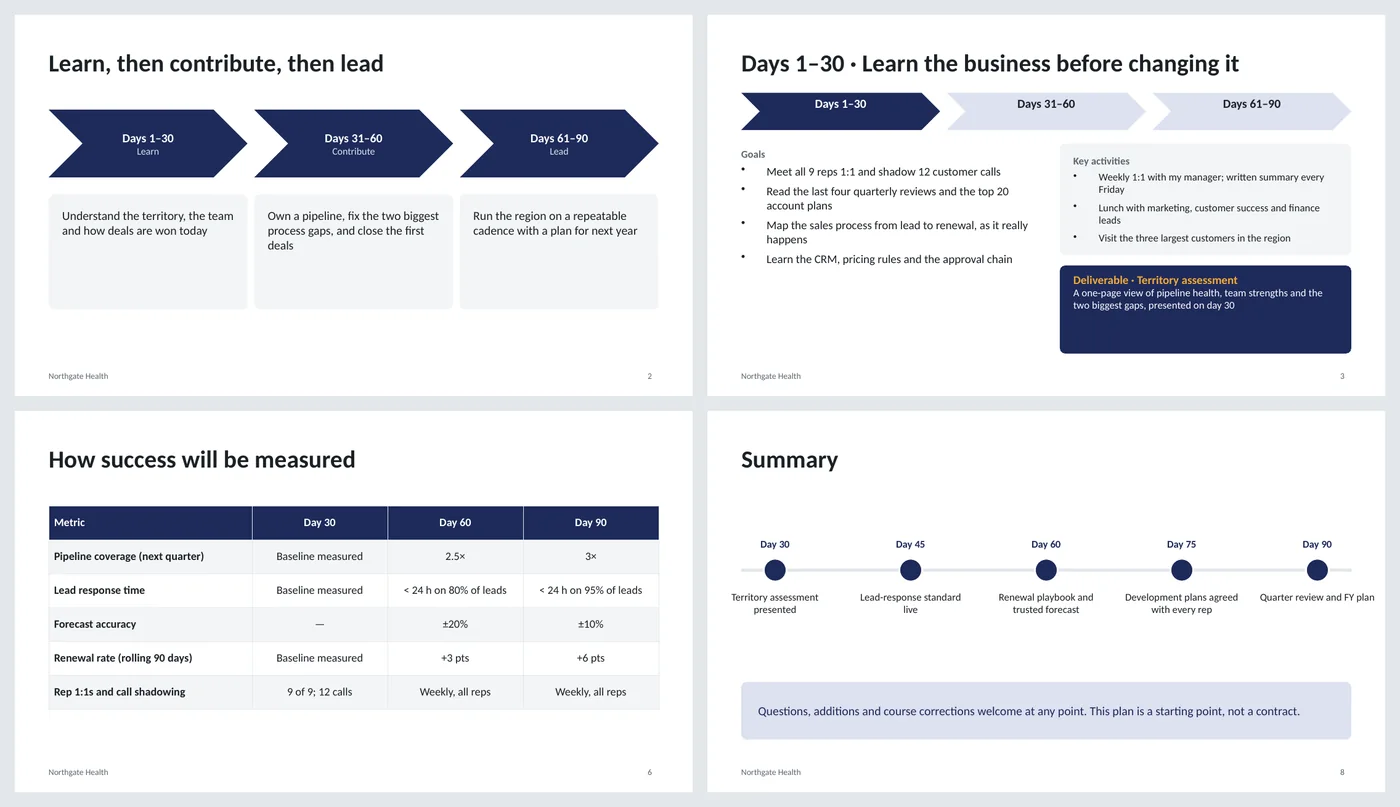
- Overview slide with the three phases as chevrons and one-line goals
- A slide per phase: goals, key activities and a named deliverable
- A metrics table with targets at day 30, 60 and 90
- Support needed, risks with mitigations, and a summary timeline
Slide by slide: what to write
Title
Your name, the role, the team and the start date. If it's for an interview, the interview date instead.
Overview
The three phases with one word each (Learn, Contribute, Lead) and a one-sentence goal under each. Someone who reads only this slide should understand the whole plan.
Days 1–30
Four learning goals (people, numbers, process, tools), three activities that make them happen, and a deliverable with a date: an assessment, not a change.
Days 31–60
The two or three improvements you'll make based on what you learned, where you'll personally contribute, and a deliverable that shows results.
Days 61–90
How you run things on a repeatable rhythm: the number you'll hit, the plan you'll write for the next year, and the development of your team.
Metrics
Four or five measures with a target at each checkpoint. "Baseline measured" is a legitimate day-30 target; a made-up number is not.
Support and risks
What you need from your manager (access, introductions, decision rights) and three risks you already see, each with how you'll handle it.
Summary
Five dated milestones on a line and a closing sentence that invites changes. Present this slide; leave the detail slides for questions.
What's in the template
The deck is a finished example, not a blank frame: every slide is filled in for a fictional company so you can see the length, tone and level of detail that works, then overwrite it.
Editing the slide in PowerPoint
Make it yours
Replace the name, role and company on the title slide and the footer (View › Slide Master › the content layout). Then rewrite each phase from the questions in the guide above.
Change the phase names
Learn / Contribute / Lead works for most roles. Technical roles sometimes use Learn / Build / Own; leadership roles Listen / Decide / Scale.
Adjust the metrics table
Click into a cell to edit. To add a row, right-click a row › Insert › Insert Below. Keep four to six rows; more looks like you haven't chosen.
Shorten it for an interview
Present the overview, one phase slide and the metrics. Bring the rest as a leave-behind PDF.
How the slide is built
The deck uses two layouts (title and content) with placeholders, a footer and slide numbers on the layout. The phase slides share one arrangement so they read as a set: the chevron strip highlights the current phase, goals sit left, activities in a light card and the deliverable in a dark card on the right. The summary timeline is drawn from shapes, the metrics table is a native table.
Frequently asked questions
When do I need a 30-60-90 day plan?
In final-round interviews for management and sales roles, where it's often requested; and in the first week of any new job, where it's a useful way to agree expectations with your manager even if nobody asks.
How detailed should it be?
Specific enough that each goal could be checked at the end of the phase. "Meet all nine reps 1:1" is checkable; "get to know the team" is not. The example shows the level.
Should I include numbers I don't know yet?
No. Use "baseline measured" for day 30 and commit to improvements relative to it. Inventing a target for a business you haven't joined undermines the rest.
Can I use it for a non-management role?
Yes. Keep the structure; change the deliverables to what an individual contributor owns (a shipped feature, a documented process, a first customer).
Is the example a real company?
No. Northgate Health, Jordan Lee and every figure are invented. Replace everything.
Learn the skills behind this template
Was this guide helpful? Spot a mistake? Send feedback · admin@arumsoft.com