What you can do with it
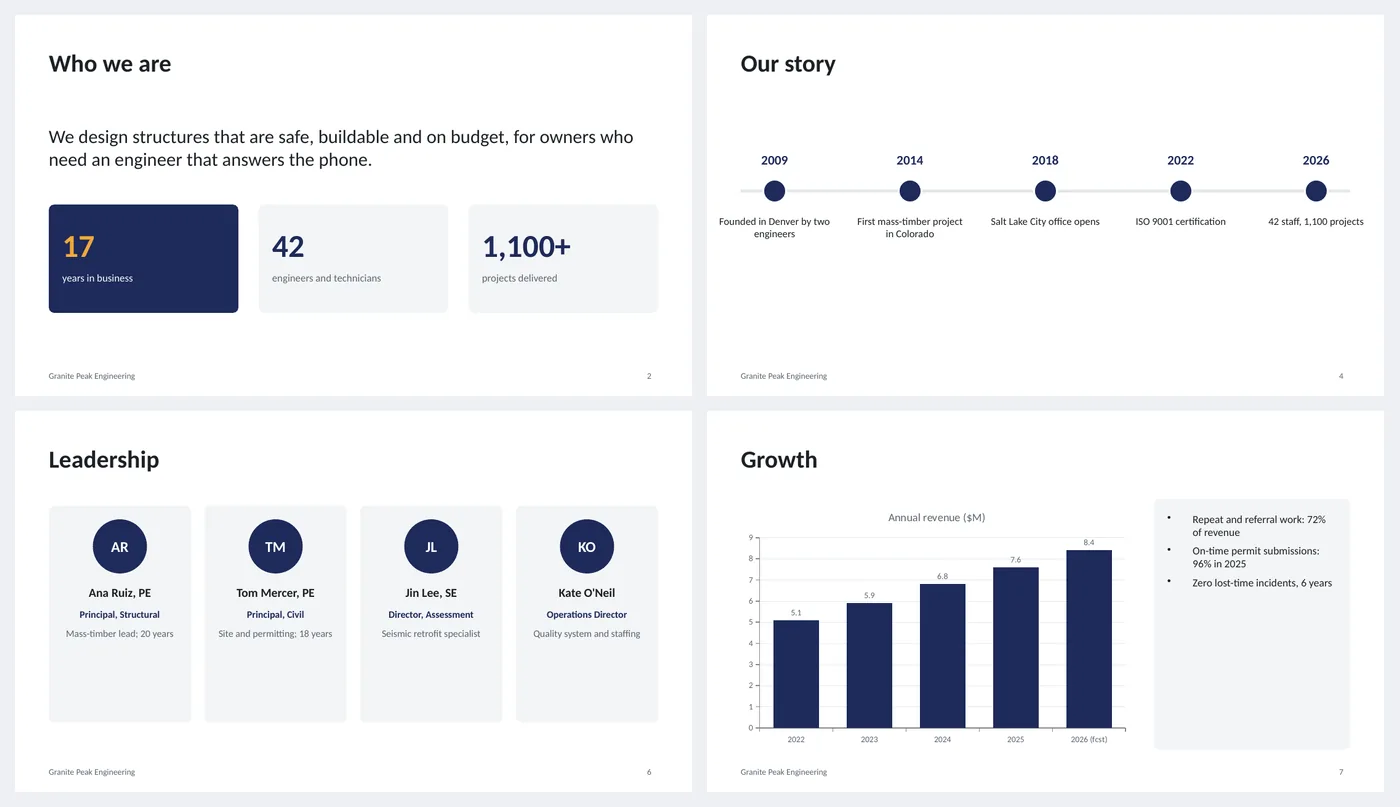
- Mission statement with three headline numbers
- Three service cards and a horizontal history timeline
- Clients table by sector with share of work
- Four leadership cards with initials, role and one-line bio
- Revenue column chart with proof points; dark contact slide
Slide by slide: what to write
Title
Company name, a one-line description of what you do and for whom, founding year and locations. Put the logo in the top-left circle.
Who we are
One mission sentence written for the customer, not the mirror ("for owners who need an engineer that answers the phone"), then three numbers: years, people, projects.
What we do
Three services, each with a heading and one sentence of scope. If you have eight, group them into three.
Our story
Five dates on a line. Founding, first notable project, expansion, certification, today. Dates and short labels; the detail goes in speech.
Who we work with
A table of sectors with share of work and a typical project. This is the slide a prospect uses to check you have done their kind of work.
Leadership
Four people with name, role and one line. Replace the initials circle with a photo: right-click › Change Picture after inserting one.
Growth
Five years of revenue or another honest growth number, with three proof points beside it (repeat work, on-time rate, safety).
Contact
Email, phone, addresses, website. Dark slide so it is obviously the end.
What's in the template
The deck is a finished example, not a blank frame: every slide is filled in for a fictional company so you can see the length, tone and level of detail that works, then overwrite it.
Editing the slide in PowerPoint
Add your logo
Delete the orange circle on the title slide and Insert › Pictures. Keep it under 1.5 inches wide.
Swap initials for photos
Insert a square photo, crop it to a circle (Picture Format › Crop › Crop to Shape › Oval) and place it over the initials circle.
Update the chart
Right-click › Edit Data. Change the title to the metric you are showing if it is not revenue.
Change the colors
Design › Variants › Colors. Every shape, table and chart uses theme colors, so one change recolors the whole deck. The green, amber and red status words are fixed on purpose.
How the slide is built
Three layouts (title, content, dark closing) with placeholders, footer and slide numbers, built on a named theme so Design › Variants recolors every slide at once. The timeline is a line with ellipse markers; the leadership and service cards are grouped shapes; the growth chart is a native column chart.
Frequently asked questions
How long should a company profile deck be?
Eight to ten slides. It is read, not presented, so each slide should make sense alone.
Should I include pricing?
No. The profile earns the meeting; pricing comes in the proposal. The sales proposal template on this site covers that.
What if we have no growth chart worth showing?
Replace it with projects delivered per year, customers served or another number that grew. If nothing did, use a map of locations instead.
Can I use it as a capability statement for bids?
Yes. Add a certifications slide after "What we do" and a past-performance table after "Who we work with".
Is the sample company real?
No. The company, people and numbers are invented so the deck can show realistic length and tone. Replace all of it.
Learn the skills behind this template
Was this guide helpful? Spot a mistake? Send feedback · admin@arumsoft.com