Tenant Rent Roll and Security Deposit Ledger for Excel
A rent roll answers three questions every month: who owes what, which leases end soon, and how much deposit money you are holding for whom. This workbook keeps a unit register, logs every payment with a late flag, works out each unit's balance from rent charged versus received, warns about leases inside your renewal window, and keeps a security deposit ledger that must reconcile to the Units tab, line by line.
- Sheets:
- 6
- Works with:
- Excel for Microsoft 365, Excel 2016 or later, Excel for Mac and Excel for the web
- Updated:
Tenant Rent Roll and Security Deposit Ledger.xlsx
Free to download. No sign-up needed.
What you can do with it
- Per-unit balance due from rent charged vs received, with Paid / Due / Late for the report month
- Lease status: Current, Expiring soon, Expired, with days to lease end
- Late fees and collection rate for the month
- A security deposit ledger (received, deductions, refunds) reconciled to the unit list
What's inside
The workbook has 6 sheets. You only type on a few of them; the rest calculate.
| Sheet | What it's for | You enter | Calculated for you |
|---|---|---|---|
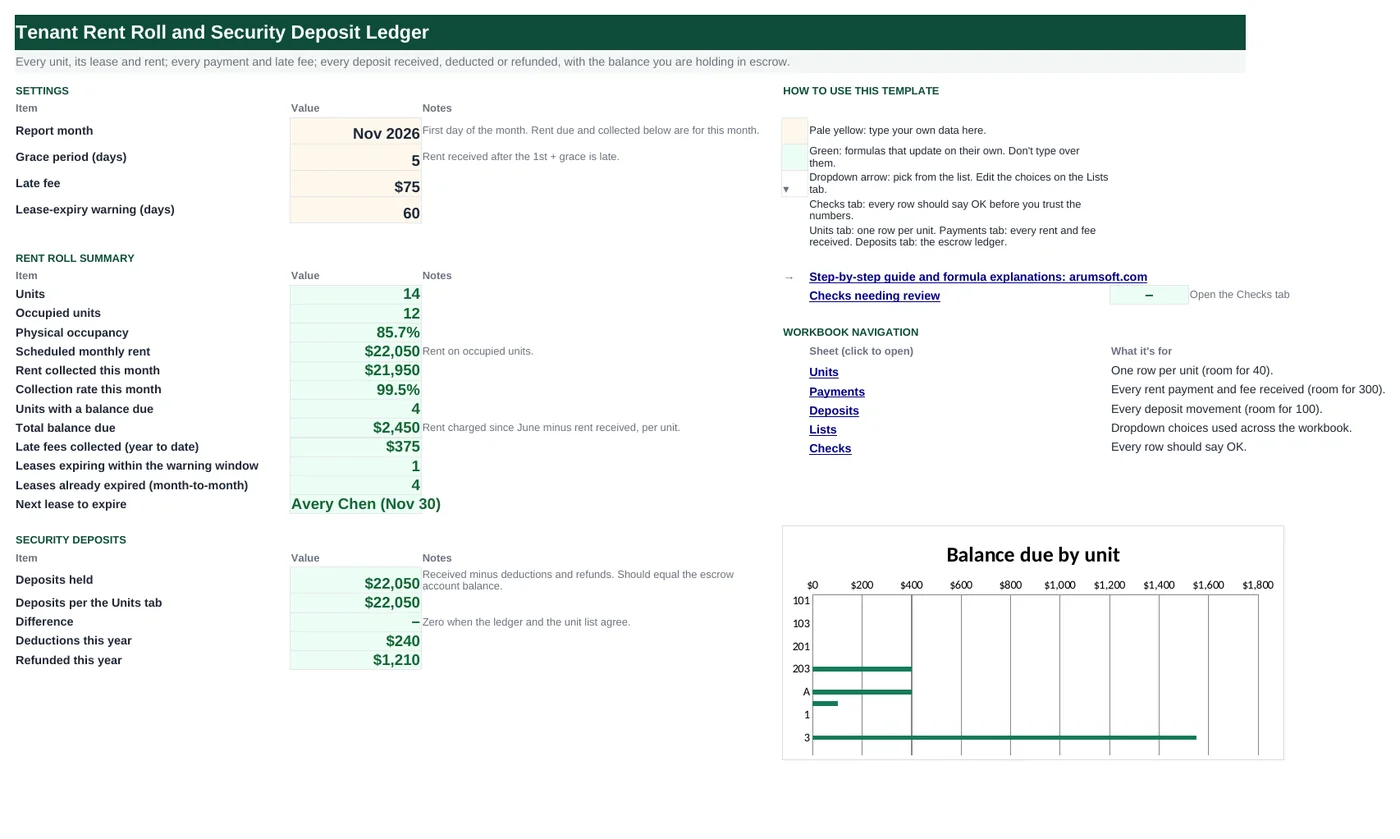
| Start Here | Settings and the monthly summary | Report month, grace period, late fee, lease-expiry warning days | Units, occupancy, scheduled rent, collected, collection rate, balances, late fees, expiring and expired leases, next expiry, deposits held and reconciled, deductions and refunds |
| Units | One row per unit (40) | Property, unit, tenant, lease dates, rent, deposit, status | Rent charged and received, balance due, lease status, days to lease end, this month's status |
| Payments | Every receipt (300) | Date, property, unit, type, amount, method, memo | Month, late flag |
| Deposits | Deposit ledger (100) and reconciliation | Date, property, unit, tenant, type, amount, memo | Ledger balance per unit vs the Units tab, match flag |
| Lists | Dropdowns | Properties, statuses, payment types, methods, deposit types | Nothing |
| Checks | Six data checks | Nothing | OK or Review |
Before you start
- List every unit with its current lease: start, end, rent and the deposit you hold.
- Decide the ledger start month. The sample counts rent charged from June 2026; change DATE(2026,6,1) on the Units tab to your own start.
- Have your deposit escrow statement handy so the ledger can be reconciled from day one.
Step-by-step guide
Set the report month
Start Here B6, the first day of the month. Rent collected, collection rate and the per-unit "This month" status are for that month. B7–B9 set the grace period, late fee and expiry warning window.
Register units
Units tab: property (dropdown), unit, tenant, lease start and end, monthly rent, deposit held, status. Vacant units have no tenant and no deposit.
Log payments
Payments tab: date, property, unit, type (Rent, Late fee, …), amount, method. The month and the late flag calculate; a rent payment dated after the 1st plus the grace period is late.
Keep the deposit ledger
Deposits tab: every deposit received (positive), deduction or refund (negative). The reconciliation on the right compares each unit's ledger balance with the deposit on the Units tab.
Review the Units tab
Balance due is rent charged since the ledger start minus rent received. Lease status flags leases inside the warning window and leases already past their end.
Read Start Here and the Checks
Occupancy, collection rate, balances, late fees, expirations, deposits held and whether they reconcile. The Checks tab catches ledger mismatches, payments for unknown units, incomplete unit rows, overpayments, expired leases still marked Occupied, and a report month that is not the 1st.
Formula map
Every formula in the workbook, grouped by the sheet and column it lives in. A column of copied formulas counts once; the range it covers is shown.
| Sheet | Cells | Functions | What it computes | Reads | Feeds |
|---|---|---|---|---|---|
| Units | I5 copied down to row 44 | IF, OR, MAX, YEAR, DATE, MONTH | Rent charged since the ledger start | D5, F5 | Balance due subtracts rent received. |
| Units | J5 copied down to row 44 | IF, OR, SUMIFS | Rent received | A5, B5 | Balance due = charged − received. |
| Units | L5 copied down to row 44 | IF, OR | Lease status | E5 | Counted on Start Here B22 and B23; colored by conditional formatting. |
| Units | N5 copied down to row 44 | IF, OR, SUMIFS, DAY, TODAY | This month | A5, B5, F5 | A live view for the current month. |
| Payments | I5 copied down to row 304 | IF, OR, DAY | Late flag | A5, D5 | Highlighted amber; use it to decide which late fees to charge. |
| Deposits | K5 copied down to row 44 | IF, SUMIFS | Ledger balance per unit | I5, J5 | Compared with the deposit on the Units tab in column M. |
| Deposits | M5 copied down to row 44 | IF, ABS | Match? | K5, L5 | Any No is flagged on the Checks tab. |
| Start Here | B17 | SUMIFS | Rent collected this month | B6 | Collection rate divides it by scheduled rent. |
| Start Here | B24 | IFERROR, INDEX, MATCH, MINIFS, TEXT | Next lease to expire | B6 | A one-line prompt for renewals. |
| Checks | B6 | IF, SUMPRODUCT, IFERROR, COUNTIFS | Every payment belongs to a listed unit | — | A typo in a unit number would otherwise make a tenant look delinquent. |
Every formula, explained
Each formula below is copied straight from the file, so what you read here is exactly what the cell contains. Click any cell in Excel to see it in the formula bar.
=IF(OR(B5="", C5=""), "",
    F5*MAX(0, (YEAR('Start Here'!$B$6)-YEAR(MAX(D5, DATE(2026, 6, 1))))*12+MONTH('Start Here'!$B$6)-MONTH(MAX(D5, DATE(2026, 6, 1)))+1))
Monthly rent times the number of whole months from the later of the lease start and the ledger start (June 2026) through the report month.
Piece by piece
MAX(D5, DATE(2026,6,1))- Later of lease start and ledger start.
(YEAR('Start Here'!$B$6)-YEAR(…))*12+MONTH('Start Here'!$B$6)-MONTH(…)+1- Months between, inclusive.
MAX(0, …)- Never negative for a lease starting after the report month.
F5*…- Rent × months.
With the sample data: D5 = Jun 1, 2025, F5 = 1,650 → I5 result 9,900
How it is used: Balance due subtracts rent received.
How to change it: Change DATE(2026,6,1) to your own ledger start month.
Learn this: Text and Date Functions in Excel →=IF(OR(B5="", C5=""), "",
SUMIFS(Payments!$E$5:$E$304,
Payments!$B$5:$B$304, A5,
Payments!$C$5:$C$304, B5,
Payments!$D$5:$D$304, "Rent"))Adds rent payments (type Rent) for this property and unit.
Piece by piece
Payments!$E$5:$E$304- Amounts.
Payments!$B$5:$B$304, A5- Property matches.
Payments!$C$5:$C$304, B5- Unit matches.
Payments!$D$5:$D$304, "Rent"- Rent only; late fees are tracked separately.
With the sample data: A5 = Maple Court, B5 = 101 → J5 result 9,900
How it is used: Balance due = charged − received.
How to change it: Nothing to change.
Learn this: How to Use SUMIF and SUMIFS in Excel →=IF(OR(B5="", C5=""), "",
IF(E5="", "No end date",
IF(E5<'Start Here'!$B$6, "Expired", IF(E5-'Start Here'!$B$6<='Start Here'!$B$9, "Expiring soon", "Current"))))Expired when the lease end is before the report month; Expiring soon when it ends within the warning window; Current otherwise; No end date if blank.
Piece by piece
E5=""- No end date entered.
E5<'Start Here'!$B$6- Ended before the report month.
E5-'Start Here'!$B$6<='Start Here'!$B$9- Ends within the warning window.
With the sample data: E5 = May 31, 2026 → L5 result Expired
How it is used: Counted on Start Here B22 and B23; colored by conditional formatting.
How to change it: Change the warning window on Start Here B9.
Learn this: How to Use the IF Function in Excel →=IF(OR(B5="", C5=""), "",
IF(SUMIFS(Payments!$E$5:$E$304, Payments!$B$5:$B$304, A5, Payments!$C$5:$C$304, B5, Payments!$D$5:$D$304, "Rent", Payments!$H$5:$H$304, 'Start Here'!$B$6)>=F5,
"Paid", IF(DAY(TODAY())>'Start Here'!$B$7+1, "Late", "Due")))Paid when rent received for the report month covers the rent; otherwise Late if today is past the grace period, Due if not.
Piece by piece
SUMIFS(Payments!$E…, …, Payments!$H$5:$H$304, 'Start Here'!$B$6)- Rent received dated in the report month.
>=F5- Covers the monthly rent.
DAY(TODAY())>'Start Here'!$B$7+1- Past the grace period today.
With the sample data: A5 = Maple Court, B5 = 101, F5 = 1,650 → N5 result Paid
How it is used: A live view for the current month.
How to change it: Nothing to change.
Learn this: How to Use TODAY and NOW in Excel →=IF(OR(A5="", D5<>"Rent"),
"", IF(DAY(A5)>'Start Here'!$B$7+1,
"Late", ""))A rent payment dated after the 1st plus the grace period.
Piece by piece
D5<>"Rent"- Only rent payments are tested.
DAY(A5)>'Start Here'!$B$7+1- Day of the month beyond the grace period.
With the sample data: A5 = Jun 2, 2026, D5 = Rent → I5 result —
How it is used: Highlighted amber; use it to decide which late fees to charge.
How to change it: Nothing to change.
Learn this: How to Use the IF Function in Excel →=IF(J5="", "", SUMIFS($F$5:$F$104,
$B$5:$B$104, I5, $C$5:$C$104,
J5))Adds every deposit movement for the property and unit: receipts positive, deductions and refunds negative.
Piece by piece
$F$5:$F$104- Amounts.
$B$5:$B$104, I5- Property matches.
$C$5:$C$104, J5- Unit matches.
With the sample data: I5 = Maple Court, J5 = 101 → K5 result 1,650
How it is used: Compared with the deposit on the Units tab in column M.
How to change it: Nothing to change.
Learn this: How to Use SUMIF and SUMIFS in Excel →=IF(J5="", "", IF(ABS(K5-L5)<0.005, "Yes", "No"))Yes when the ledger balance equals the deposit on the Units tab to the cent.
Piece by piece
ABS(K5-L5)<0.005- Difference smaller than half a cent.
With the sample data: K5 = 1,650, L5 = 1,650 → M5 result Yes
How it is used: Any No is flagged on the Checks tab.
How to change it: Nothing to change.
Learn this: How to Use the IF Function in Excel →=SUMIFS(Payments!$E$5:$E$304,
Payments!$D$5:$D$304, "Rent",
Payments!$H$5:$H$304, B6)Rent payments whose month equals the report month.
Piece by piece
Payments!$D$5:$D$304, "Rent"- Rent only.
Payments!$H$5:$H$304, B6- Payment month = report month.
With the sample data: B6 = Nov 1, 2026 → B17 result 21,950
How it is used: Collection rate divides it by scheduled rent.
How to change it: Nothing to change.
Learn this: How to Use SUMIF and SUMIFS in Excel →=IFERROR(INDEX(Units!$C$5:$C$44,
MATCH(MINIFS(Units!$E$5:$E$44, Units!$E$5:$E$44, ">="&B6), Units!$E$5:$E$44, 0))&" ("&TEXT(MINIFS(Units!$E$5:$E$44, Units!$E$5:$E$44, ">="&B6),
"mmm d")&")", "")The earliest lease end on or after the report month, with the tenant name and the date joined into one label.
Piece by piece
MINIFS(Units!$E$5:$E$44, Units!$E$5:$E$44, ">="&B6)- Earliest end date not yet passed.
MATCH(…, Units!$E$5:$E$44, 0) → INDEX(Units!$C…)- The tenant on that row.
TEXT(…, "mmm d")- The date as text.
&" ("&…&")"- Joined.
With the sample data: B6 = Nov 1, 2026 → B24 result Avery Chen (Nov 30)
How it is used: A one-line prompt for renewals.
How to change it: Nothing to change.
Learn this: How to Use MIN and MAX in Excel →=IF(SUMPRODUCT((Payments!$A$5:$A$304<>"")*IFERROR(COUNTIFS(Units!$A$5:$A$44, Payments!$B$5:$B$304, Units!$B$5:$B$44, Payments!$C$5:$C$304)=0, 1))=0,
"OK", "Review")For each payment, counts Units rows with the same property and unit; zero means the payment cannot be matched.
Piece by piece
COUNTIFS(Units!$A…, Payments!$B…, Units!$B…, Payments!$C…)- Matching units per payment.
=0- None found.
SUMPRODUCT((Payments!$A…<>"")*IFERROR(…, 1))=0- No unmatched payments.
With the sample data: B6 result OK
How it is used: A typo in a unit number would otherwise make a tenant look delinquent.
How to change it: Nothing to change.
Learn this: How to Use COUNTIF and COUNTIFS in Excel →Tips and limits
- Capacity: 40 units, 300 payments, 100 deposit entries. Extend with Ctrl+H ($44, $304, $104).
- Start the file in the month your records are clean. Balances carried in from before the ledger start can be entered as a one-off "Rent" payment of the prior balance owed (negative) or by adjusting the start date.
- Reconcile the deposit ledger with the escrow bank statement monthly. The Difference line on Start Here should read zero.
- When a tenant moves out, log the deduction and the refund on the Deposits tab, then set the unit to Vacant and clear the deposit on the Units tab so the reconciliation still matches.
- The "This month" column uses TODAY(), so opening the file on the 3rd shows Due and on the 9th shows Late for the same unpaid unit.
Learn the skills behind this template
Was this guide helpful? Spot a mistake? Send feedback · admin@arumsoft.com