Roofing Material Takeoff Sheet for Excel
A roof is measured flat but shingled on the slope. This workbook takes each plane's horizontal length, run and pitch, applies the pitch factor to get the true roof area, adds a waste factor for the roof style, and converts the result into squares and bundles. Edge lengths drive starter strip, ridge cap, drip edge, ice-and-water and flashing, all rounded up to what you can actually buy. Labor, steep-roof surcharge and tear-off give a job cost and a cost per square.
- Sheets:
- 6
- Works with:
- Excel for Microsoft 365, Excel 2016 or later, Excel for Mac and Excel for the web
- Updated:
What you can do with it
- Pitch factor = √(1 + (rise ÷ 12)²) per plane, so plan area becomes sloped area
- Squares with a waste factor picked from the roof style
- An order list of 14 materials, each rounded up to whole bundles, rolls or pieces
- Install labor with a steep-roof surcharge, tear-off, and cost per square
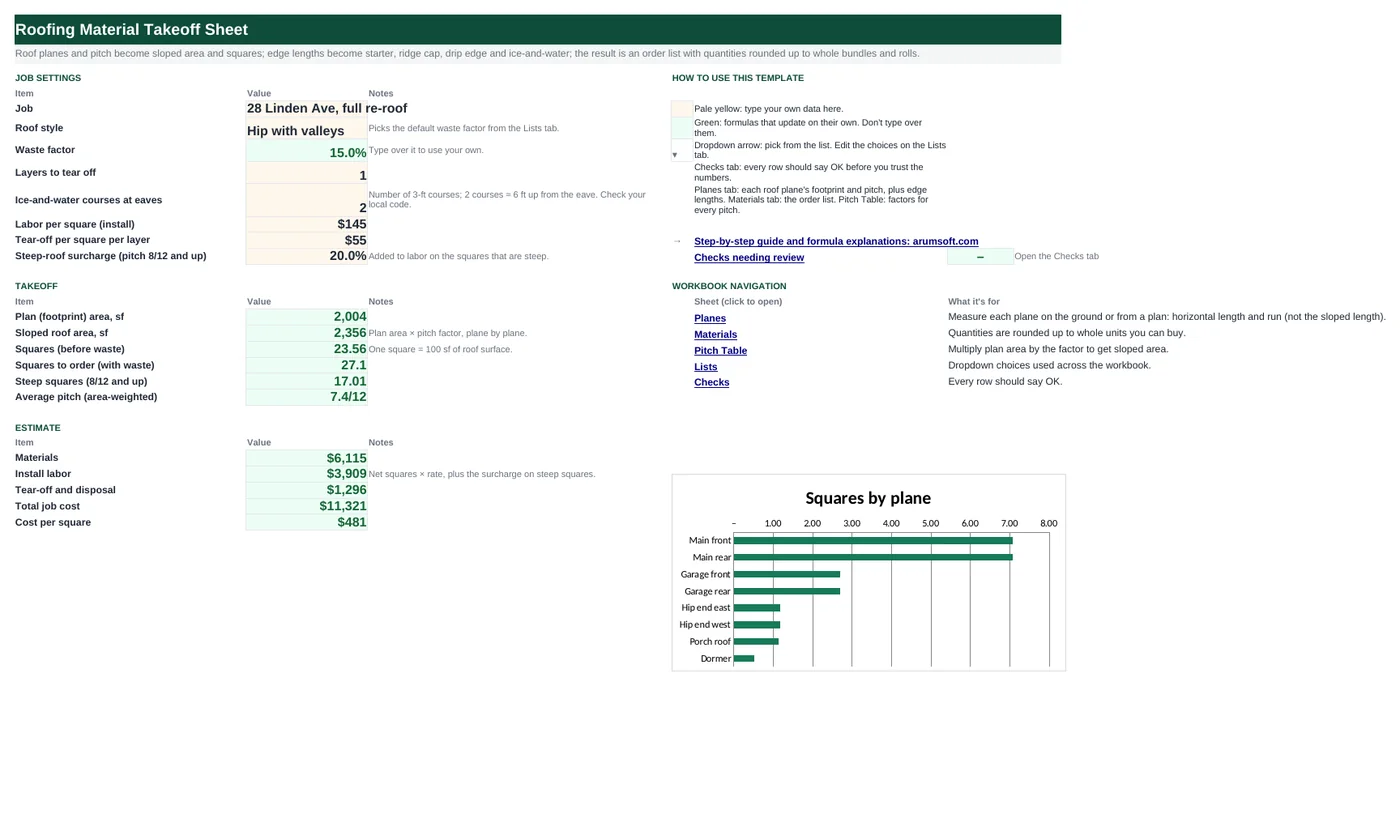
What's inside
The workbook has 6 sheets. You only type on a few of them; the rest calculate.
| Sheet | What it's for | You enter | Calculated for you |
|---|---|---|---|
| Start Here | Job settings, takeoff and estimate | Job, roof style, layers, ice-and-water courses, labor and tear-off rates, steep surcharge | Waste factor, plan area, sloped area, squares, squares with waste, steep squares, average pitch, materials, labor, tear-off, total, cost per square |
| Planes | Roof planes (20) and edge lengths | Plane, horizontal length and run, pitch; eaves, rakes, ridges, hips, valleys, wall flashing LF | Pitch factor, plan area, sloped area, squares, steep flag |
| Materials | Order list | Coverage per unit, unit price, extra lines, sales tax | Quantities rounded up, line totals, materials with tax |
| Pitch Table | Pitches 1–18 | Nothing | Pitch factor, angle, walkability |
| Lists | Roof styles and waste factors | Edit the waste per style | Nothing |
| Checks | Six checks | Nothing | OK or Review |
Before you start
- Measure each roof plane's horizontal footprint (from the ground, a plan or aerial measurements), not the length up the slope.
- Find the pitch of each plane (rise in inches per 12 inches of run) with a pitch gauge or app.
- Measure the edges: eaves, rakes, ridges, hips, valleys and the length of walls that need step flashing.
Step-by-step guide
Set up the job
Start Here B6–B13: job name, roof style (sets the waste factor), layers to tear off, ice-and-water courses at the eaves, labor and tear-off rates per square, and the steep-roof surcharge.
Enter the planes
Planes tab: one row per plane with horizontal length, horizontal run and pitch. Pitch factor, plan area, sloped area and squares calculate; planes at 8/12 and up are marked steep.
Enter the edges
The edge table below the planes: eaves, rakes, ridges, hips, valleys and wall flashing in linear feet.
Check the coverage
Materials tab: coverage per unit (bundles per square, LF per roll or bundle) and unit prices. Match them to your supplier's product sheets.
Read the order list
Every quantity is rounded up to a whole unit: shingle bundles, underlayment and ice-and-water rolls, starter and ridge cap bundles, drip edge, ridge vent, flashing and valley metal pieces, nail boxes and dumpster hauls.
Read the estimate
Start Here: materials, install labor (net squares × rate, plus the surcharge on steep squares), tear-off, total job cost and cost per square.
Formula map
Every formula in the workbook, grouped by the sheet and column it lives in. A column of copied formulas counts once; the range it covers is shown.
| Sheet | Cells | Functions | What it computes | Reads | Feeds |
|---|---|---|---|---|---|
| Planes | E5 copied down to row 24 | IF, SQRT | Pitch factor | D5 | Multiplies the plan area to give the sloped area. |
| Planes | G5 copied down to row 24 | IF | Sloped area | F5, E5 | Summed on Start Here B18. |
| Start Here | B8 | IFERROR, INDEX, MATCH | Waste factor | B7 | Applied to squares to order. |
| Start Here | B20 | ROUNDUP | Squares to order | B19, B8 | The basis for shingles, underlayment and nails. |
| Start Here | B21 | SUMIF | Steep squares | — | The steep-roof surcharge applies to these. |
| Start Here | B22 | IF, SUMPRODUCT | Average pitch | B18 | A one-number description of the roof for the proposal. |
| Materials | D5 | ROUNDUP | Shingle bundles | — | The largest material line. |
| Materials | D7 | ROUNDUP, SUMIF | Ice-and-water rolls at the eaves | — | Code in cold climates often requires ice barrier up to 24 inches inside the wall line. |
| Start Here | B27 | arithmetic | Install labor | B19, B11, B21, B13 | Part of total job cost. |
| Pitch Table | C5 copied down to row 22 | DEGREES, ATAN | Roof angle | A5 | A reference for safety equipment and material limits. |
Every formula, explained
Each formula below is copied straight from the file, so what you read here is exactly what the cell contains. Click any cell in Excel to see it in the formula bar.
=IF(A5="", "", SQRT(1+(D5/12)^2))How much longer the slope is than its horizontal run: the square root of 1 plus (rise ÷ 12) squared.
Piece by piece
D5/12- Rise per foot of run.
(…)^2- Squared.
SQRT(1+…)- Pythagoras: slope length per foot of run.
With the sample data: D5 = 8 → E5 result 1.2
How it is used: Multiplies the plan area to give the sloped area.
How to change it: Nothing to change.
Learn this: How to Write Basic Formulas in Excel →=IF(A5="", "", F5*E5)Plan area (length × run) times the pitch factor.
Piece by piece
F5- Plan area.
*E5- Pitch factor.
With the sample data: F5 = 588, E5 = 1.2 → G5 result 706.69
How it is used: Summed on Start Here B18.
How to change it: Nothing to change.
Learn this: How to Write Basic Formulas in Excel →=IFERROR(INDEX(Lists!$B$5:$B$9,
MATCH(B7, Lists!$A$5:$A$9, 0)),
0.12)Looks up the waste for the roof style chosen in B7 on the Lists tab; 12% if the style is not found.
Piece by piece
MATCH(B7, Lists!$A$5:$A$9, 0)- The style's row.
INDEX(Lists!$B$5:$B$9, …)- Its waste factor.
IFERROR(…, 0.12)- Default.
With the sample data: B7 = Hip with valleys → B8 result 15.0%
How it is used: Applied to squares to order.
How to change it: Type over B8 with your own figure, or edit the Lists tab.
Learn this: How to Use INDEX and MATCH in Excel →=ROUNDUP(B19*(1+B8), 1)Squares before waste, plus waste, rounded up to a tenth.
Piece by piece
B19*(1+B8)- Squares with waste.
ROUNDUP(…, 1)- Up to the next 0.1 square.
With the sample data: B19 = 23.56, B8 = 15.0% → B20 result 27.1
How it is used: The basis for shingles, underlayment and nails.
How to change it: Nothing to change.
Learn this: How to Round Numbers in Excel: ROUND, ROUNDUP and ROUNDDOWN →=SUMIF(Planes!$D$5:$D$24, ">=8", Planes!$G$5:$G$24)/100Sloped area of planes at 8/12 or steeper, in squares.
Piece by piece
Planes!$D$5:$D$24, ">=8"- Pitch 8 or more.
Planes!$G$5:$G$24- Sloped areas to add.
/100- Square feet to squares.
With the sample data: B21 result 17.01
How it is used: The steep-roof surcharge applies to these.
How to change it: Change ">=8" to your own steep threshold.
Learn this: How to Use SUMIF and SUMIFS in Excel →=IF(B18=0, 0, SUMPRODUCT(Planes!$D$5:$D$24,
Planes!$G$5:$G$24)/B18)Each plane's pitch weighted by its sloped area.
Piece by piece
SUMPRODUCT(Planes!$D$5:$D$24, Planes!$G$5:$G$24)- Pitch × area, added up.
/B18- Divided by total sloped area.
With the sample data: B18 = 2,355.98 → B22 result 7.39
How it is used: A one-number description of the roof for the proposal.
How to change it: Nothing to change.
Learn this: How to Use SUMIF and SUMIFS in Excel →=ROUNDUP('Start Here'!$B$20*C5, 0)Squares to order times bundles per square, rounded up to a whole bundle.
Piece by piece
'Start Here'!$B$20- Squares with waste.
*C5- Bundles per square (3 for most architectural shingles).
ROUNDUP(…, 0)- Whole bundles.
With the sample data: D5 result 82
How it is used: The largest material line.
How to change it: Change C5 for a shingle with different coverage.
Learn this: How to Round Numbers in Excel: ROUND, ROUNDUP and ROUNDDOWN →=ROUNDUP(SUMIF(Planes!$A$29:$A$34,
"Eaves", Planes!$B$29:$B$34)*'Start Here'!$B$10/C7,
0)Eave length times the number of courses, divided by the length one roll covers, rounded up. The eave length is pulled from the edge table with SUMIF.
Piece by piece
SUMIF(Planes!$A$29:$A$34, "Eaves", Planes!$B$29:$B$34)- Eave LF from the edge table.
*'Start Here'!$B$10- Courses (2 × 3 ft ≈ 6 ft up).
/C7- LF per roll.
ROUNDUP(…, 0)- Whole rolls.
With the sample data: D7 result 6
How it is used: Code in cold climates often requires ice barrier up to 24 inches inside the wall line.
How to change it: Change the courses on Start Here B10.
Learn this: How to Use SUMIF and SUMIFS in Excel →=B19*B11+B21*B11*B13Net squares times the labor rate, plus the steep surcharge on steep squares only.
Piece by piece
B19*B11- All squares at the base rate.
+B21*B11*B13- Surcharge on steep squares.
With the sample data: B19 = 23.56, B11 = 145, B21 = 17.01, B13 = 20.0% → B27 result 3,909.46
How it is used: Part of total job cost.
How to change it: Nothing to change.
Learn this: How to Write Basic Formulas in Excel →=DEGREES(ATAN(A5/12))The angle in degrees for a given pitch: arctangent of rise ÷ 12, converted from radians.
Piece by piece
A5/12- Rise per foot.
ATAN(…)- Angle in radians.
DEGREES(…)- In degrees.
With the sample data: A5 = 1 → C5 result 4.76
How it is used: A reference for safety equipment and material limits.
How to change it: Nothing to change.
Learn this: How to Write Basic Formulas in Excel →Tips and limits
- Capacity: 20 planes and six edge types. Add materials in the blank rows on the Materials tab (rows 19–20).
- Always measure horizontal run, not slope length; the pitch factor does the conversion. Measuring on the slope and then applying the factor double-counts.
- Waste factors: 10% for a simple gable, 15% or more for hips and valleys, because every hip and valley cut wastes shingle.
- Ice-and-water requirements vary by code and climate; confirm the number of courses with your local building department.
- Under 2/12 is low-slope: shingles are not rated for it, which is why the Checks tab flags it.
Learn the skills behind this template
Was this guide helpful? Spot a mistake? Send feedback · admin@arumsoft.com