High School GPA to 4.0 Converter.xlsx
High School GPA to 4.0 Converter (Blank).xlsx
Free to download. No sign-up needed. No macros.
What you can do with it
- Convert letters, percentages, IB scores or 4.0 points to an unweighted 4.0 GPA
- Choose plus/minus (A- = 3.7) or whole-letter conversion
- Read a transcript photo, PDF, Excel, Word or CSV file in the online tool
- See your GPA by grade level and by subject, or core courses only
How to convert grades to a 4.0 GPA
Every grade goes through two steps. First it's turned into a letter using your school's scale (for example, 92% on the most common US scale is an A-). Then the letter is turned into 4.0 points with the method you pick.
- Plus/minus keeps the + and -: A- = 3.7, B+ = 3.3, B- = 2.7 and so on. This is the conversion most online GPA calculators use.
- Whole letters ignores + and -: every A is 4, every B is 3. This matches the College Board's general guide and how the University of California recalculates GPA.
Your GPA is the average of those points, weighted by credits: a full-year course (1 credit) counts twice as much as a semester course (0.5 credit).
GPA conversion chart (percentage and letter to 4.0)
| Letter | Percentage (D = 65+) | Plus/minus | Whole letters |
|---|---|---|---|
| A+ | 97–100 | 4.0 | 4 |
| A | 93–96 | 4.0 | 4 |
| A- | 90–92 | 3.7 | 4 |
| B+ | 87–89 | 3.3 | 3 |
| B | 83–86 | 3.0 | 3 |
| B- | 80–82 | 2.7 | 3 |
| C+ | 77–79 | 2.3 | 2 |
| C | 73–76 | 2.0 | 2 |
| C- | 70–72 | 1.7 | 2 |
| D+ | 67–69 | 1.3 | 1 |
| D | 65–66 | 1.0 | 1 |
| F | 0–64 | 0.0 | 0 |
Other scales in the converter and the template: percentages with D at 60 (the 10-point scale), percentages with A at 93 (the 7-point scale), grades that are already on a 4.0 scale, IB 1–7 (an estimate) and your school's own cutoffs.
Using the online converter
- Add your courses. Upload a photo or screenshot of your transcript or report card, a PDF, an Excel or Word file, or a CSV. You can also copy rows from your school portal or a spreadsheet and choose Paste text. The converter finds each course, its credits and grade and shows them for you to check before anything is added.
- Check what it found. Text recognition from photos isn't perfect, so fix any wrong course name or grade, untick lines that aren't courses, then add them.
- Choose how to convert. Pick the method, your school's grading scale, the grade levels to include and whether to count all courses or core academic courses only.
- Read your GPA. The unweighted GPA updates as you edit, with a breakdown by grade level (including your cumulative GPA after each year) and by subject.
What's inside the Excel template
Prefer a spreadsheet? The template does the same conversion with ordinary Excel formulas: no macros and no security warnings.
| Sheet | What it's for | You enter | Calculated for you |
|---|---|---|---|
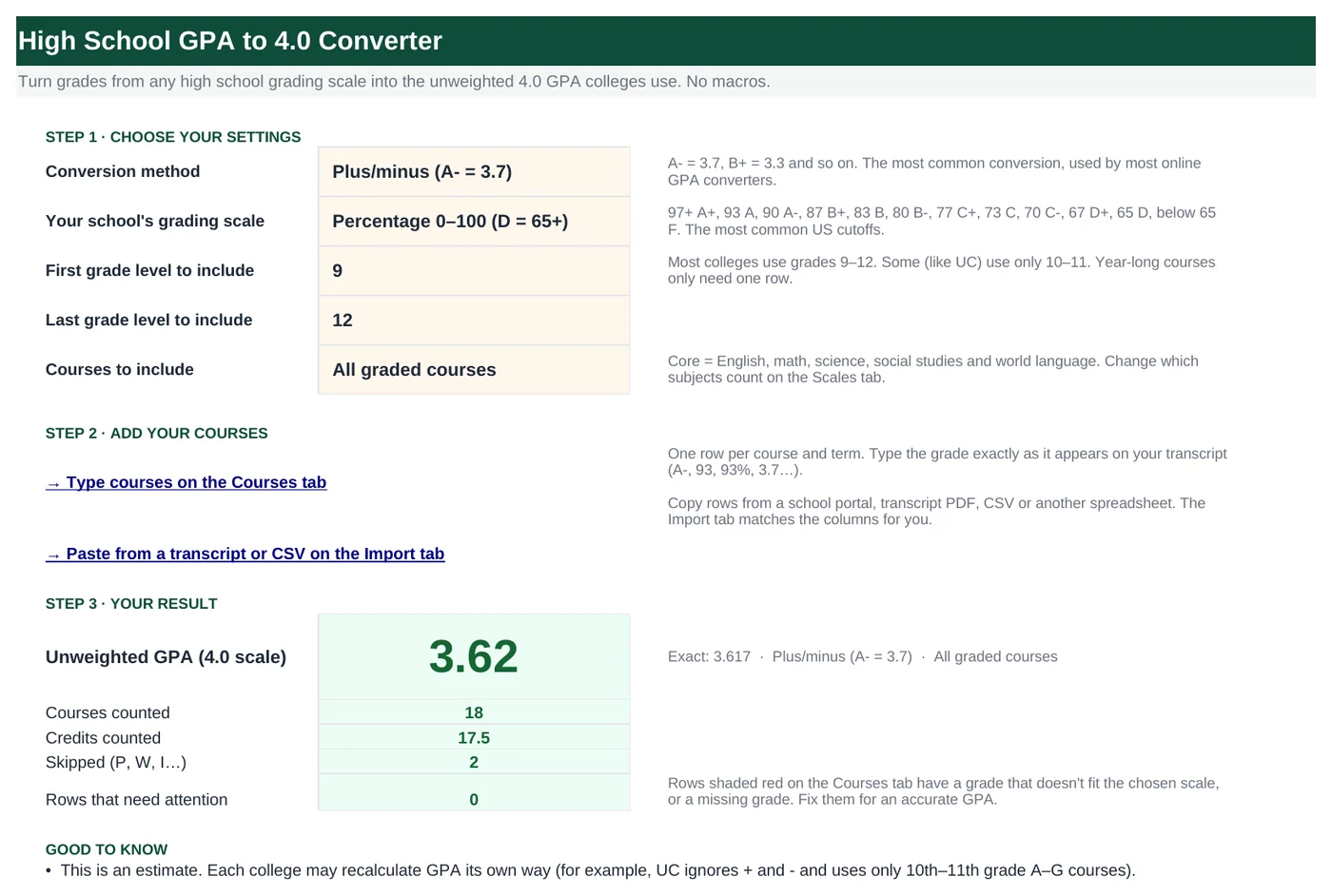
| Start Here | Settings and your result | Method, grading scale, grade levels, which courses count | Unweighted GPA, courses and credits counted, rows that need attention |
| Courses | One row per course and term (room for 200) | Grade level, term, course, credits, grade as printed; optional subject and scale | Subject (guessed from the name), letter equivalent, 4.0 points, status |
| Import | Paste rows copied from anywhere | Pasted data; optionally which column is which | Matched columns and clean rows to copy into Courses |
| Results | Breakdowns and a chart | Nothing | GPA by grade level (with cumulative), GPA by subject |
| Scales | Every conversion table | Your school's own cutoffs, if needed | Nothing |
Step-by-step guide (Excel)
Choose your settings
On Start Here, pick the Conversion method and Your school's grading scale from the dropdowns. Then set the first and last grade levels to include (most colleges use 9 to 12; UC uses 10 to 11) and choose all graded courses or core academic courses only.
Type your courses
On Courses, add one row per course and term. Type the grade exactly as it appears on the transcript:
A-,93,93%or3.7all work.- Credits: leave blank for 1. Semester courses are often 0.5.
- Subject: leave blank and it's guessed from the course name (shown in italics).
- Scale: leave blank to use the scale on Start Here. Pick another only for courses from a different school.
- Count it?: choose No to leave a course out.
Or paste them on the Import sheet
Copy rows from your school portal, a CSV file or another spreadsheet, including the header row, and paste at cell
A15on Import. Headers such as Course, Credits and Final Grade are matched automatically. Copy the green rows and paste them into Courses with Paste Special› then Values.Fix the red rows
A row turns red when its grade doesn't fit the scale (for example
105on a percentage scale), the credits aren't a number, or the grade is missing. The Status column says which. Pass, withdrawn and incomplete grades (P, W, I) are skipped automatically and shown in grey.Use your school's own scale
If your school's cutoffs are different, open Scales and edit a custom scale: Custom 2 takes minimum scores (for example 9 or more out of 10 is an A) and Custom 1 takes exact words (for example Excellent = A). Then pick it on Start Here.
Read your results
Start Here shows your unweighted GPA. Results breaks it down by grade level, with a cumulative GPA after each year, and by subject.
How the formulas work
The template uses only classic functions, so it works in Excel 2016 and Google Sheets. Click any green cell to see its formula.
=INDEX(Scales!$N$6:$N$125, MATCH(O5&"|"&SUMPRODUCT(MAX((Scales!$K$6:$K$125=O5)
   *(Scales!$M$6:$M$125<=AB5)*Scales!$M$6:$M$125)), Scales!$O$6:$O$125, 0))
SUMPRODUCT(MAX(…)) finds the highest cutoff in the chosen scale that the score reaches, without needing MAXIFS. INDEX/MATCH then returns that cutoff's letter.
Learn this: How to Use INDEX and MATCH in Excel →=INDEX(Scales!$B$6:$C$18, MATCH(J5, Scales!$A$6:$A$18, 0), Scales!$B$3)A two-column INDEX: the row is the letter and the column is the method you chose on Start Here.
Learn this: Lookup Formulas in Excel →=IF(SUM(Courses!$W$5:$W$204)=0, "—", SUM(Courses!$V$5:$V$204)/SUM(Courses!$W$5:$W$204))Hidden helper columns hold points × credits (V) and credits (W) for counted courses only, so the GPA is a credit-weighted average.
Learn this: How to Use SUMIF and SUMIFS in Excel →Tips and limits
- It's an estimate. Colleges often recalculate GPA their own way, for example counting only academic courses or only certain years. Your school's official GPA is on your transcript.
- Weighted transcripts. If your school prints weighted points (5.0 for an AP A, for example), enter each course's letter or percentage instead. This tool reports the unweighted GPA only.
- Use your school's cutoffs. They're usually on the school profile or the back of the transcript. Choose My school's cutoffs online, or a Custom scale in the template.
- IB 1–7 has no official US conversion. The built-in IB scale is a common estimate; check with your school.
- Photo import. Flat, well-lit photos of typed transcripts work best. Handwriting usually doesn't. Always check the rows before adding them.
- Old .xls files can't be read online. Save them as .xlsx or CSV first.
Frequently asked questions
How do I convert my GPA to a 4.0 scale?
Turn each course grade into a letter using your school's scale, turn each letter into points (A = 4, B = 3, C = 2, D = 1, F = 0, with A- = 3.7 and B+ = 3.3 if you keep plus and minus), then take the credit-weighted average. The converter at the top of this page does all three steps for you.
Is a 93 an A or an A-?
On the most common US scale a 93 to 96 is an A (4.0) and a 90 to 92 is an A- (3.7). Some schools use a 10-point scale where 90 and above is an A, so pick the scale that matches your school.
How do I convert a percentage to a GPA?
Find your percentage in the conversion chart above to get the letter, then use the letter's points. For example, 88% is a B+, which is 3.3 with plus and minus or 3.0 with whole letters.
How do I turn a weighted GPA (out of 5.0) into an unweighted 4.0 GPA?
You can't reliably convert the final number, because the bonus depends on which courses were Honors or AP. Enter each course's letter or percentage instead and the converter calculates the unweighted GPA directly.
What's the difference between weighted and unweighted GPA?
An unweighted GPA treats every course the same on a 0 to 4.0 scale. A weighted GPA adds bonus points for harder courses, so it can go above 4.0. Many colleges recalculate an unweighted GPA so applicants from different schools can be compared.
Do colleges use my school's GPA or recalculate it?
Both happen. Many colleges read the GPA on your transcript together with your school profile; others, like the University of California, recalculate it using only certain courses and years. This converter gives a consistent estimate, not an official GPA.
Learn the skills behind this template
Was this guide helpful? Spot a mistake? Send feedback · admin@arumsoft.com